How to Automate DX1
Automating DX1 means covering the follow-up after its first reply: the note after a demo ride, warranty registrations checked on manufacturer portals and recall letters. The Lead Manager's instant replies, scheduled reports and parts texts are set up inside DX1. WebRun is an AI agent that can do the checking and draft the notes for staff to send.
 Written by
Nora Whitfield
Editorial lead
Written by
Nora Whitfield
Editorial lead
 Reviewed by
Owen Hartley
Workflow engineer
Reviewed by
Owen Hartley
Workflow engineer
A DX1 dealership enters each new side-by-side once
One login runs a DX1 dealership: the DX1 DMS, the Lead Manager and the dealer website share a single database. DX1 sells that to powersports, motorcycle, golf car and LSV dealers as the only all-in-one system in their trade.
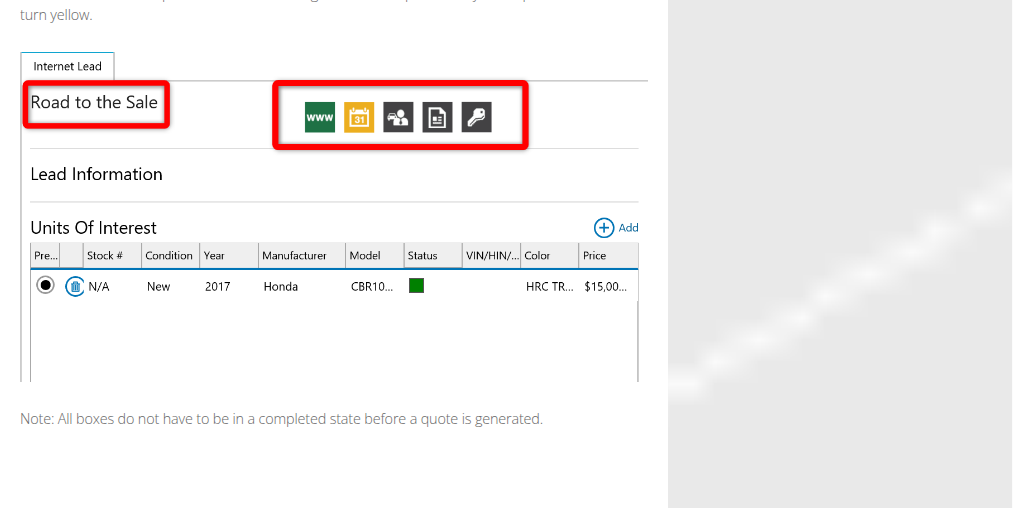
When a new side-by-side comes in, the dealership enters it once and picks where it goes: the dealer website, Cycle Trader, Craigslist, Facebook or eBay. Leads from every one of those land in the Lead Manager and show up in red in the Leads tile on the dashboard. The salesperson converts a lead to a quote, and the five boxes of Road to the Sale turn from yellow to green as it becomes a deal and then a finished sale.
In the service department, service writers book appointments against each technician's availability and assign the work, and service managers add photos to repair orders. A color-coded view shows which parts have arrived, so a job can start.
The follow-up after a demo ride rarely gets written
A couple took a side-by-side on a demo ride on Saturday and said they would talk it over. The trade-in the sales manager priced on Tuesday has not had a call since. A lead that came in at ten at night got DX1's automatic email and nothing else. Before the model-year closeout, the sales manager wants every lead who asked about a leftover unit called again, and those leads are buried among months of others in the Lead Manager.
Delivery starts the manufacturer's paperwork. The sales office registers each new unit for warranty on its brand's dealer site, so a store carrying four brands keeps four logins for it. When a recall bulletin lands, the service manager works out which customers own the affected models and years.
DX1 answers each new lead once and looks up one VIN at a time
The Lead Manager sends an immediate automated reply to every new lead and finance application, from custom email templates, and routes each lead type to the right salesperson with a notification. The Daily Planner and Road to the Sale keep the team working the dealership's color-coded sales process.
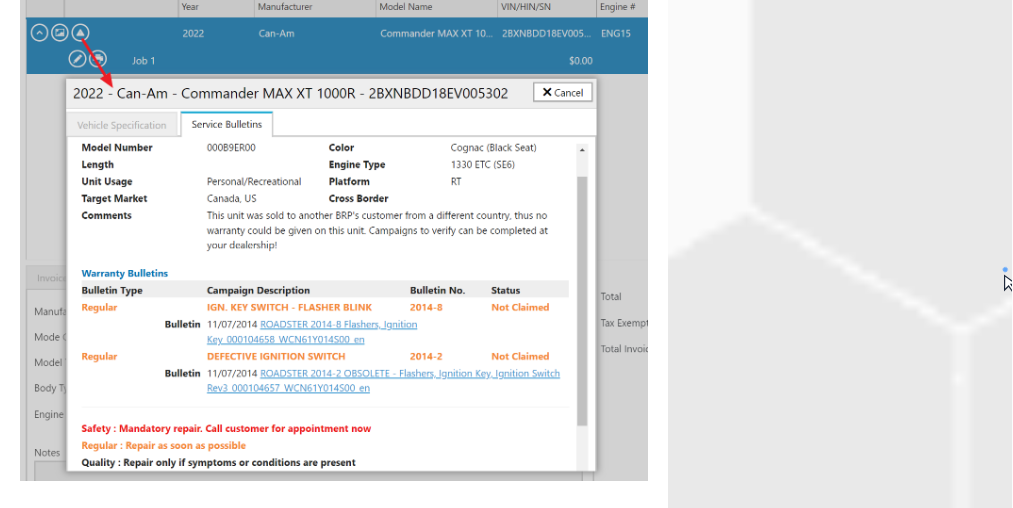
The sales manager builds a report once and DX1 emails it by employee role at a set date and time. Special-order parts customers get text or email updates automatically. For integrated brands, among them Polaris, BRP, Harley-Davidson and Club Car, a service manager can look up a VIN's service history and remaining warranty term in the manufacturer's database, and authorized dealers see recall updates on the VIN.
The automated email answers a lead the moment it arrives; the note after a demo ride, written around the unit and the rider, comes from a salesperson with a free half hour. The OEM lookups work one VIN at a time, on the unit someone has open, so checking last week's deliveries for registrations, or matching a new recall against every sold unit, is still a job someone does VIN by VIN. For a brand outside the integrations, the dealership does all of it in that manufacturer's own dealer portal.
Every sold VIN in DX1 can be checked against the manufacturer
The sales manager sees which of last week's deliveries still have no warranty registration on the manufacturer's dealer site, with the VIN, the buyer and the delivery date on each line. The manager files the missing ones before the buyer's first service. When a manufacturer posts a recall bulletin, the service manager approves a letter to each owner of an affected model and year, already matched against DX1's sold units.
Three days after a demo ride with no quote, the salesperson who owns that lead reads a follow-up note written around the unit the customer rode, and sends it or rewrites it. The trade-in owner hears back about Tuesday's figure the same way. Before the model-year closeout, the sales manager reviews a message for each earlier lead who asked about a leftover unit, naming that unit and the manufacturer's current rebate on it.
Salespeople send the notes and the service manager signs the letters
Both the warranty list and the recall letters come from comparing two places VIN by VIN: DX1's sold units and each manufacturer's dealer portal. WebRun is an AI agent that works a real Chrome browser, signed in as you. Once a week, with your DX1 login and a login for each portal, it makes that comparison.
Lead notes go to the salesperson who owns the lead, recall letters to the service manager, and each of them sends their own. In DX1 the agent changes no lead status and opens no quote or deal. The warranty check runs a week after each sale, the demo-ride note three days after each ride, and the recall letters whenever a bulletin lands.
Questions people ask
Which manufacturer dealer portals will it work in?
Any portal you give it a login for. Check each brand's dealer agreement for its rules on account use before connecting one, and give the agent its own account where the manufacturer allows it.
Will it file warranty registrations or claims for us?
No. The units with no registration on file go to the sales manager, and your staff file them, because a registration or a warranty claim is a submission to the manufacturer in the dealership's name.
Can a closeout message quote the manufacturer's current rebate?
Yes. The rebate for that model can come from the manufacturer's offers page, or from what DX1's Unit Promotions integration shows for an integrated brand, and the salesperson checks the figure before sending, because promotions change.
Sources
- DX1 Lead Manager Says the Lead Manager collects leads from the DX1 website, CycleTrader.com, Craigslist, eBay and Facebook, sends automated lead and finance application response emails from custom templates, routes leads with notifications, and offers the Daily Planner and Road to the Sale tools.
- DX1 Reporting Describes custom reports scheduled by employee role, emailed at a set date and time, and exported to Excel, CSV or PDF.
- DX1 Parts and Accessories Lists automatic SMS or email updates for special-order parts customers, price file updates from OEM and aftermarket vendors, and automatic min/max reordering.
- DX1 OEM Integration Lists the integrated manufacturers and describes the Vehicle Information lookup by VIN (including service history, bulletins and remaining warranty term), real-time recall updates by VIN for authorized dealers, Unit Promotions and OEM parts ordering.
- DX1 Service Describes service scheduling against technician availability, assigning work, photos on repair orders and a color-coded view of which parts have arrived.
- DX1 Inventory Distribution Says dealers choose which major units to send to their website and to sites such as Cycle Trader, Craigslist, Facebook and eBay, and that leads from every distribution point flow into the Lead Manager.
- Working a lead from the internet to a major unit quote (DX1 help centre) Shows new leads in the dashboard's Leads tile, converting a lead to a quote, and the five Road to the Sale boxes that turn green as a lead becomes a quote, a deal and a finalized sale.
8 ready-made DX1 workflows
Each one names the apps it touches and the exact steps it takes. Open one to read what it will do, then turn it on.


Want one of these running on your own DX1?
Show WebRun the process once and it will run it on schedule, in your own private browser environment.