How to Automate CattleMax
CattleMax calculates calving, booster and withdrawal dates and lists them on its Calving screen and Herd Health tabs. Its help centre says alerts cannot yet reach a phone, so the lists wait for whoever opens them; an AI agent such as WebRun can read them on a schedule and send each to the crew, the vet or the auditor.
 Written by
Julian Adeniyi
Retail operations
Written by
Julian Adeniyi
Retail operations
 Reviewed by
Priya Raghavan
Solutions lead
Reviewed by
Priya Raghavan
Solutions lead
CattleMax keeps each animal's history from birth weight to sale ticket
On a cow-calf place the year follows the cattle: bulls turned out, cows pregnancy checked, calves born in the spring and weaned in the fall. CattleMax is record-keeping software for commercial and registered herds, sold since 1999 by a company whose staff raise cattle themselves. Ranchers open it in a browser on a computer or a phone, and its own help pages still say CattleMax Online in places.
Every animal has a timeline: ear tag and EID number, sire and dam, birth and weaning weights, each vaccination with its dose and lot number, every breeding and pregnancy check, pasture moves, and finally the sale ticket or the death loss. Pastures sit on a map and expenses sit beside the cattle.
Every plan includes unlimited users, so the owner, family, a hired hand at the chute and an accountant on a narrower role can all sign in. Commercial costs $30 a month billed yearly for up to 250 active animals; Registered, at $41, adds pedigrees, EPDs and breed association interfaces.
Chute-side worksheets get typed in after supper
The work happens in the pens and the pasture, and the records follow. Preg-check day ends with a worksheet of tag numbers and results. Weaning leaves a file off the scale indicator. Calving season fills a notebook on the dash with tags, birth weights and which heifer needed help at two in the morning.
Then the records have to answer questions. Before turnout the crew has to find out which calves are due a booster, and before a load is booked, whether anything treated last month is still inside its withdrawal time. The vet wants a preg-check date, and the verification auditor wants treatment records and feed tags.
The owner, or a ranch manager if there is one, digs those answers out of CattleMax after chores, one screen at a time, and phones or texts them to whoever needs them.
CattleMax works out the due dates and keeps the lists on its own screens
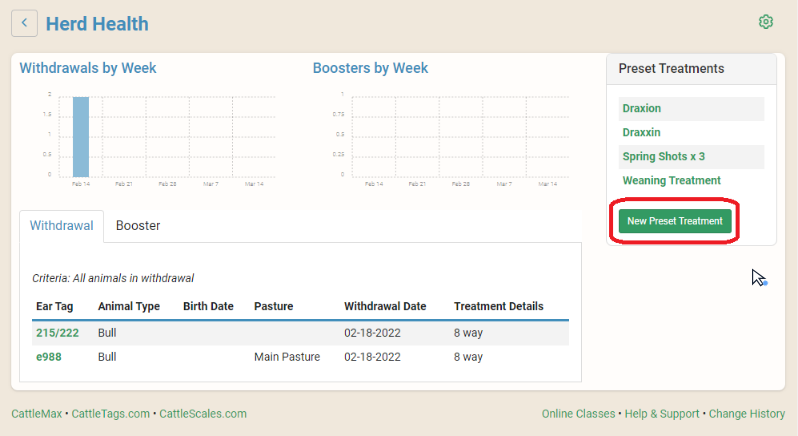
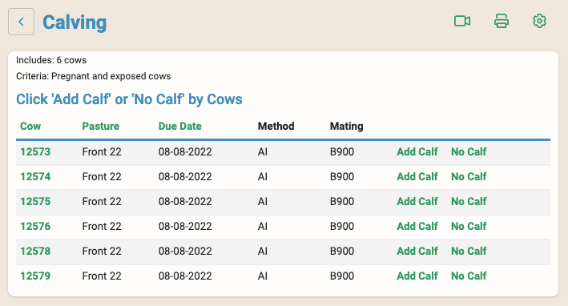
Enter a breeding and CattleMax calculates the expected calving date, on a 285-day gestation unless a breed has its own, and the Calving screen lists the cows due each week, refreshed every Sunday night. A preset treatment works out the booster date: the Booster tab in Herd Health lists animals coming due, the Withdrawal tab lists animals still inside their withdrawal period, and each animal's page carries a withdrawal notice. Since the second quarter of 2026, average daily gain calculates itself from the most recent weight. Tasks carry a reminder date and an assigned user.
Partner connections move records in and out. The CCIA interface builds birth, move and retirement files for Canada's livestock tracking system, the Fusion connection exports animal records in a format a feedlot running Fusion can take, and a Legacy Verified customer can give the verification specialist read-only access.
Each list stays on its CattleMax screen until someone opens it. The help centre says alerts cannot be sent to a device yet, though important dates can go to a phone's calendar through a calendar subscription. The vet, the sale barn and the feed supplier are outside CattleMax altogether.
The Sunday calving list reaches whoever checks the heifer pasture
The hand who checks the heifer pasture reads the week's calving list on a phone on Sunday night, once the Calving screen refreshes: the cows due this week and any past due, each with her tag and pasture.
On Monday the Booster tab turns into a list of calves coming due, sorted by pasture, and the owner books the vet clinic from a drafted note when a working day is needed. Before cattle are consigned, the owner reads which tags on the load, if any, still show on the Withdrawal tab, so nothing inside its withdrawal time gets on the truck.
Exposed cows far enough along to check become a preg-check request to the vet, drafted with the head count and pastures. After a weigh day the crew sees CattleMax's gain figures averaged by group, so a pen that stalled shows up the same week. The Monday head count set beside last week's turns up a missing pair or an unrecorded death long before the End of Year Organizer is run.
Outside CattleMax, the sale barn's latest market report can sit beside the weights of the calves about to sell.
Each CattleMax list goes out on the ranch's own timetable
Every list above starts with someone opening the Calving screen or a Herd Health tab at the right hour. WebRun is an AI agent that works a real Chrome browser, signed in as you. The ranch adds it as a separate CattleMax user, read-only on herd records, and sets the hours: Sunday night for calving, Monday morning for boosters, the day before a sale for withdrawal. Each list goes by email or to the ranch's Slack channel.
Treatments, calvings and preg-check results are still entered by whoever was at the chute, and the owner sends any message to the vet or the auditor.
Calving season is the time to switch on the breeding and calving alerts; the vaccination, preg-check and weigh-day workflows carry the rest of the year.
Questions people ask
What CattleMax role does WebRun's login need?
Viewer, in most cases. A Viewer can open every herd record and print reports but cannot change cattle records or see the account's financial information. If a workflow only needs reports and worksheets, the Reporter role is narrower still. Every plan includes unlimited users, so the extra user costs nothing.
Will it enter treatments or pregnancy check results for us?
No. A treatment, a calving or a preg-check result stays on an animal's timeline for good, so the person who did the work enters it, the same way as now. WebRun only reads CattleMax.
Does CattleMax track how much feed is on hand?
No. The Feeds List records what was fed, with photos of feed tags and letters for verification audits, but CattleMax's help says it keeps no running inventory of feed on hand. Stock levels have to come from wherever you track them, such as a spreadsheet or your supplier's account, and WebRun can read those alongside.
Will the Ranch Verification Organizer cover our audit?
For the records, largely. It gathers the health records and the feed tags and letters a verification auditor asks for, as a PDF or a spreadsheet. WebRun can run it for the calf crop being verified and draft the email to the auditor for you to send, and Legacy Verified customers can also give their verification specialist read-only access directly.
Sources
- Herd Health, Preset Treatments, Booster and Withdrawal | CattleMax Help CattleMax calculates booster dates from preset treatments and lists animals on the Booster and Withdrawal tabs of the Herd Health screen.
- Calving Records | CattleMax The Calving screen lists cows due each week, updated automatically each Sunday night from the breeding data entered, and CattleMax calculates last calving date and calving intervals.
- Subscribing to the CattleMax Calendar | CattleMax Help The CattleMax calendar can be subscribed to from a phone or tablet, and the article states that alerts cannot be sent to a device at this time.
- Role-based Permissions | CattleMax Help Lists the Administrator, Manager, Observer, Editor, Viewer and Reporter roles; a Viewer can look up records without changing them and has no access to financial information.
- Pricing | CattleMax Commercial at $30 a month billed yearly and Registered at $41, for up to 250 active animals; Registered adds breed association interfaces, pedigrees and EPDs; every plan includes unlimited users.
- CattleMax Q2 2026 Product Updates | CattleMax Adds automatic Average Daily Gain from the most recent weight, emailed download links for large report exports, and a Fusion Partner Connection that exports animal records in a Fusion-ready format for feedlots.
7 ready-made CattleMax workflows
Each one names the apps it touches and the exact steps it takes. Open one to read what it will do, then turn it on.

Want one of these running on your own CattleMax?
Show WebRun the process once and it will run it on schedule, in your own private browser environment.