How to Automate Sitelink
Sitelink posts late fees overnight, locks and reopens gate codes by days past due, emails online renters their code, and Price Optimizer moves street rates daily. Overlock removals, past-due chasing and the weekly rate review still wait for a manager; WebRun, an AI agent working in myHub, lists them each morning and drafts tenant emails for approval.
 Written by
Tom Kessler
Field operations analyst
Written by
Tom Kessler
Field operations analyst
 Reviewed by
Samuel Adeyemi
Integrations writer
Reviewed by
Samuel Adeyemi
Integrations writer
Every unit, gate code and ledger sits in Sitelink
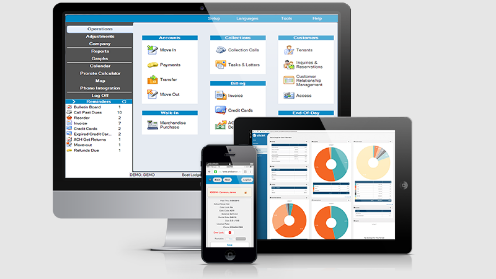
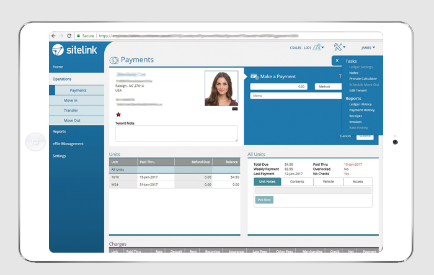
Sitelink by Storable, written SiteLink on its original website, runs the office of a self-storage facility, from each unit's rate and status to every tenant's ledger, gate code and eSign lease. Sitelink Web Edition is a Windows program for the office PC. myHub opens the same database in a browser, on a phone or a Mac as easily as on that PC, for taking payments and moving tenants in and out.
Operators with several stores use the Corporate Control Center to manage settings and reports across sites. Gate access and collections come from Storable's own products or from partners in the Sitelink marketplace. Storable, which also makes Storable Edge, is moving the sitelink.com website to storable.com and still sells Sitelink on monthly billing.
A tenant who pays at midnight still finds the padlock on in the morning
The office work follows the rent cycle. A few days into the month the Past Due Schedule starts producing tasks on Tasks & Letters: notices to send, collection calls that each need a note, overlocks to put on doors and, later, lien and auction steps. Each waits until a manager selects the tenants and clicks Process.
Payments arrive at all hours, online or through auto-bill. Sitelink lets the gate code work again once a tenant is no longer past due, but the padlock on the door stays until somebody reverses the overlock in Sitelink and walks out to take it off.
New tenants who rent at the counter want their gate code and access hours in writing. Rate increase season brings a batch of notices with effective dates and notice periods to respect, and the district manager reviews street rates against occupancy every week.
Sitelink lifts the gate lockout when a late tenant pays
The Past Due Schedule posts up to five late fees overnight without anyone processing an event, locks a late tenant's gate code after the days past due you set, and lets the code through again once the tenant has paid. Online Move-In emails each tenant who rents online the unit and size, a receipt, the gate code and the access hours, unless the facility chooses to withhold codes so that online renters contact the office.
Price Optimizer recalculates push rates daily from occupancy, raises tenant rates by rules such as days since move-in and since the last change, alerts the manager when to approve an increase and send its notice, and pushes new rates to the website and kiosks. Storable Collections, sold alongside Sitelink, sends scheduled payment reminders by text, email and voice with text-to-pay links. Storable's AI assistant, Agent Assist, launched in July 2025 for Storable Edge customers, and its announcement does not mention Sitelink.
Overlocks stay manual. The status comes off only when a manager processes Reverse: Overlock on Tasks & Letters or clears it in the ledger, and the padlock only when somebody walks to the unit. Facilities on a smart-lock integration such as Keep It Simple Storage are the exception, because there a payment in Sitelink unlocks the unit in real time.
An overlocked unit joins the removal list minutes after its balance clears
The manager walking the site works from an overlock-removal sheet that gains a row within minutes of an overlocked tenant's payment clearing the balance, with the payment date and how long the lock has been on. A partial payment that still leaves a balance never appears.
The same manager has a chase list in Google Sheets each morning: every past-due tenant with unit, balance and days late, oldest and largest first, names from yesterday's list marked, and a reminder with a payment link drafted in Gmail for each.
Rate increases taking effect within 30 days come as one sheet with current rate, new rate and effective date, tenants raised in the past six months flagged and a notice drafted for each. Revenue per available unit for every unit size, set against its street rate, its occupancy and last week's figure, goes into another sheet for the owner each Monday.
After a counter rental, the welcome with the unit number, gate code, address and access hours waits in the manager's Gmail to be checked and sent, and the Slack note about the move-in names the unit but never the code.
myHub is the part of Sitelink that opens in a browser
Web Edition runs as a Windows program on the office PC, and myHub, its browser version, shows the same tenant ledgers and Tasks & Letters. WebRun is an AI agent that works a real Chrome browser, signed in as you, so myHub is where it reads Sitelink, under an employee login with a Security Level of its own.
None of these workflows processes a Tasks & Letters event or accepts a rate change, and none reverses an overlock. A manager reads every tenant email in Gmail before sending it, and the lists and the weekly figures go to Google Sheets and Slack.
Questions people ask
Is the overlock list any use if our units have smart locks?
No. With a smart-lock integration such as Keep It Simple Storage, the overlock comes off automatically when the tenant pays in Sitelink. The list is for padlocks someone removes by hand.
Which move-ins does the gate-code welcome cover?
Any new rental in Sitelink. For online move-ins, Sitelink's own confirmation email already carries the unit, receipt, gate code and hours, so the draft adds most where a facility withholds codes from online renters or wants a welcome after a counter rental.
Does any workflow reverse an overlock or process a past-due notice?
No. Reverse: Overlock, past-due notices and lien or auction steps are processed by a manager on Tasks & Letters. The workflows list and draft.
Does the rate-increase workflow replace Price Optimizer's notices?
It sits beside them. Price Optimizer tells the manager when to approve an increase and send its notice. The workflow lays a month of upcoming increases out in one sheet, marks tenants raised in the past six months and drafts a notice for each, which the manager can use or ignore.
Sources
- Sitelink Self Storage Management Software | Storable Storable's product page for Sitelink: Web Edition for Windows 10 and 11 with the Corporate Control Center, myHub in a browser for payments, move-ins, eLeases, audits and reports, and integrations.
- Past Due Schedule States that late fees are added automatically overnight, that gate lockout happens automatically by days past due and that overlock events must be processed manually by a manager.
- Collection Calls and Past Due Tasks Shows collection calls, notices, delinquency actions and auction activities listed on Tasks & Letters, in Web Edition and in myHub, and processed by selecting tenants and clicking Process.
- How do I set up Reporting Jobs? Describes the Report Scheduler in the Corporate Control Center, which runs up to five reports per job daily, weekly, monthly or yearly and notifies chosen users by email.
- SiteLink Price Optimizer Push rates calculated daily from occupancy, Tenant Rate Optimization rules, alerts on when to approve an increase and send rate increase notices, and rates updated on the website, call centers, kiosks and listing services.
- Storable Collections Scheduled payment reminders by SMS, email and voice with text-to-pay links, integrated with Sitelink and Storable Edge.
- Storable Launches Agent Assist 15 July 2025: Agent Assist, Storable's AI assistant, launched for Storable Edge customers and embedded on operator websites.
- SiteLink + KISS integration Smart locks that overlock delinquent tenants automatically and remove the overlock in real time when the tenant pays through SiteLink.
5 ready-made Sitelink workflows
Each one names the apps it touches and the exact steps it takes. Open one to read what it will do, then turn it on.


Want one of these running on your own Sitelink?
Show WebRun the process once and it will run it on schedule, in your own private browser environment.