How to Automate Jewel360
Jewel360's own notices come first: the Ready for Pickup text, and on Plus the automatic coupons and review requests. Parts on order, repairs waiting on a customer's approval, missed layaway payments and appraisals written before the gold price moved still need someone to follow up. An AI agent like WebRun can read those records and draft the notes.
 Written by
Julian Adeniyi
Retail operations
Written by
Julian Adeniyi
Retail operations
 Reviewed by
Ben Kirkwood
Solutions engineer
Reviewed by
Ben Kirkwood
Solutions engineer
An independent jeweler's Saturday runs through Jewel360
On a Saturday, the counter at an independent jewelry store takes in a watch battery, a ring for sizing and a layaway payment between two bridal appointments. Jewel360 is the cloud point of sale that records all of it. The same system handles work orders for repairs and custom pieces, special orders, layaways with scheduled payments, dated appraisals and gold bought over the counter.
Every sale and repair lands on the customer's record, alongside the birthdays, anniversaries and preferences the store has noted. Integrations price repairs from Geller's Blue Book, sell Jewelers Mutual care plans at the register, import Stuller inventory and sync the books to QuickBooks.
The associate at the counter works in it all day, the bench jeweler sees the work orders assigned to them, and the owner reads the reports from anywhere, since it runs in the cloud.
A repair ticket can wait weeks on one customer's answer
A ring came in for new prongs, the bench jeweler found a cracked shank, and the work order sits at Pending Approval while the customer ignores a voicemail. Another ring has been at Waiting for Parts for three weeks, and the part's ship date is in a supplier's email that nobody has matched to the order. A chain has been at Ready for Pickup for five weeks; the text went out on the first day and the chain is still in the safe.
A layaway customer has missed two scheduled payments since the last visit.
An appraisal written years ago for insurance values a ring at a gold price that has since changed, and the customer has no reason to think about it until something is lost.
Every Jewel360 message starts from a work order, a sale or a date on file
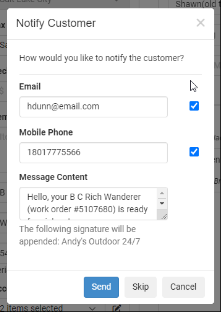
Setting a work order to Ready for Pickup offers to text or email the customer, with the store's own wording and the work order number. On the Plus plan, automatic marketing emails send a birthday coupon on the day, a bounce-back coupon the day after a purchase, a come-back coupon when a customer goes a set stretch without buying, and service reminders for serialized pieces, each with up to 320 characters of the store's own words.
Jewel360 also describes AI assistants. Its Marketing Assistant builds campaigns around holidays and customer milestones and responds to reviews; its Support Assistant chats with customers and automates repair updates.
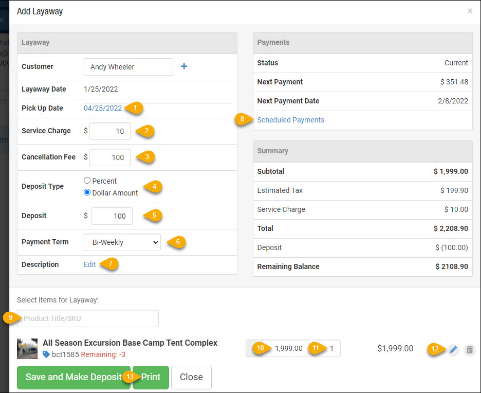
Staff load each scheduled layaway payment into the register with Make Payment when the customer pays it. A part's ship date arrives by email from the supplier and stays there until someone types it onto the work order. A saved appraisal is final and cannot be edited, so updating one means writing a new appraisal, and the store decides which old ones are worth offering to update.
A ring waiting for parts can get a real date from the supplier
The bench jeweler can give the customer a date for the ring at Waiting for Parts the morning the supplier's shipping email arrives, with the tracking number matched to the work order.
The manager rings each customer whose work order has sat at Pending Approval for more than three days, working from an email that carries the bench jeweler's note and the last time anyone called. The same email names the pieces still at Ready for Pickup after two weeks, with the date the first text went out.
The owner can offer an appraisal update each month to customers whose insurance appraisals are more than three years old, with the gold price on each appraisal's date set against today's. A layaway customer who has missed two scheduled payments gets a note from the associate who wrote the layaway, drafted for that associate to send.
Jewel360's register is off limits to the agent's login
The supplier's email names the part and the order; Jewel360's work order names the customer and the ring. WebRun is an AI agent that works a real Chrome browser, signed in as you. The agent matches the supplier emails in the store's inbox to Jewel360's work orders, goes through the appraisals and layaways, and sends the manager one email with what needs a person.
Jewel360's user permissions can keep its login away from the register, so it takes no payments, moves no work order status and never touches an appraisal. Notes to customers go into the associate's drafts, in the associate's name, for the associate to send or rewrite.
Waiting for Parts is the status to start with, since that is where customers ask for a date.
Questions people ask
Can it change a work order or take a layaway payment?
No. Its login can be kept away from the register, payments and status changes, and in Jewel360 it only reads work orders, layaways and customer records.
Is Core enough, or does this need Plus?
Core or Plus. The work orders and appraisals the agent reads start on Core; Startup has neither. Plus adds text messaging and the automatic marketing emails, which keep running alongside.
How does this differ from Jewel360's Marketing and Support Assistants?
Jewel360 describes its Marketing Assistant building campaigns and responding to reviews, and its Support Assistant chatting with customers and automating repair updates. The jobs on this page each need something from outside Jewel360: a supplier's shipping email for a part, or today's gold price set against an old appraisal.
How does this sit alongside Clientbook?
Separately. Clientbook is its own subscription that syncs customers, products and transactions with Jewel360 and tracks customers working toward a higher-value purchase. The agent's jobs here are repairs, parts, appraisals and layaways.
Sources
- Marketing Email Settings Jewel360's knowledge base on the automatic marketing emails (called the Marketing Package there): birthday, bounce-back and come-back coupons, service reminders by interval, and the 320-character limit on custom messages.
- Work Orders Lists the work order statuses, from Received and Pending Approval to Ready for Pickup, where the system offers to notify the customer.
- Review Request Tool Explains that review requests go out by text or email from the Marketing menu or the register, and that the reviews themselves are read on Google or Facebook.
- Plans & Pricing for Jewelry Stores Lists what each plan includes: repairs, appraisals and QuickBooks on Core; multi-location, text messaging, automatic marketing emails and Request Review via Register on Plus.
- Appraisals Jewel360's knowledge base: an appraisal is built in four panels, and once saved it is final and cannot be edited.
- Layaways Layaways carry weekly to yearly scheduled payments, and staff load the next scheduled payment into the register with Make Payment.
- Clientbook Integration Clientbook needs its own active account; the integration syncs customers, products and transactions, and Clientbook tracks customers working toward higher-value purchases.
- Jewelry Store POS Integrations | Jewel360 Lists Geller's Blue Book repair pricing, Jewelers Mutual care plans and insurance, Stuller inventory import, Clientbook and QuickBooks.
- Jewelry Store Marketing Tools | Jewel360 Birthday and anniversary emails, campaigns triggered when an order is ready, and automatic review requests sent to Google and Facebook.
- Jewel360 | Jewelry Point of Sale | All-In-One POS for Jewelry Stores Describes Jewel360's AI assistants: a Marketing Assistant for campaigns and review responses and a Support Assistant that chats with customers and automates repair updates.
6 ready-made Jewel360 workflows
Each one names the apps it touches and the exact steps it takes. Open one to read what it will do, then turn it on.




Want one of these running on your own Jewel360?
Show WebRun the process once and it will run it on schedule, in your own private browser environment.