How to Automate Floranext
Occasion Reminders, delivery and pickup texts and post-delivery review emails run inside Floranext once they are set up. The order list still needs a reader: sympathy orders with a service in the next three days, corporate standing orders due this week, holiday preorders against capacity. WebRun, an AI agent, can read it every morning and post the results to Slack.
 Written by
Tom Kessler
Field operations analyst
Written by
Tom Kessler
Field operations analyst
 Reviewed by
Priya Raghavan
Solutions lead
Reviewed by
Priya Raghavan
Solutions lead
Counter, phone and web orders meet on one Floranext screen
Floranext is florist software for retail shops. Orders taken at the counter or on the phone go through its POS, which runs on a PC, a Mac or an iPad, and orders from the shop's Floranext website drop into the same list with no commission taken on them. Shops that also do weddings use the Wedding & Event Manager for proposals and deposits.
Each order carries an event picked at the till. Birthday and Anniversary drive next year's reminder email, and Sympathy adds an acknowledgement section to the card. Deliveries are routed in the Delivery Manager, and drivers work from the Driver App on their phones, setting each stop to Taken/Delivered, Out for Delivery or Returned - Not Delivered and attaching a photo of the arrangement. A business that orders every week can buy on a house account, and the hotel lobby that wants fresh flowers every Monday is set up as a standing order.
Funeral services and Monday standing orders set deadlines the counter has to watch
Sympathy orders arrive with a deadline somebody else chose. A family orders a casket spray on the website on Wednesday night for a Friday service, and by Thursday morning the designer needs to know which arrangement it is and what time it has to be at the chapel.
Standing orders announce themselves with a banner three days before they are due. Each one waits for a member of staff to choose Process and confirm the card message, the delivery details and the payment method, and if a corporate account likes a note confirming the week's delivery, the counter types it by hand.
In the fortnight before Mother's Day the manager keeps a running count of preorders on a notepad, roses against mixed arrangements against plants, because the owner wants to stop selling a category before the cooler and the design bench run out. And each morning, in a shop without the routing add-on, somebody writes out which driver takes which stops.
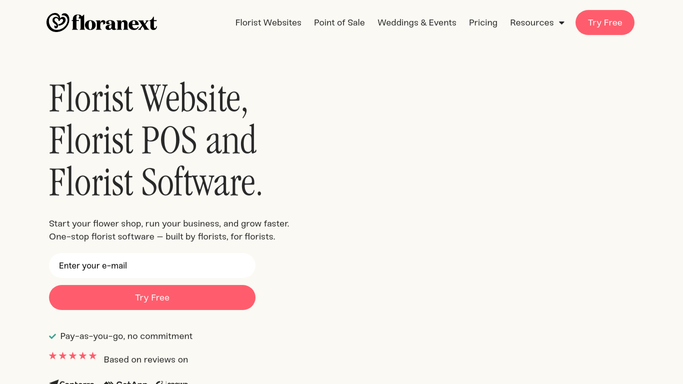
Occasion Reminders write to last year's birthday customers two weeks early
Occasion Reminders email a customer a year after an order tagged with an annual event, such as a birthday or an anniversary, two weeks ahead by default, with a link to the shop's website. Text messages tell customers about deliveries and pickups. Once Floranext support switches it on, setting an order to Taken/Delivered sends the sender a review email: a happy customer lands on the shop's Google review form and an unhappy one on a private feedback form, and with the Advanced POS's Send Photo the email shows the arrangement.
Delivery routing comes with the Advanced POS and is a monthly add-on for POS Lite and web-only shops. The Delivery Manager optimizes routes with Google Maps, and Advanced Routing, added in January 2026, moves any delivery given a priority number to the start of its route.
Standing orders stay manual. The banner appears and nothing is made until a person chooses Process, so a corporate account's delivery depends on whoever reads the banners that day. Floranext's reports show last year's peak hours and best sellers, but how full this year's Mother's Day categories are against what the shop can make is arithmetic the manager does from the order list.
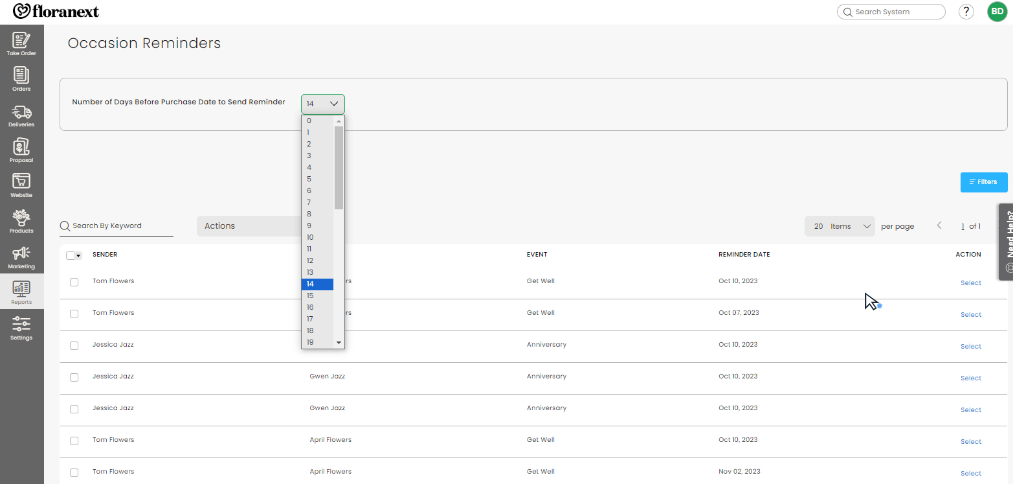
A Friday funeral order is in front of a designer on Thursday morning
The designers read every sympathy order taken in the last day, or with a service in the next three, in one Slack post each morning: service date and time, delivery address, arrangement and notes, with anything inside 24 hours marked first. Whoever runs the floor assigns them before the first bucket comes out of the cooler.
The counter manager works through the week's corporate standing orders from a single Monday list. It shows each house account due that week with its usual arrangement and delivery day, and a drafted note to the account's contact confirming it. Where an account's past notes suggest the order may change, the manager phones before choosing Process.
During a preorder window the owner checks a Google Sheet each morning that sets confirmed preorders in each category against the limit the shop chose, and Slack names any category past 80 percent, which is when the owner chooses to keep selling it or stop.
Shops without routing get a run sheet in the drivers' channel before the first van leaves, grouped by zone, each stop with its time window, sympathy and timed orders at the top of each zone.
Each workflow reads Floranext in the morning and changes no order
Catching a Friday funeral order on Thursday means reading the event and service time on every new order before the designers arrive. WebRun is an AI agent that works a real Chrome browser, signed in as you. Monday adds the house accounts with standing orders to its Floranext round, and a holiday window adds the preorder count.
No order in Floranext changes because of these lists. The counter manager sends each corporate note from Gmail after checking the order behind it, and choosing Process on a standing order, or changing what the website sells, is done by staff in Floranext.
Questions people ask
Is the run-sheet workflow worth it if we pay for Floranext's routing?
Mostly not. With routing on the Advanced POS, or added to POS Lite, the Delivery Manager builds and optimizes routes, Priority Routing puts urgent stops first and drivers follow them in the Driver App. The Slack run sheet is for a shop without routing.
Can WebRun process a standing order for us?
No. The workflow lists the week's standing orders and drafts a note to each corporate contact. Choosing Process, and checking the card message, delivery details and payment method in the window that opens, is done by staff.
Who sets the capacity for each holiday category?
The owner, when the workflow is set up: one limit per product category for each holiday window. Floranext's confirmed preorders supply the counts.
Which Floranext role should WebRun's user have?
Employee, unless a job needs a report Employees cannot open. A Manager matches the Owner except for the Billing page and stored card details, an Employee has the main permissions with limited reports, and a Driver sees only Orders and Deliveries, which is too little for house accounts.
Sources
- Florist POS | Floranext Lists retail and phone order taking, automatic occasion emails, subscription flowers, holiday pricing, the Driver App with turn-by-turn directions, text message delivery and pickup notifications and the visual delivery manager.
- Take Order Process The event dropdown: annual events send a reminder email the next year, and Sympathy adds an acknowledgement to one section of the card.
- House Accounts Billing Preference States that the email billing preference is only a reminder for staff and will not automatically send statements or invoices, and shows statements printed in a batch or emailed per account.
- Occasion Reminders Describes the automated reminder email sent about a year after an order tagged with an annual event, two weeks before the date by default, with the shop's logo, phone number and website link.
- Subscription/Standing Order Process Explains that a banner appears three days before a standing order by default and that staff process each one, confirming the card message, delivery info and payment method.
- Google Reviews Setting an order to Taken/Delivered sends the sender a review email once support enables it; positive reviews go to Google, negative ones to a feedback form; Send Photo on the Advanced POS adds the arrangement photo.
- Advanced Routing January 2026: drag-and-drop route editing, optimized routes with Google Maps, and Priority Routing that places deliveries with a priority number at the start of a route.
- Add Delivery Routing To Your Package Offers delivery routing and the driver app as a monthly add-on for Web Only and POS Lite customers.
- Driver App Drivers see their deliveries, navigate with Google Maps, set Taken/Delivered, Out for Delivery or Returned - Not Delivered, and add photos and notes.
- Adding and Updating Users Defines the Manager, Employee and Driver roles and what each can open.
4 ready-made Floranext workflows
Each one names the apps it touches and the exact steps it takes. Open one to read what it will do, then turn it on.



Want one of these running on your own Floranext?
Show WebRun the process once and it will run it on schedule, in your own private browser environment.