How to Automate Flight Schedule Pro
Flight Schedule Pro's Scheduling Hub sends lesson and maintenance reminders, and its Billing Hub invoices at check-in and syncs to QuickBooks Online. For open instructor blocks offered to waitlisted students, inspection and utilization alerts in Slack, and a daily rental check against QuickBooks, an AI agent such as WebRun reads FSP each day, and staff approve every text.
 Written by
Julian Adeniyi
Retail operations
Written by
Julian Adeniyi
Retail operations
 Reviewed by
Marcus Deleon
Support operations
Reviewed by
Marcus Deleon
Support operations
Every reservation in Flight Schedule Pro ties a student to an aircraft and an instructor
A student pilot's training, from the discovery flight to the last lesson before the checkride, runs through Flight Schedule Pro. Usually shortened to FSP, it is flight operations software for flight schools, flying clubs, colleges and universities, and career pilot training centers, and since February 2026 it has carried the name of the team behind it, as Flight Schedule Pro by Pilotbase.
Every reservation ties a student or renter to an aircraft, an instructor and an activity. Users book online or on the mobile app, then check in and self-dispatch, or let the front desk do it, and FSP generates the invoice once the flight is checked in. The Training Hub holds the syllabus and the Part 141 and Part 61 training records, and the Maintenance Hub holds work orders, squawks and generated logbook entries. Dispatch runs the day from the schedule, while the director of maintenance follows the Hobbs hours on every tail number.
A cancelled lesson leaves an instructor and an airplane on the ground
Flight training is booked weeks ahead, and the gaps open the night before. A student cancels tomorrow's 9:00 dual lesson with a cold, and an instructor and a Cessna 172 now have two empty hours. Two students on the school's waitlist would take them, and dispatch calls or texts each one between briefings.
One trainer is eight Hobbs hours from its 100-hour inspection, with three lessons booked on it before the weekend, and another flew twice all week while the rest of the fleet was full. The chief flight instructor wants both facts before they cost a day of training.
In the office, yesterday's rentals have to match what QuickBooks billed: a cross-country with a fuel charge, a Hobbs time entered wrong at check-in. The bookkeeper reconciles them at month end, weeks after the students flew.
FSP's hubs send reminders and invoice each flight at check-in
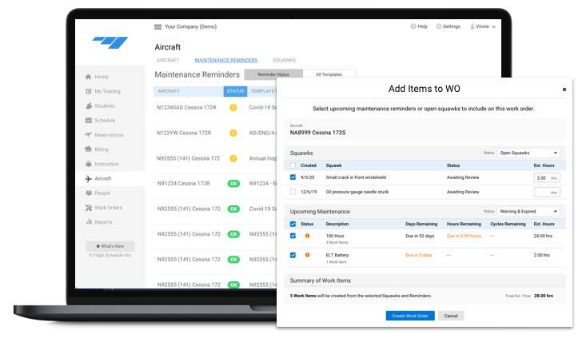
The Scheduling Hub sends automatic reminders for reservations and automatic maintenance reminders for the fleet, and staff report squawks and track each one until the aircraft is back in the air. The schedule shows METAR and a decoded TAF for the field, and Find a Time lists every opening that matches an activity, an aircraft and an instructor. Intelligent Scheduling, still labeled beta, builds a complete schedule from the school's parameters for staff to finalize and approve.
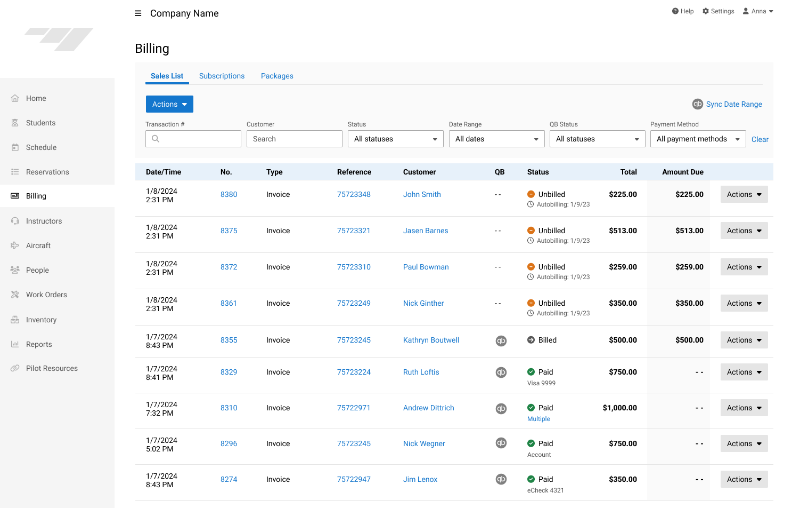
The Billing Hub generates the invoice as soon as a flight is checked in, watches for billable hours slipping through with mismatch monitoring, and syncs transactions to QuickBooks Online by hand or automatically every day. Reporting Hub Advanced, quoted separately, emails reports and dashboards on a schedule; Basic, included with the other hubs, has saved filters and shared reports that staff run themselves. Tower, the AI support assistant under Help, answers common questions about using the software.
Find a Time shows openings to whoever searches, and a waitlisted student who is not searching hears of one when dispatch calls. The hours left before a 100-hour sit in the Maintenance Hub for whoever looks, a school on Basic sees last week's utilization when someone runs the report, and the bookkeeper sets QuickBooks against FSP's reservations by hand whenever the two disagree.
Unbooked instructor time reaches the scheduling channel every morning
Every unbooked instructor block in the next 48 hours is in the scheduling channel by 7:30, nearest first, with its instructor, time and aircraft. A staff member then approves the Twilio texts lined up for waitlisted students, each offering the open slot nearest that student's preferences.
A six o'clock alert for the maintenance lead names each aircraft within 10 Hobbs hours of its 100-hour inspection or 30 days of its annual, with the hours or days left, and the maintenance tracker in Google Sheets shows the same figures for the whole fleet. The chief flight instructor's nine o'clock digest gives each aircraft's hours for the day against its seven-day average, and the utilization log flags any airplane flying below the school's threshold.
The bookkeeper begins the day with a reconciliation in the billing channel that lists every rental completed yesterday with no matching QuickBooks invoice or a different amount, and the dollar total of the gaps.
WebRun reads FSP's schedule, fleet and reservations for dispatch
The inspection alert and the open-slot alert both arrive before the first briefing of the day. WebRun is an AI agent that works a real Chrome browser, signed in as you. It only views FSP's schedule, fleet and reservations, and in QuickBooks it looks at invoices alone; its output lands in Slack, Google Sheets or a Twilio queue.
Dispatch books, moves and cancels reservations, a staff member approves each text before Twilio sends it, and the bookkeeper corrects any invoice in QuickBooks. The fifth job, lesson reminders, queues a text in Twilio for each lesson in the next 24 hours at seven and tells the instructors in Slack how many are waiting.
Questions people ask
Will students get two reminders for the same lesson?
They will if both are on. The Scheduling Hub sends its automatic reminders regardless of the workflow's texts, so a school that keeps FSP's reminders can leave the workflow off, or use it for texts from its own number.
Which QuickBooks invoices does the billing check look at?
Those dated the previous day for the students who flew, whether FSP's sync created them or someone keyed them into QuickBooks. A rental with no invoice, or with a total that differs from its Hobbs time times the rate plus fuel, is listed for the bookkeeper.
Can Intelligent Scheduling fill the open slots instead?
Partly. It recommends prioritized reservations from each student's curriculum and the aircraft and instructors available, which helps while a schedule is being built. The open-slot alert starts later, from the schedule as it stands each morning after the night's cancellations, and texts waitlisted students once staff approve.
Sources
- Explore Our Pricing | Flight Schedule Pro Plan contents by hub: automatic reminders and maintenance reminders in Scheduling, emailed statements, mismatch monitoring and QuickBooks Online in Billing, and scheduled email reports only in Reporting Hub Advanced.
- Automated Billing | Flight Schedule Pro States that invoices are generated as soon as a flight is checked in and that transactions sync to QuickBooks Online manually or with automatic daily updates.
- Scheduling and Training | Flight Schedule Pro Describes Intelligent Scheduling (Beta), which builds prioritized reservations from the curriculum and resource availability for staff to finalize and approve.
- What's Pilotbase? FSP's February 9, 2026 help article explaining that Pilotbase is the team behind Flight Schedule Pro and LogTen and that the product now appears as Flight Schedule Pro by Pilotbase.
- Flight Schedule Pro Unveils a Refreshing New Way to Schedule FSP's post on the new schedule: METAR from the National Weather Service and a decoded TAF shown on the schedule, and the Find a Time tool for openings that match an activity, aircraft and instructor.
- Contact Us | Flight Schedule Pro Introduces Tower, FSP's AI support assistant under Help, which answers common flight school questions about the software.
5 ready-made Flight Schedule Pro workflows
Each one names the apps it touches and the exact steps it takes. Open one to read what it will do, then turn it on.




Want one of these running on your own Flight Schedule Pro?
Show WebRun the process once and it will run it on schedule, in your own private browser environment.