How to Automate Details Flowers
Details Invoicing's auto-send and reminders, Automatic Reports and the Zapier app cover what Details records. Following up proposals and mockups couples have not answered, and pricing stems at wholesalers outside Details Direct, means signing in and reading screens, and WebRun, an AI agent, does that reading and leaves drafts for the designer.
 Written by
Marta Ellison
Automation strategist
Written by
Marta Ellison
Automation strategist
 Reviewed by
Marcus Deleon
Support operations
Reviewed by
Marcus Deleon
Support operations
In Details, every centerpiece is a recipe with a stem count
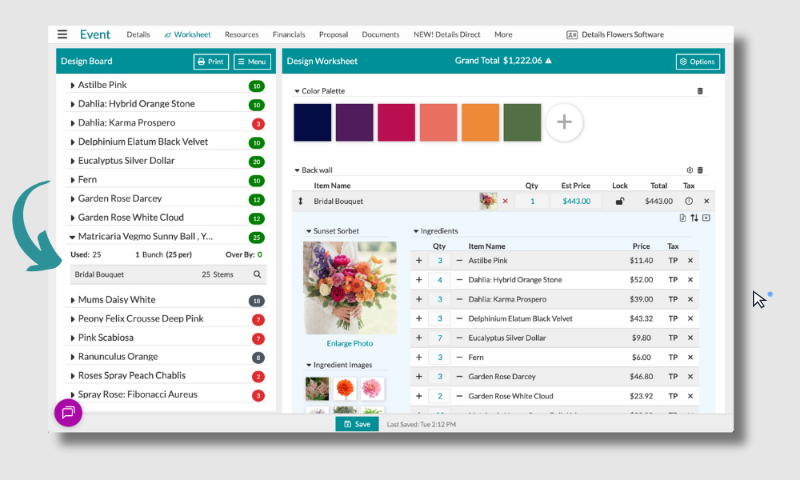
Details Flowers Software, which shortens its own name to Details, is made for wedding and event work. A wedding lives in it from the first inquiry to the final payment. The Design Worksheet holds a recipe for every arrangement, and the Stem Counter adds up the stems that fifteen identical centerpieces need. The couple approves the proposal, signs it and pays the retainer through the Client Portal.
The studio manager works the Event List, where each wedding sits at a stage of the event pipeline according to its status. In the week of the event, the Items Needed report rolls the weekend's recipes into bunch counts for ordering, and the Costs page records what was ordered and at what stem cost, against what the proposal projected. The Delivery PDF tells the crew what to drop off, when and where, and what to collect once the reception ends, with a space for the client to sign for what arrived.
The admin starts after the couple opens the proposal
Most of a studio's work away from the design table arrives once the proposal is out. One couple opens it twice and then goes quiet for three weeks; another has had the design mockup for ten days without a word. A couple who signed in January emails in March to swap garden roses for peonies, and the recipe has to be rebuilt and repriced.
Ordering comes next. The Items Needed report gives the weekend's bunch counts, but not every supplier sells through Details Direct. For the others, the designer signs in to each wholesaler's web shop and looks up one variety at a time, checking whether this week's price still leaves the margin the wedding was priced at months ago.
Two weeks before each wedding, the studio manager writes the couple a confirmation of the flowers and the delivery time. After the reception the same manager owes them a thank-you and a request for a review.
Details Invoicing emails each payment on the event's schedule
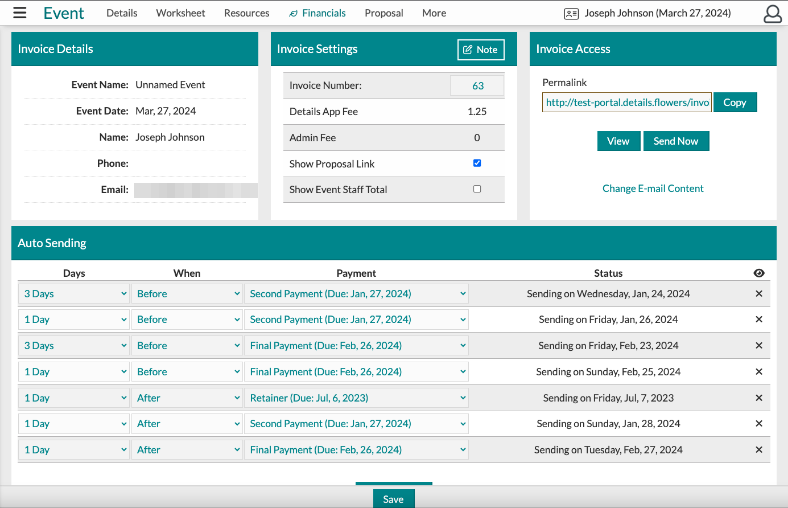
Details Invoicing, an optional add-on that takes payments through Stripe for 1 to 1.5 percent of each payment on top of Stripe's own fee, depending on the plan, sends each Invoice Ready email as many days before the due date as the studio chooses. Reminders follow once the due date has passed, and only while the payment is not marked paid. A thank-you email follows automatically once a payment processes.
Automatic Reports email a saved Event List search as a CSV or XLSX attachment on a schedule, run at 4 AM. Details Direct shows live prices and availability from participating vendors, and the studio can prebook and order there without leaving Details. Through its Zapier app, Details can start a Zap when a client or event is created, a payment is logged or an event is updated.
Every one of these works from what Details records or what a participating vendor publishes. A wholesaler outside Details Direct keeps this week's prices behind its own shop login. Client Portal Analytics logs every session a couple spends on the proposal, and the Email Lists tab shows how many times each email was opened, but a proposal that simply sits unsigned starts no Zap, so the studio manager reads those screens and writes each follow-up by hand.
The draft purchase order lists every stem the next ten days are short of
The designer approves each stem order from a draft in Slack, listing every stem the next ten days of recipes need beyond what is on hand, each priced at the wholesaler's web shop with its minimum order quantity. The designer also reads, every Monday, which recipes have slipped under the studio's margin target, worst first, with the stems that pushed each one there, and reprices or swaps a variety before the next event.
For each proposal with no client activity for three days, the designer edits a drafted follow-up naming the event date and the proposal value, then sends it, and couples still holding a design mockup get a drafted note that asks for a yes or the change they want. Fourteen days before each event not yet confirmed, the studio manager checks a drafted confirmation, listing the itemised flowers, venue, delivery time and total, against the Worksheet and sends it.
Two days after a wedding is marked complete, the studio manager sends the couple a thank-you drafted with a link to the studio's Google or The Knot page.
Every note to a couple starts as a Gmail draft linked from Slack
Sorting proposals by the couple's last activity and pricing a stem shortfall are reading jobs across two logins. WebRun is an AI agent that works a real Chrome browser, signed in as you. Its round covers the open proposals in Details, the mockups awaiting a reply, the next fortnight's events and their recipes, then the wholesaler's web shop for this week's prices.
Every note to a couple is saved as a Gmail draft, and the list in Slack links to each one, so the studio sends or deletes it from there. The purchase order stops at a draft as well. None of the Details workflows checks out a cart, on Details Direct or at the wholesaler, or edits a proposal the couple has signed.
Questions people ask
Who places the stem order with the wholesaler?
The designer. The reorder workflow ends at a draft purchase order posted to Slack, listing each stem, the quantity short and this week's price per stem, and it has no checkout step.
Does the Details app on Zapier handle proposal follow-ups?
No. Its triggers fire on a new client or event, a logged payment or an updated event, so a proposal that sits unsigned never starts a Zap.
Is the final-balance reminder workflow worth turning on alongside Details Invoicing?
Only if Details Invoicing's reminders are off. With auto-send set up, Details emails each Invoice Ready message before its due date and reminds the couple after it until the payment is marked paid. The workflow drafts its own reminders for events in the next 21 days that still carry a balance, which suits a studio that takes payments outside Details Invoicing.
Which Details login should WebRun use?
A separate Details user. The Business, Professional and Portfolio plans include one user and Enterprise two per branch, and each extra user costs $25 a month, so the owner's login never has to be shared.
Sources
- Features by Details Flowers Software Lists the Client Portal for approving, signing and paying, the Stem Counter and pricing calculator on the Worksheet, automated payments and e-signature through Stripe, Details Direct and reporting.
- Details Invoicing: Sending The Invoice Describes the Auto Sending schedule that sends each invoice a chosen number of days before its due date, and reminders after the due date that go only if the payment is not marked paid.
- Account Information: Subscription Plans Plan by plan: one authorized user on Business, Professional and the Portfolio plans, two users per branch on Enterprise, additional users at $25 a month, and optional invoicing with a Details fee of 1 to 1.5 percent per transaction on top of Stripe's.
- Emails: Email Settings Documents the Invoice Ready email and the Thank You email that is sent automatically after a payment has been processed.
- The Event List: Automated Reporting Overview Explains Automatic Reports: a saved Event List search emailed daily, weekly, monthly or yearly as a CSV or XLSX file, run at 4 AM.
- Details Direct Describes the marketplace inside Details that connects to participating vendors for live inventory, pricing and availability, with prebooks and an order summary.
- Details Flowers integrations on Zapier Lists the Zapier triggers (New Client, New Payment, Updated Event) and actions (Create Client-Event, Create Client Log Entry, Create Payment Record, Revoke Proposal Access).
- The Client Portal: Analytics Shows what Client Portal Analytics tracks: users, sessions with their length and page, page views and average time on the portal.
- Documents: The Delivery PDF Describes the Delivery PDF: which items are dropped off, when and where, which are picked up after the event, and a space for the client to sign off.
7 ready-made Details Flowers workflows
Each one names the apps it touches and the exact steps it takes. Open one to read what it will do, then turn it on.



Want one of these running on your own Details Flowers?
Show WebRun the process once and it will run it on schedule, in your own private browser environment.