Export Gaana's trending chart for your programming committee
Every Monday, WebRun checks Gaana's trending and new release charts, exports track, artist, and chart position to a shared sheet, and emails the programming committee a summary highlighting new entries and big movers.
- No credit card
- Under $0.01 per run
- Cancel anytime
How do I export Gaana's trending chart for a music programming committee?
WebRun checks Gaana's trending and new release charts every Monday, exports track, artist, and chart position to a shared sheet, and emails the programming committee a summary highlighting new entries and big movers. The committee reviews chart shifts from a ready export instead of scanning Gaana by hand.
- The committee reviews chart movement from a ready export every Monday
- New chart entries and big movers get flagged automatically
- Past weeks stay archived for season-long comparison
Built for Retail and venue music programmers · Radio programming committees · Music licensing teams · Hospitality brand music directors
What does WebRun do on every run?
The exact actions WebRun takes, in order - in plain language, so you can adjust anything.
-
WebRun signs in and gets to work
Opens
gaana.comin a real browser with your saved login - no setup, no API keys. -
1
Gaana - check trending and new release charts
gaana.com
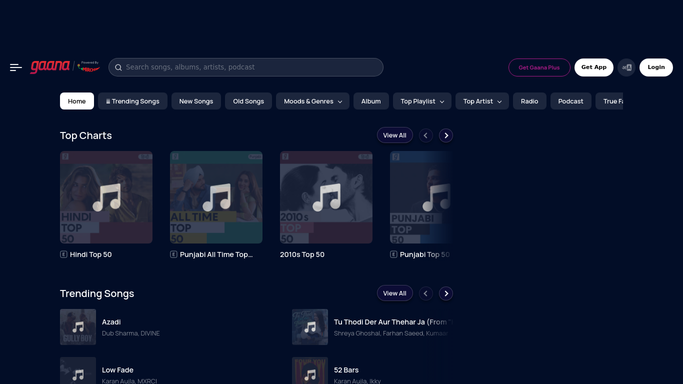
WebRun opens Gaana to check trending and new release charts. - Open Gaana and review the trending and new release charts
- Note track, artist, and chart position for the top entries
- Compare against last week's chart for notable movement
Done when This week's trending and new release charts have been reviewed.
-
2
Google Sheets - export the chart list
google.com How to Automate Google Sheets

WebRun opens Google Sheets to export the chart list. - Export track, artist, and position to the programming sheet
- Note any track that's new to the chart this week
- Keep prior weeks in earlier sheet tabs for comparison
Done when The programming sheet holds this week's full chart export.
-
3
Gmail - email the committee
gmail.com How to Automate Gmail

WebRun opens Gmail to email the committee. - Draft an email summarizing the week's chart movement
- Highlight tracks new to the chart
- Send it to the programming committee
Done when The committee has this week's chart update in their inbox.
How is each run configured?
Secure by default
Connect once, stays signed in
WebRun signs in once and keeps each session in a persistent environment, so every run picks up right where it left off.
Every action is checked against this policy before it runs.
Questions, answered
Will it add tracks to a live playlist automatically?
No. WebRun only exports the chart data. Adding a track to a live playlist or in-store rotation is a decision the committee makes.
How does it track chart movement week to week?
It compares each track's position against the chart it recorded the previous week, so genuinely new entries and big jumps stand out.
Does it cover every genre on Gaana?
It reads the overall trending and new release charts as shown on Gaana, not a genre-specific filter, unless the committee narrows it further.
Related templates
Put this on autopilot.
Turn it on in minutes - or have our team set it up for you.