Get your competitive programming club ready for the next AtCoder contest
Every Monday, WebRun opens AtCoder, checks the upcoming contest schedule and each club member's rating change from the last contest, creates a Trello prep card for the next contest, and drafts a WhatsApp alert with the schedule and standings for the club lead to review and send.
- No credit card
- Under $0.01 per run
- Cancel anytime
How do I keep my competitive programming club ready for AtCoder contests?
WebRun checks the upcoming AtCoder contest schedule and each club member's rating change every Monday, creates a Trello prep card for the next contest, and drafts a WhatsApp alert with the schedule and standings for the club lead to review and send, so contest prep starts a full week ahead.
- Contest prep starts a full week ahead of the next contest
- Members with a rating drop get flagged for extra practice
- No club alert reaches the group without the lead's review
Built for competitive programming clubs · university algorithms teams · coding contest coaches · high school programming clubs
What does WebRun do on every run?
The exact actions WebRun takes, in order - in plain language, so you can adjust anything.
-
WebRun signs in and gets to work
Opens
atcoder.jpin a real browser with your saved login - no setup, no API keys. -
1
AtCoder - check the contest schedule and ratings
atcoder.jp
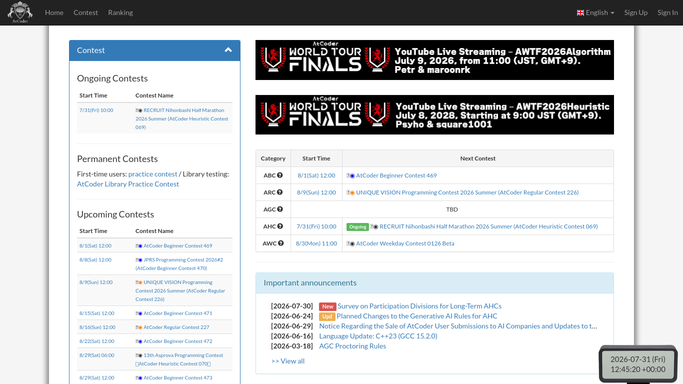
WebRun opens AtCoder to check the contest schedule and ratings. - Check the upcoming contest schedule for the next 2 weeks
- Open each member's profile and note their rating change from the last contest
- Flag any member with a large rating drop for extra practice focus
Done when The upcoming contest and every member's latest rating change is captured.
-
2
Trello - create a contest prep card
trello.com How to Automate Trello

WebRun opens Trello to create a contest prep card. - Create a prep card for the next contest with its date and type
- List members who need extra practice ahead of it
- Archive the card for the contest that just passed
Done when The next contest has a current Trello prep card.
-
3
WhatsApp - draft a club alert
whatsapp.com How to Automate WhatsApp

WebRun opens WhatsApp to draft a club alert. - Draft an alert with the contest date and last week's rating changes
- Encourage members who dropped rating to join the prep session
- Leave the draft unsent for the club lead to review and send
Done when A reviewable contest alert is ready for the club lead.
How is each run configured?
Secure by default
Connect once, stays signed in
WebRun signs in once and keeps each session in a persistent environment, so every run picks up right where it left off.
Every action is checked against this policy before it runs.
Questions, answered
Will it message the club group without the lead?
No. The alert is always drafted and left unsent. WebRun never sends a WhatsApp message on its own, the club lead approves and sends it.
Does it register anyone for a contest?
No. It only reads the public contest schedule and reports it. Registering for AtCoder contests is always done by each member.
How does it read rating changes?
From each member's public AtCoder profile after a contest is rated, so the numbers reflect real results, not estimates.
Related templates
Put this on autopilot.
Turn it on in minutes - or have our team set it up for you.