How to Automate Trainerize
Trainerize handles the scheduled parts itself: auto-messages written ahead, a session credit taken off when a paid appointment is booked, reminders before it, and tags by compliance. Following up what those leave behind, such as credits nobody is booking or a third no-show, means reading client profiles every week, and an agent like WebRun can do that reading.
 Written by
Aiko Tanabe
Product researcher
Written by
Aiko Tanabe
Product researcher
 Reviewed by
Elliot Nakamura
Platform writer
Reviewed by
Elliot Nakamura
Platform writer
Trainerize puts the whole program on the client's phone
ABC Trainerize is the app a client opens instead of texting their trainer. Today's workout sits at the top, exercise by exercise. Below it the client logs meals, ticks off the day's habit and messages the coach, under the coach's own logo if they pay for a custom branded app.
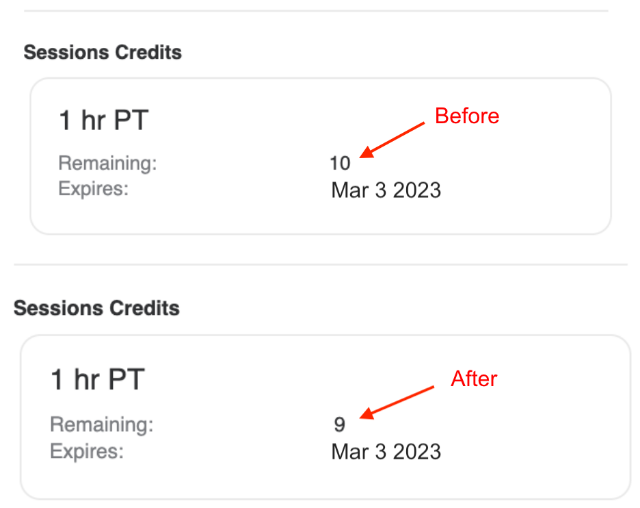
The trainer works the other side, from a web dashboard. A program is built once as a Master Program, then either copied to one client to be tailored or run for every client subscribed to it. The calendar holds paid appointments. A Stripe add-on sells session packs and online memberships and delivers each one as soon as the client pays, and every client's remaining session credits show on their overview page.
Trainerize is built for online, in-person and hybrid training. An independent trainer sells a ten-session pack for the gym floor and an online program for the weeks between visits, while a studio or club puts its coaches on one account with team roles and permissions.
Trainers track leftover credits and repeat no-shows from memory
Sunday evening goes on next week. Clients at the end of a phase need the next block written. Then the trainer reads the food logs: one went blank on Wednesday, and a client who ticked every habit has earned a proper reply rather than a thumbs-up.
The money gets less attention. A client who bought a ten-session pack in the spring still holds four credits, with no booking since the start of the month, and the trainer has not raised it because it feels awkward. Trainerize gives a session pack no end date, so those four credits stay on the account until the client books them.
The Tuesday six o'clock has now missed three sessions in five weeks, and the trainer remembers the first two only roughly. At a studio the head coach wants that picture for every coach's clients, and builds it by opening each coach's list in turn.
Trainerize's Zapier triggers cover purchases and tags, not unused credits
A paid appointment takes one credit off the client's session pack when it is booked, whether the trainer books it or the client does from the app, and Trainerize reminds both of them before the session. A coach can write auto-messages ahead and schedule them, which is what Trainerize's own blog suggests for a client whose credits are running low. Trainerize also tags clients automatically by compliance and activity, so a slipping client is one filter away.
Past its own features, Trainerize sends twelve kinds of event to Zapier, among them New Purchase, Tag Added to a Client and Auto-Renew Cancelled, and Zapier can act back by sending a message in Trainerize or copying a Master Program to a client. Mindbody contracts and appointments sync in for studios that book there, and ABC Glofox has an integration of its own.
Every one of these waits for something to happen in Trainerize. Four credits that have sat untouched for three weeks are not an event, and neither is a client who stopped booking, so no trigger fires for them. The front desk of a gym on other software, and the sheet where an independent trainer tallies what they owe for floor time, sit outside Trainerize altogether.
The trainer's week of follow-ups starts from the Sales tab and the calendar
The trainer writes that week to every client sitting on unused credits with no booking in three weeks, and each note gives the sessions left and the month the pack was bought, both taken from the Sales tab.
Sunday's programming begins with the clients who finish a phase this week with nothing scheduled after it, so no client opens the app on Monday to find an empty day.
The trainer's no-show sheet has a dated row for every missed session, with the slot and the client, so when the Tuesday six o'clock misses again the trainer raises it with three dates in hand.
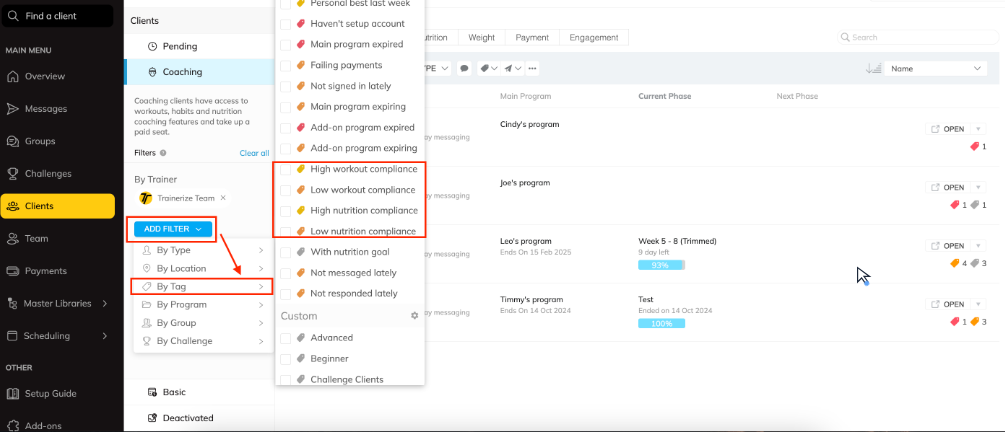
At a studio, the head coach works from a single page of every coach's clients whose compliance tag has slipped, sorted by the date each membership renews, and each coach sees the same view limited to their own clients. When a Stripe payment fails, the owner knows what that client bought and how far through the program they are before deciding what to write.
WebRun opens every Trainerize client profile once a week
Building those lists means opening every client's overview page, their Sales tab and the calendar before a six o'clock start on the gym floor.
WebRun is an AI agent that works a real Chrome browser, signed in as you. Client by client, it reads the Trainerize dashboard weekly or daily and records what it finds in a sheet, an email draft or a Slack message. It can open Stripe or the gym's booking software on the way, with no API key or developer involved.
Each note to a client sits unsent in the trainer's Gmail drafts until the trainer, or a studio's head coach, picks which go. Master Programs and bookings stay as the trainer left them unless a job you set up changes them. Of the jobs below, the lapsed-client win-back and the no-show follow-up start from those same client profiles.
Questions people ask
We already pay for FitMetrics. Is this the same thing?
No. FitMetrics is an add-on inside Trainerize that drafts a reply to each check-in from the client's own data and flags drop-offs in a compliance tracker, and the coach reviews every reply before it sends. The agent works across screens and systems instead, setting a credit balance against the calendar or a Stripe payment against a program.
Which screen shows a client's remaining session credits?
The client's overview page, under Summary or the Sales tab. Trainerize takes a credit off whenever a paid appointment is booked, so that balance is current, and it is the number the agent reads.
Can the same run read our gym's Mindbody account?
Yes. Trainerize already pulls Mindbody contracts and appointments in, and a run can open Mindbody itself for anything the sync leaves out, so a membership that lapsed there and a client who stopped logging workouts in Trainerize end up in the same sheet.
Are MyFitnessPal food logs included in what it reads?
Yes, once the client has connected MyFitnessPal to Trainerize. Their calories, macros and meal details then sync onto their Trainerize profile, which is where the agent picks them up, the same as a meal logged in the Trainerize app.
Sources
- Features | ABC Trainerize Personal Training Software Lists in-app messaging with auto-messages, automatic client tags by compliance and activity, a custom branded app, team roles and permissions, multiple locations, and the Mindbody, ABC Glofox and Zapier integrations.
- FitMetrics: AI coaching tools for ABC Trainerize coaches Describes the FitMetrics add-on drafting a reply to every check-in from the client's own data, with the coach reviewing drafted messages before they are sent, and a compliance tracker that flags drop-offs.
- TRAINERIZE UPDATE | Give Clients the Flexibility to Book Their Own Appointments and Sessions in ABC Trainerize Establishes client self-booking, a session credit deducted automatically when a session is booked, and reminders from the app to both coach and client before an appointment.
- TRAINERIZE UPDATE | Introducing Session Packs - Sell your PT Sessions and Packages right from Trainerize Session packs are a set number of sessions at one price and cannot have a start or end date; remaining credits show on the client's overview page under Summary or the Sales tab; for a client low on credits it suggests a personal message or an auto-message scheduled in advance.
- Stripe Payments | ABC Trainerize Personal Training Software The Stripe add-on sells memberships, add-on content, recurring services and session packs for online, in-person or hybrid training, delivers products and session credits as clients buy, and sends automatic email reminders about payments.
- ABC Trainerize integrations | Zapier Lists the twelve ABC Trainerize triggers, including New Purchase, Tag Added to a Client and Auto-Renew Cancelled, and actions such as Send Message in Trainerize and Copy Master Program to Client.
- Mindbody Integration | ABC Trainerize Personal Training Software States that Mindbody contracts and appointments sync into ABC Trainerize.
- TRAINERIZE UPDATE | Full Meal Details Now Available with the MyFitnessPal Nutrition Integration States that calories, full macros and meal details logged in MyFitnessPal appear in the client's nutrition dashboard in Trainerize.
6 ready-made Trainerize workflows
Each one names the apps it touches and the exact steps it takes. Open one to read what it will do, then turn it on.


Want one of these running on your own Trainerize?
Show WebRun the process once and it will run it on schedule, in your own private browser environment.