How to Automate Tradify
The gaps in a Tradify business sit between records: a quote accepted with no job booked, a supplier bill that never reached the invoice, a work-order email still waiting as an enquiry. Tradify's reminders and notifications do not look for those, but an AI agent like WebRun can check every morning and flag each one for the office.
 Written by
Marcus Deleon
Support operations
Written by
Marcus Deleon
Support operations
 Reviewed by
Nora Whitfield
Editorial lead
Reviewed by
Nora Whitfield
Editorial lead
Tradify keeps the quote, the job and the invoice on one record
Tradify was built for the trade business where the person who quotes the job also turns up to do it. Electrical contractors, plumbers and gas engineers, HVAC and refrigeration techs, and property maintenance firms run their work through it, often from a phone.
An enquiry lands in the Enquiries tab from the web form or a forwarded email. The quote comes together from price lists, the customer accepts it online, and it becomes a job on the Scheduler. The crew clock their hours on timesheets and order materials on purchase orders linked to the job, and the supplier's bill arrives against those orders. The invoice goes out from the job and syncs to Xero or QuickBooks Online. Recurring work, such as a quarterly service on a restaurant's extraction system, repeats on the Scheduler without being entered again.
Job Sheets, which the customer can sign on the phone, and the Work Diary replace the pad of job sheets and the diary on the dashboard.
Paperwork for the day's jobs waits until the van is parked
In a small firm the office is often the owner, after dinner, working through what the day left behind. A property manager emails three work orders with PDFs attached, and each has to become a job with the right site address and tenant contact. A quote accepted on Tuesday never got scheduled, because the acceptance email arrived while everyone was on site. The wholesaler's bill for a hot water cylinder is in Tradify, but the cylinder never made it onto the customer's invoice. Tomorrow's crew needs to know where to be at seven, so the owner texts each of them. The customer who rang about a leak at lunchtime is still written on the back of a receipt.
Tradify chases quotes and invoices, but nothing checks one job against another
Quote reminders email customers who have not answered a quote, and payment reminders chase unpaid invoices by email or text. Staff get a push notification and an email when they are scheduled for an appointment or their schedule changes, and customers get the appointment details and automated reminder emails. Work-order emails forwarded to the enquiries address appear in the Enquiries tab by themselves. On the money side, Job Financial Reports compare estimated with actual time, materials and costs for each job.
An enquiry then waits in its tab until a person actions it and creates the customer and the job, because Tradify converts nothing on its own. An accepted quote emails the office and changes status, and no check follows to see that a job was ever booked. A supplier bill that never reached the invoice shows up only when someone opens that job's financial report, and a property manager's own portal is outside Tradify altogether.
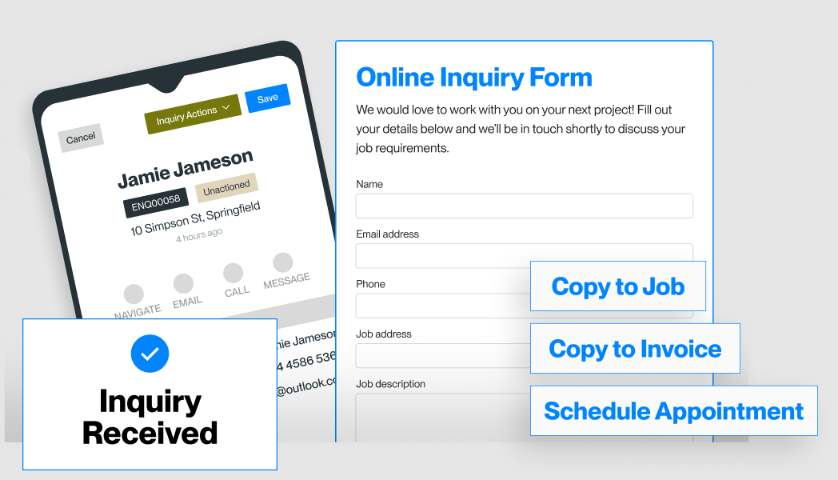
The office sees every accepted quote that never reached the Scheduler
Each morning, a post in Microsoft Teams shows the office manager any quote accepted since yesterday with no job on the Scheduler, and a Trello card for each one stays open until it is booked, before the customer rings to ask. The office actions each property manager's work order into a job with the site address and access notes already pulled from the PDF.
While a job is still open, the owner sees on a Notion page the supplier bills and purchase orders on it that no invoice line covers, and can add the hot water cylinder before the job closes. The afternoon before, the crew gets tomorrow's jobs in a Telegram brief, times and addresses in order, and sees the same jobs on the team's Google Calendar. After a job closes, the office approves a drafted review request to the customer.
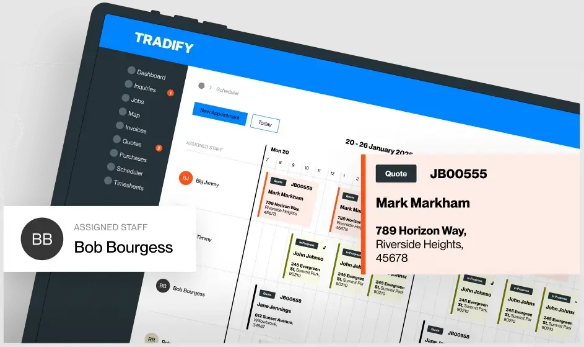
The cross-checks can run before the first callout of the day
The owner who does the office after dinner is the person every one of those checks depends on today. WebRun is an AI agent that works a real Chrome browser, signed in as you. It uses the office's Tradify login to open the quotes, the Scheduler and the bills, and it reads the inbox where the work orders arrive, so there is no integration to set up first.
A wrong site address sends a van to the wrong street, so by default the agent sets out each work order for the office to action into a job; you can let it create jobs outright once its details prove right. It adds no line to an invoice and leaves the Xero or QuickBooks sync alone. The quote-to-job check below is the one that would have caught Tuesday's quote.
Questions people ask
Can Tradify email staff their schedule automatically?
Yes, appointment by appointment: Tradify sends each staff member a push notification and an email when they are scheduled or their schedule changes. For the whole of tomorrow as one list the evening before, with times and addresses in order, WebRun can put it together from the Scheduler and send it by email or as a Telegram brief to the crew.
We keep forgetting to bill for materials. Can Tradify catch that?
Not by itself. Job Financial Reports show a job's costs against its estimate when someone opens them, one job at a time. WebRun reads the purchase orders and supplier bills linked to each job, compares them with that job's invoice lines and lists anything supplied but not charged, and nothing is added to an invoice without a person deciding to.
Can it pick up work orders from a property manager's portal instead of email?
Yes. WebRun signs in to the portal with your account, reads the new work orders and passes each one into Tradify for the office to action, the same as an emailed one.
Sources
- Job Scheduling App for Contractors | Try Free! | Tradify™ States that staff get push notifications and emails when an appointment is scheduled for them or their schedule changes, and that customers get appointment confirmation and reminder emails.
- Job Quoting Software | Try Free! | Tradify™ Describes automatic quote reminders on quotes with no response, online quote acceptance with an email when a quote is accepted, and turning a quote into a job.
- Contractor Invoice Software | Try Free! | Tradify™ Describes automatic payment reminders on unpaid invoices by email or text, and invoice sync with Xero and QuickBooks.
- Customer Inquiry Software | Try Free! | Tradify™ Explains that enquiries arrive through a web form or a forwarding email inbox into the Enquiries tab, where a person actions or rejects them and creates the customer, quote or job.
- Purchase Order Software | Tradify Purchase orders linked to quotes, jobs, invoices and customers, and raised POs linked to supplier invoices, from the web or the mobile app.
6 ready-made Tradify workflows
Each one names the apps it touches and the exact steps it takes. Open one to read what it will do, then turn it on.






Want one of these running on your own Tradify?
Show WebRun the process once and it will run it on schedule, in your own private browser environment.