How to Automate TaxDome
TaxDome runs the pipeline itself: automations attached to each stage send emails and proposals and create tasks, conditions pick clients by tag, and automove carries jobs forward. Personal follow-up and anything outside TaxDome, such as e-file acknowledgements, website inquiries and review requests, stays manual, and a browser agent such as WebRun can prepare it for approval.
 Written by
Nikhil Bhatt
Automation strategist
Written by
Nikhil Bhatt
Automation strategist
 Reviewed by
Priya Raghavan
Solutions lead
Reviewed by
Priya Raghavan
Solutions lead
A tax firm's whole season moves through TaxDome's pipelines
TaxDome is practice management software for tax, bookkeeping, accounting and payroll firms. Clients get the firm's own portal and the TaxDome client app, where they upload documents, fill in organizers, sign engagement letters and pay invoices. The firm works the other side: client accounts and contacts, document folders, secure messages and synced email, e-signatures, proposals, billing and time tracking.
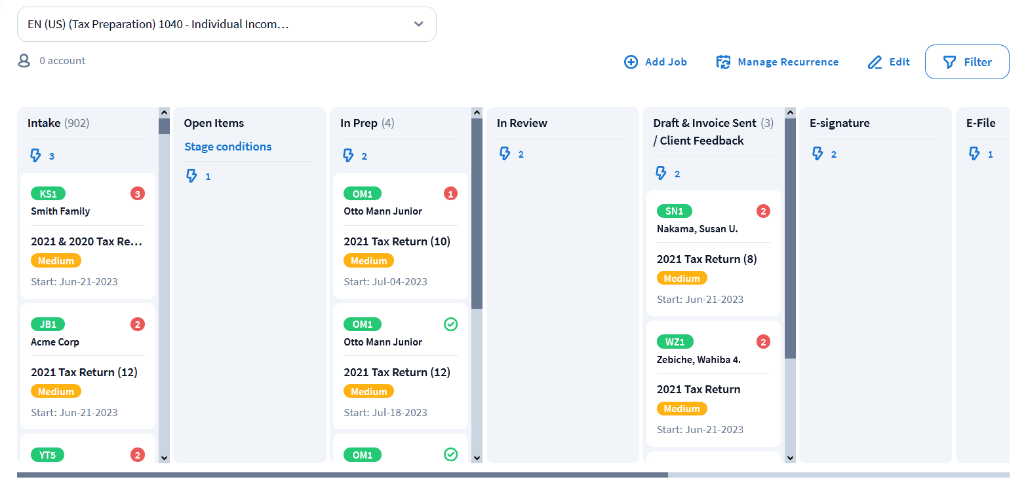
Work is organized as pipelines. Each service, such as individual returns, business returns or monthly bookkeeping, gets its own pipeline split into stages; every client moves through it as a job, and each job carries tasks for the team.
In season the pipeline view is where the partners look first: which returns are waiting on the client, which are in preparation, which are with the reviewer, and which are ready to go out once the invoice is paid.
Returns stall while the client still owes a document
The organizer goes out in January, and in March a long row of jobs still sits in the stage for missing documents. Some of those clients opened the organizer and stopped halfway; others have not logged in to the portal since last season.
The preparer knows what each of those clients is missing and why: the brokerage 1099 that was corrected and reissued, the K-1 from a partnership that always files late, the property tax statement that only lives on the county's website. The follow-up a client answers is the personal one, and the preparer writes those in the evenings, client by client.
Engagement letters go out and some are never signed, and a finished return can sit behind an unpaid invoice. An inquiry from the website form may never become an account, and a client who was delighted in April is never asked for a review. After filing, a preparer opens the tax software to see which e-files have been accepted, because the acknowledgement lives there.
Stage automations run on what the client has done in the portal
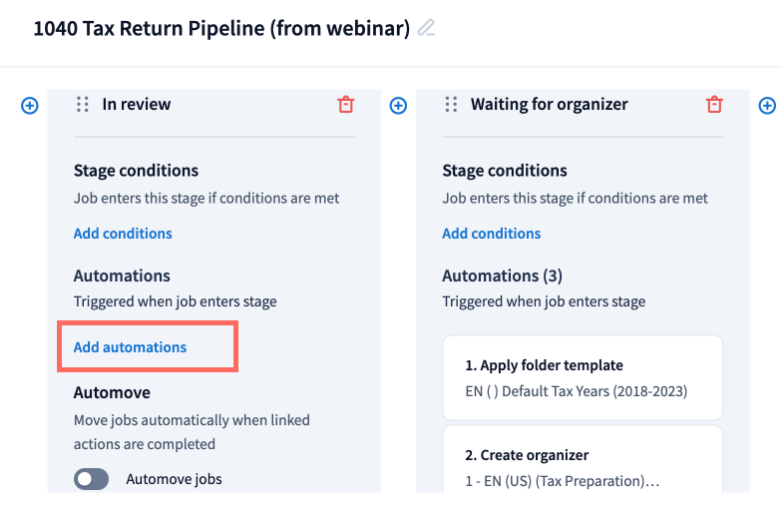
Automations attached to each pipeline stage run from templates the firm writes once: an email, a proposal, a task for the team. If/then conditions on client tags decide which clients get which automation, and a client has to carry every tag a condition names. Recurring jobs start the next period's work on a schedule, and jobs can move to the next stage by themselves, which TaxDome calls automove.
Organizers, TaxDome's customizable forms, collect data and documents from clients, and last year's document checklists can be rolled over for returning clients. SMS reaches clients who ignore email. In 2026 TaxDome added Work Forecaster, which forecasts every job and flags the ones at risk before they become overdue.
TaxDome Atlas, TaxDome's own AI agent, went into beta in summer 2026 with an API and an MCP connection. The MCP connects a TaxDome account to Claude or ChatGPT, to query it and act on it alongside information from outside TaxDome, and the API is for custom integrations.
The stage automations run on what happens inside TaxDome: whether the client uploaded, signed, paid or finished the organizer. They cannot see the e-file acknowledgement in the tax software, an inquiry still sitting in a website form, or the firm's review page on Google.
Each waiting job can get a follow-up that names what is missing
For a client still missing a corrected 1099, the follow-up could name that form and answer the last message they sent, written in the preparer's own words for the preparer to approve. The partner could see every return that is ready to deliver but still carries an unpaid invoice, each with a payment reminder written, and decide once which to hold and which to release.
E-file acknowledgements on the status screen a preparer already checks in the tax software could be set against the jobs marked as filed in TaxDome, so the reviewer sees any return marked filed that the tax software has not shown as accepted.
The admin who handles onboarding could see each website inquiry that has not become an account, and each engagement letter unsigned for a week. After delivery, the partner could approve review requests for the firm's Google profile, one for each client who had a smooth season.
The agent reads the pipeline and leaves every job in its stage
A follow-up a client will answer needs their last message in TaxDome and the exact form still missing from the job's checklist. WebRun is an AI agent that works a real Chrome browser, signed in as you. In season it reads the jobs waiting on clients in TaxDome every morning and checks the tax software's acknowledgement screen, then writes the follow-ups and the unpaid-returns list from what it found.
It moves no job, because moving a job into a stage runs that stage's automations, and it releases no return. Each follow-up goes into the preparer's synced mailbox as a draft, and the preparer decides whether it reaches the client. The cards below include the document chaser, the fee collection list and the review request.
Questions people ask
Where do TaxDome Atlas and the MCP fit in?
Atlas works inside your practice as TaxDome's own AI agent, and the MCP connects your TaxDome account to Claude or ChatGPT; both, with the API, were in beta in summer 2026. The browser agent sits next to them and needs neither, since it uses your team's own logins.
Can tax return delivery include an approval step before the client signs?
Yes. The Summer 2026 update added an approval step before signing to tax return delivery, along with faster package building.
Which pipeline stages does it read?
The ones you point it at, usually the stage for missing documents, the stage for returns awaiting payment and the one for unsigned engagement letters. Pipelines and stages are named by your firm, so it reads the stage names you already use.
Sources
- TaxDome bootcamp handout: first steps, workflows and billing TaxDome's own training handout defining pipelines, stages, jobs and tasks, automations added to stages from templates, if/then conditions by tag, recurring jobs, automove, SMS for unresponsive clients and invoices from tracked time.
- TaxDome Webinars & Tutorials TaxDome's training page covering e-signatures, client communication and automation, organizers, client onboarding, proposals, engagement letters and billing.
- Summer Update 2026 (TaxDome, official video) TaxDome's own release video, whose description names smart document checklists that roll over last year's, Work Forecaster for jobs at risk, an approval step before signing in tax return delivery, and TaxDome Atlas, an API and an MCP connection to Claude or ChatGPT, all three in beta in summer 2026.
8 ready-made TaxDome workflows
Each one names the apps it touches and the exact steps it takes. Open one to read what it will do, then turn it on.




Want one of these running on your own TaxDome?
Show WebRun the process once and it will run it on schedule, in your own private browser environment.