How to Automate Square Appointments
A tattoo shop's reminders, text rescheduling through Square Assistant and deposits at online booking all run in Square Appointments without staff. Checking that each custom design was approved in the artist's inbox, and logging spore test results from the lab's website, still falls to a person or to an agent like WebRun.
 Written by
Tom Kessler
Field operations analyst
Written by
Tom Kessler
Field operations analyst
 Reviewed by
Marcus Deleon
Support operations
Reviewed by
Marcus Deleon
Support operations
Square Appointments is where a tattoo shop books its artists and takes deposits
Square Appointments is the booking side of Square: the same account, card readers and payouts as the register, with a calendar of artists and services on top. Salons, spas, barbers, medspas, and tattoo and piercing shops book their clients through it.
A shop's week runs through it. Walk-ins, touch-ups and custom pieces go on the calendar under an artist, and apprentices and the shop manager work from the same calendar. On the Premium plan a station can be set up as a resource, so a four-hour session books the chair along with the artist.
Clients book from the shop's online booking site, from Instagram or through Square Go, Square's free marketplace app for beauty and personal care. A deposit, fixed or a percentage of the service, is taken when the client books online. Contracts and other documents can be attached to the booking, and aftercare and merch sell at the same checkout as the session.
A custom piece needs a deposit, a signed form and an approved design
Before a long session the shop manager wants three things settled: the deposit paid, the consent form signed and the design approved. The first two are in Square. The third usually is not, because the sketch and the client's yes live in the artist's email or DMs.
So the evening before a big day, the manager opens each booking, checks the deposit and the form, then scrolls back through messages to find the approval. A session with no signed-off design turns into a nervous phone call in the morning, or an artist drawing at the station while the client waits.
Other jobs come round on a clock. Touch-ups fall due inside the window the shop offers. If the shop sterilises with an autoclave, a spore test goes to a mail-in lab on the schedule the health department sets, the result appears on the lab's website, and the manager copies it into the log an inspector may ask to see.
Square Appointments records the deposit and the contract, not the design approval
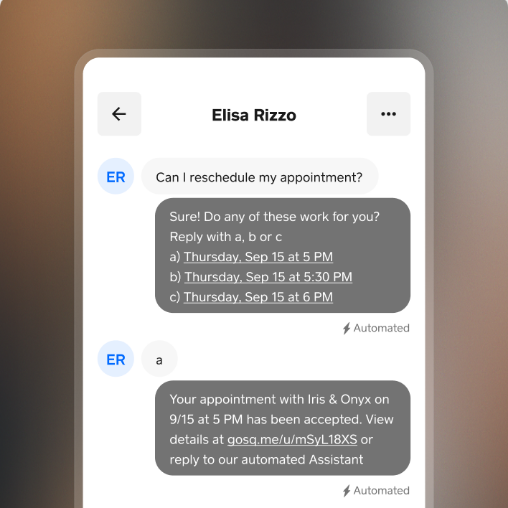
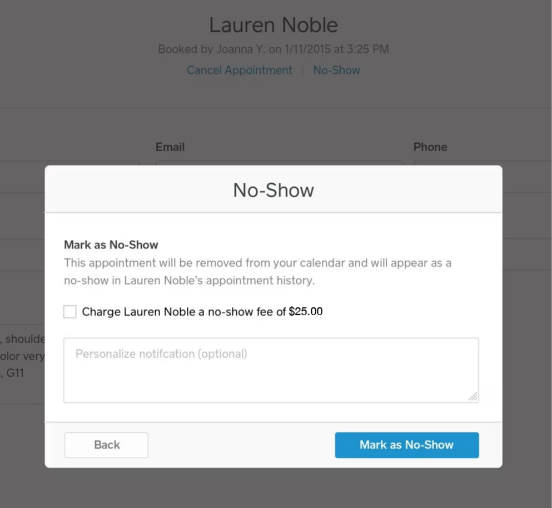
Square's waitlist, which needs Plus, texts and emails waiting clients when an opening comes up, and Plus also adds a cancellation policy with no-show fees and booking with more than one artist. Square Assistant answers client texts at any hour, confirming, cancelling or rescheduling appointments straight into the calendar, and reminders go out automatically by text or email on every plan.
Premium adds stations as bookable resources and per-artist commissions, flat or tiered. Square Marketing, sold separately, sends automated email and text campaigns for flash-sheet sales or aftercare products.
The client's yes to a design usually comes back in the artist's email or Instagram DMs, outside Square's own messages, and a thread is the only record of it. The spore test result is posted on the lab's website.
Only the custom sessions with a gap reach the artist the night before
The artist's message the night before names only the custom sessions with a gap: no deposit in Square, no contract on the booking, or no clear yes to the design in the thread with that client. The manager sees every session for the next day marked cleared or not, and has an evening to chase the gaps. For sleeves and back pieces the same check can run three days out, which leaves the artist time to redraw.
The artist approves a drafted offer for each client whose session falls inside the shop's touch-up window, and a few weeks later a second draft asks the same clients for a healed photo, for artists who want one for the portfolio.
The autoclave log gets each spore test result with its date and the load it covers once the lab posts it. The manager still signs it, and a late result shows up in the week it was due.
One pass after closing covers Square, the design inbox and the lab's results page
The deposit and the contract are on the booking in the Square Dashboard, and the yes to the design is in the client's thread with the artist. WebRun is an AI agent that works a real Chrome browser, signed in as you. One pass after closing covers the Dashboard, the thread for each custom session and the lab's results page, and the spore result lands in the shop's log in Google Sheets.
It takes and refunds no deposit in Square and sends clients nothing. Touch-up offers go into the shop's email as drafts, each artist choosing which ones go out, and a person still signs the log.
Deposit tracking is the workflow here that chases what this check only finds; aftercare messages, touch-up reminders, artist schedules, a sales digest and a commission report run on the same Square records.
Questions people ask
Does this cover Square's register too?
No. This page covers the appointments side of Square: the calendar, the artists, deposits and booking documents. The register and the day's takings have their own guide to Square.
What counts as an approved design?
A clear yes in writing, in the latest messages of the thread with that client. Anything short of that, such as a question about the linework or a reply that only says thanks, is flagged for the artist, who makes the call.
Do approvals sent through Square Messages count?
Yes. Square Messages keeps texts and emails with each client in the Square Dashboard, so a yes written there counts the same as one in the artist's email.
Will it take or refund a deposit?
No. Square takes the deposit when the client books online, and a refund is issued from Square by someone in the shop. The agent only reports whether each custom session has one.
Our artists answer clients from their own Instagram accounts. Can it still find the design approval?
Only in the inboxes it is allowed into. Some shops route design talk through one shared email address; others connect each artist's inbox or Instagram account. Every reply in those threads is still one the artist writes.
Sources
- Square Appointments features Automatic appointment reminders by SMS and email, Square Go as a free marketplace app, booking from Instagram, resources such as rooms, stations or chairs, contracts and documents attached to bookings, client purchase history, and Square Marketing campaigns.
- Square Appointments pricing and plans Reminders and unlimited staff calendars on the Free plan; cancellation policy and no-show fees, multi-staff booking and the waitlist on Plus; resource management on Premium.
- Square Assistant Describes Square Assistant replying to clients' texts around the clock to confirm, cancel or reschedule appointments directly in the calendar.
- Set up and manage your appointments waitlist | Square Support Center Clients join from the online booking page or are added by the business; Square can notify them automatically when an opening occurs, and the team can also message them. Plus and Premium only.
- Set up and accept deposits with Square Appointments | Square Support Center Deposits, fixed or a percentage per service, are collected when a client books online and are available on the Free plan; appointments with a deposit are cancelled by the seller.
- Set up and manage commissions | Square Support Center Flat-rate or tiered commissions per team member, available on Square Appointments Premium among other Square plans.
6 ready-made Square Appointments workflows
Each one names the apps it touches and the exact steps it takes. Open one to read what it will do, then turn it on.




Want one of these running on your own Square Appointments?
Show WebRun the process once and it will run it on schedule, in your own private browser environment.