How to Automate Sentry
In Sentry, issue alerts fire on new, escalating or regressed errors, notify Slack or PagerDuty, and open tickets in Jira, GitHub or Azure DevOps. Nothing built in matches the users an error hit to their help desk tickets and customer accounts, so support does that lookup by hand unless an AI agent like WebRun does it.
 Written by
Owen Hartley
Workflow engineer
Written by
Owen Hartley
Workflow engineer
 Reviewed by
Marcus Deleon
Support operations
Reviewed by
Marcus Deleon
Support operations
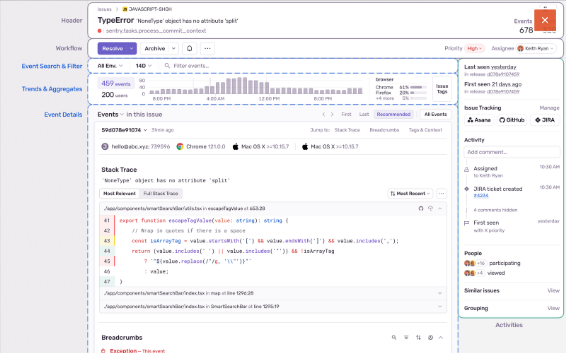
Sentry groups every error into an issue with its stack trace and its users
Developers add Sentry (sentry.io) to their code with an SDK, and from then on Sentry records the errors the app throws, groups each event under an issue, and keeps the stack trace, the release it happened in and, where the app sends one, the ID or email of each user it hit.
It reaches well past errors now. Tracing follows a slow request across services, Session Replay shows what the user did before, during and after an error, Uptime and Cron Monitoring watch endpoints and scheduled jobs, and Seer, Sentry's AI debugger, explains why the code failed and proposes a fix, on a separate subscription.
Developers triage the issue stream every morning, and the engineering lead watches what escalates after each release. The Team plan starts at $26 a month, billed annually, with unlimited users, so support and product can have logins too, though support spends its day in the help desk.
Customers tell support about the error Sentry already recorded
Take a checkout error that starts at 10:40. By eleven it has hit sixty users, engineering is in the incident channel, and three of those users have written to support.
The rep answering them cannot see that engineering already knows. An engineer pastes a link into the support channel eventually, and until then the rep asks customers for screenshots of a failure Sentry has already recorded, replay included.
The fix ships the next afternoon and an engineer marks the issue resolved in that release. The three tickets stay open until a rep happens to check, and the fifty-seven customers who hit the error and never wrote in hear nothing.
Planning has a gap of its own. If the team schedules work in a tracker Sentry does not connect to, an engineer retypes every issue worth fixing into it and updates it again by hand when the release goes out.
Sentry alerts reach engineers' tools and stop short of the help desk
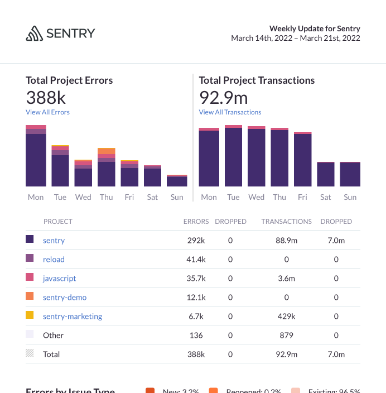
An issue alert fires when a new issue appears, when one escalates, or when a resolved issue regresses, and it can filter on how many users an issue has hit. It can notify Slack, Microsoft Teams, Discord, PagerDuty or Opsgenie, call a webhook, or open a ticket in Jira, GitHub or Azure DevOps. Resolving an issue in the next release lets Sentry flag it as regressed if it returns, and a weekly report email sums up the organization's activity every Saturday.
Sentry's integrations page covers notification tools, source control and a long list of issue trackers, Jira, Linear, ClickUp and Teamwork among them, and names no help desk and no CRM. A webhook can go anywhere something is built to receive it, which means a developer writing and hosting the code in between. Third-party integrations also start on the Team plan; the free Developer plan is one user with email alerts. So the users an issue hit stay listed on its page in Sentry, with nothing to carry their IDs and emails to the tickets and accounts they belong to.
Open tickets get a note while the issue is still escalating
Before the next customer writes in, the support rep could already be answering from a private note on each open ticket from an affected user: what broke, when it started, the Sentry link and whether a fix is under way. The account manager for your top pricing tier could have a message drafted for each affected account, to send or discard.
Once engineering resolves the issue in a release that is live, the rep could close the same tickets from a second note saying so, and a person could approve a drafted all-clear for the customers who never wrote in.
An engineering manager who plans outside Sentry's list of trackers could schedule from a task that already holds the top of the stack trace, the release and the user count, closed with the release number when Sentry resolves the issue. On Mondays, product and support could read the week's error counts in plain English, set against the week before.
The lookup needs two logins, one for Sentry and one for the help desk
For each escalating issue, the lookup starts from the affected users in Sentry and ends at the tickets and accounts those IDs and emails belong to. WebRun is an AI agent that works a real Chrome browser, signed in as you. With a login for each side, it reads the issue and its affected users, searches the help desk for each one and writes the notes where support already works.
Its workflows only read in Sentry: resolving, archiving and assigning issues stay with engineers. The notes are internal, visible to reps and not to customers, and a message a customer would see stays in the account manager's drafts. Each workflow below starts from a Sentry issue or the weekly numbers.
Questions people ask
How much customer data leaves Sentry?
Very little. Customers are matched on the ID or email your app already sends to Sentry, and the ticket note carries the error, the times and a link, not the event data. A project set to prevent storing IP addresses has none to copy.
What if our app sends no user IDs to Sentry?
Then there is nothing to match on. Sentry's SDKs accept an id, username, email or IP address for the user on each event, and once one of those is set, issues can be tied to tickets from then on.
Can it run on Sentry's free Developer plan?
Yes. Reading pages in a browser needs no third-party integration, and those start on the Team plan. The Developer plan allows one user, so the agent works as that user.
Which help desks can it write to?
Any help desk your team signs in to in a browser, whether or not Sentry integrates with it, because the agent adds each note from the ticket's own page.
Sources
- Integrations Groups Sentry's integrations into categories such as notification and incidents, source code management and issue tracking (Jira, Linear, ClickUp, Teamwork and others); no help desk or CRM appears on the page.
- Issue alert configuration Issue alerts trigger on new, escalating, regressed and resolved issues, can filter on users affected, and act through Slack, Discord, Microsoft Teams, PagerDuty, Opsgenie, webhooks, and Jira, GitHub or Azure DevOps tickets.
- Identify users Events can carry a user id, username, email and IP address, and a project can be set to prevent storing IP addresses.
- Sentry pricing The Developer plan is one user with email alerts; Team ($26 a month billed annually) and Business include unlimited users and third-party integrations; Seer is a separate subscription.
- Sentry notifications Sentry sends weekly reports every Saturday by email, summarising the organization's activity over the last week.
- Sentry product documentation Lists Sentry's product areas, including Session Replay, Uptime Monitoring, Crons and the Seer AI debugger.
2 ready-made Sentry workflows
Each one names the apps it touches and the exact steps it takes. Open one to read what it will do, then turn it on.
Want one of these running on your own Sentry?
Show WebRun the process once and it will run it on schedule, in your own private browser environment.