How to Automate Datadog
Monitors, Workflow Automation with its scheduled trigger, Synthetic browser tests and scheduled PDF reports cover most of what Datadog does unattended, and Bits Investigation can chase an alert's root cause. The overnight handover, the noisy-monitor review, a plain-English weekly note and consoles that send Datadog nothing are jobs for WebRun, an AI agent.
 Written by
Devon Ruiz
Workflow engineer
Written by
Devon Ruiz
Workflow engineer
 Reviewed by
Sofia Marchetti
Marketing operations
Reviewed by
Sofia Marchetti
Marketing operations
Datadog is the screen the on-call engineer opens first
Every server, container, database and cloud account a software team runs can report to Datadog. Its agent and integrations send metrics, logs and traces into one place, with dashboards and monitors on top.
Each monitor watches a metric, a log query, a trace or a synthetic test and, when it crosses a threshold, notifies Slack, PagerDuty, Microsoft Teams, Jira, ServiceNow, email or a webhook. Datadog On-Call adds schedules and escalation policies, and Incident Management gives each incident its own page and timeline. Watchdog, built in with no setup, computes a baseline of expected behaviour and flags anomalies without anyone setting a threshold.
Site reliability engineers and platform teams live in it. Product managers and support leads mostly meet it as a link someone pasted into a channel.
The day shift rebuilds last night from a channel full of alerts
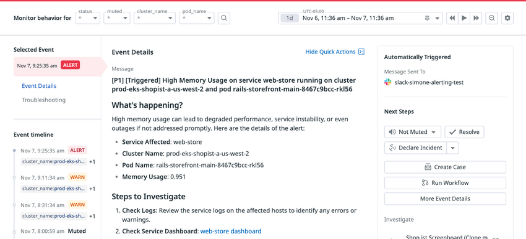
The engineer coming on at eight opens the monitor list to see what happened overnight: which monitors triggered, which recovered on their own, which are still red. The engineer going off shift slept through half of it, so the day engineer pieces the handover together from a Slack channel full of alert messages. Anything that fired and recovered between two and four in the morning is easy to miss entirely.
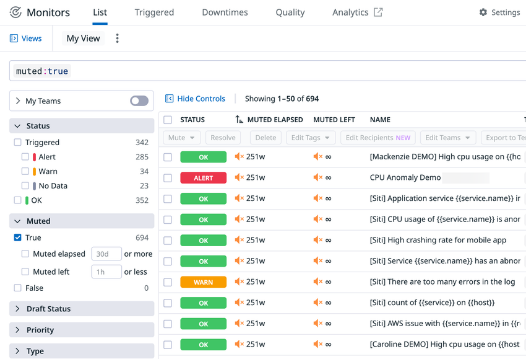
Some monitors fire every night and resolve within minutes. Everyone learns to ignore them, and a real problem on one of those monitors looks like the usual noise. Reviewing them means pulling a month of alert history and arguing about thresholds, and it slips every sprint.
Questions arrive from outside engineering too. The product lead wants to know whether errors rose after Tuesday's release; the head of support wants to know whether the slowdown customers mentioned was real. Each answer is a screenshot of a graph and a paragraph written from memory, usually by the engineer who was meant to be fixing the problem.
Datadog workflows reach only systems with an integration or an HTTP API
Monitor Quality flags monitors with a high volume of alerts, monitors muted for more than 60 days, monitors with no recipients and alerts stuck in one state. Workflow Automation chains actions across tools and can start on a schedule, from a monitor, from Slack or GitHub, or by hand. Synthetic browser tests walk through sign-up or checkout as often as every minute, from Datadog's managed locations or a private one, and scheduled reports send a dashboard as a PDF to email, Slack or Teams.
Bits Investigation, Datadog's own AI agent for production issues, gathers telemetry and tests hypotheses to help the on-call engineer find a root cause, and is billed in Datadog's AI credits.
A scheduled workflow can post last night's monitor list to Slack once an engineer builds it action by action and keeps it working, and every workflow and test reaches only what Datadog collects or a system it can call through an integration or an HTTP request. A backup console or a vendor's status page that sends Datadog nothing stays outside. Monitor Quality flags the noisy monitors and the team decides each new threshold, and a PDF of graphs gives a support lead no sentence about what changed this week.
The day engineer reads a written handover before stand-up
The engineer coming on reads the handover in the team's Telegram group: the monitors that triggered overnight, grouped by service and split into fired, recovered on their own and still alerting. If anything is still red, a text message reaches the engineer on call instead of the news waiting for stand-up.
The team's Monday review works from a Notion page that ranks a month of monitors by how often each fired and how many alerts resolved without anyone touching them, with each monitor's query and threshold beside it. The weekly note for product and support sets this week's error counts and rates from Datadog and Sentry against last week's in plain English, worst-affected service first, and the morning deploy digest puts what shipped from GitHub overnight beside what Datadog showed afterwards.
The checks Datadog never hears about can join the same round: last night's backup jobs in the cloud console, and the day-over-day line in the cost explorer for any service whose spend jumped, so one morning note covers the parts of the estate Datadog does not watch.
Datadog's Read Only Role is the access these jobs use
A handover written from a night of alerts, or a review page ranked from a month of alert history, means reading one screen and writing on another. WebRun is an AI agent that works a real Chrome browser, signed in as you. Its Datadog user sits on the Read Only Role, which by Datadog's definition cannot edit anything, and it uses the team's own logins for Sentry, GitHub and the cloud console.
Muting a monitor and changing a threshold are the on-call engineer's calls, and the Read Only Role allows neither. The jobs here are built around Datadog's own screens: the monitor list for the overnight digest, the alert history for the noisy-monitor review and the error graphs for the weekly report.
Questions people ask
Could a scheduled Datadog workflow write the handover instead?
It can gather the monitors that triggered and post them to Slack on a timer, once an engineer builds the workflow and keeps it working. It reaches only what Datadog collects or a system with an integration or HTTP API, so a backup console with nothing but a login page stays out of the note.
Does it work alongside Datadog On-Call or PagerDuty?
Yes. Paging stays with Datadog On-Call or PagerDuty. The agent writes the handover and, if you choose, texts the engineer on call about monitors that are still alerting in the morning.
Can it watch our cloud costs as well?
Yes: the morning round can include the cost explorer, and the note names the service whose spend jumped since the day before. With Datadog Cloud Cost Management set up, cost monitors also alert inside Datadog on changes, thresholds, anomalies, forecasts and budgets.
Sources
- Monitor Quality Monitor Quality lists monitors with a high volume of alerts, muted for more than 60 days, missing recipients or stuck in an alert state, among other checks.
- Workflow Automation Workflows chain actions across tools, including an HTTP action.
- Trigger a workflow Workflows can be triggered manually, from dashboards, monitors, security signals, incidents, the software catalog, GitHub, Slack, an API call, or on a schedule.
- Bits Investigation Bits Investigation is an autonomous AI agent that investigates production issues end to end to help on-call engineers pinpoint root causes; Bits AI is billed through AI credits.
- Browser Testing Browser tests run at intervals from every minute to once a week, from managed or private locations.
- Scheduled Reports Dashboards can be sent as PDFs on a schedule to email addresses, Slack channels or Microsoft Teams channels.
- Role Based Access Control Datadog's managed roles include a Read Only Role whose users cannot edit anything in Datadog.
- Watchdog Watchdog computes a baseline of expected behaviour to detect anomalies, with no setup required.
- Cloud Cost Monitors Cost monitors alert on changes, thresholds, anomalies, forecasts and budgets, and need Cloud Cost Management set up.
7 ready-made Datadog workflows
Each one names the apps it touches and the exact steps it takes. Open one to read what it will do, then turn it on.

 AWS›AWS›
Want one of these running on your own Datadog?
Show WebRun the process once and it will run it on schedule, in your own private browser environment.