How to Automate Houzz Pro
For a design studio on Houzz Pro, the Clipper, one-click purchase orders, payment reminders and the QuickBooks Online sync take care of the studio's own paperwork. Vendor ship dates, freight tracking and warehouse reports arrive outside it, so the Selections Tracker is only as current as its last update; an AI agent like WebRun can check those every morning.
 Written by
Hannah Vogel
Finance operations
Written by
Hannah Vogel
Finance operations
 Reviewed by
Owen Hartley
Workflow engineer
Reviewed by
Owen Hartley
Workflow engineer
A Houzz Pro project hangs off the products a designer clips
Houzz is best known as the site homeowners browse for ideas. Houzz Pro is the business software the company sells to the people they hire: interior designers, builders, remodelers and architects. For a design studio it holds the whole project, and most of it hangs off products the designer has clipped.
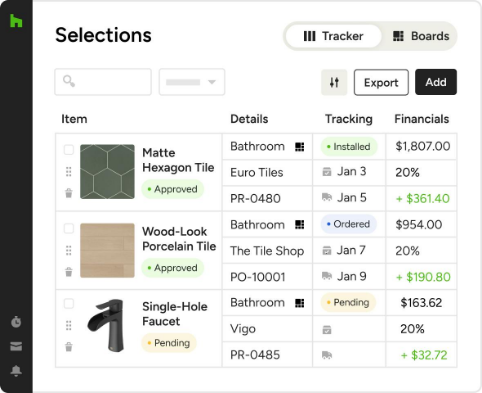
Every product on a project starts as a clip. The designer saves it from a vendor's site into the studio's Product Library, puts it on a mood board, then on a Selection Board where the client comments and approves it with a click. The Selections Tracker follows every approved item after that, with its specs, vendor, costs and order status, and the client follows the project in the Client Dashboard, a branded page for its updates and invoices.
Every order on a design project lives on a different vendor's portal
A living room with forty line items from a dozen vendors is an ordinary project. One showroom confirms an order with a PDF; another only updates its trade portal. The sofa's lead time slips from ten weeks to fourteen, and only the vendor's portal says so. The lamp reaches the receiving warehouse with a cracked base, and the warehouse's report sits unread in a shared inbox.
The design assistant gives Mondays to the portal round, logging in vendor by vendor and updating the Selections Tracker by hand. Freight tracking numbers arrive in shipping emails and get pasted into a carrier's site one at a time. Before each order goes out, the designer rechecks the vendor's trade price, because the price the Clipper captured in March may not be the price in June. A week before install, the backorder comes to light when the client asks where the sofa is.
The Selections Tracker only knows what someone typed into it
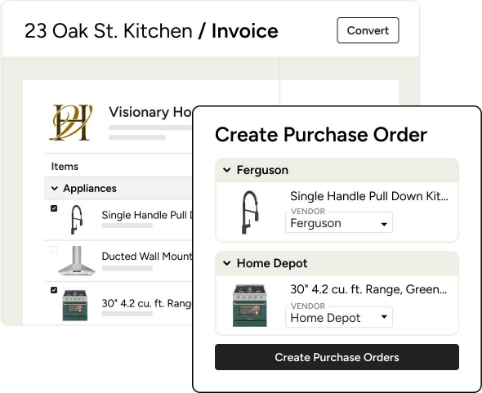
The AI Clipper pulls a product's pricing, specs and images from the vendor's site, and a product clipped once carries them into proposals and invoices without retyping. Invoice line items convert into purchase orders in one click, and the POs sync with the Selections Tracker and the Budget tool.
Invoices carry payment schedules, clients pay them online, and Houzz Pro sends reminders for upcoming or overdue payments. Financial documents sync one way to QuickBooks Online every five minutes.
Houzz Pro exports a purchase order as a PDF with every detail the vendor needs, and the studio emails it. From then on the Selections Tracker shows whatever status the team last clicked: updating an item takes a couple of clicks, once somebody has learned the new status somewhere else. Order confirmations, freight tracking and the receiving warehouse's reports arrive by email and on vendors' portals, and the design assistant carries each one into the tracker by hand. A vendor's price rise after the clip stays on the vendor's site until a person goes and looks.
Vendors' ship dates and warehouse reports reach the Selections Tracker daily
A designer can tell the client about the sofa's new fourteen-week lead time the day the vendor's portal shows it, and click the new date into its Selections Tracker line. The design assistant can query a vendor the day its confirmation arrives if it shows a different finish or quantity from the one on the PO.
The procurement coordinator gets each shipment's carrier status from the tracking numbers in vendors' emails, and can reorder the cracked lamp the day the receiving warehouse writes it up, with the report already matched to its project and its line on the tracker.
A week before install, the designer can confirm the install date or move it, with every item for the room marked in hand or missing and the vendor's latest date against each missing one. Before a purchase order goes out, the principal can put a vendor's price rise since the proposal onto a change order instead of absorbing it in the studio's margin.
Every order change goes through a designer's click
Each vendor's trade portal shows ship dates and backorders only to a signed-in trade account, and a studio holds one account per vendor.
WebRun is an AI agent that works a real Chrome browser, signed in as you. The open purchase orders in Houzz Pro are its list: the agent logs in to each trade account, reads the inbox for confirmations, shipping emails and warehouse reports, and reports what has moved.
It never places or changes an order. A new date goes onto the Selections Tracker only when a designer clicks it in, and a delay note for a client waits in the designer's email drafts, in the designer's own words to edit. Every job here begins with an open purchase order in Houzz Pro.
Questions people ask
Will it update the Selections Tracker for us?
A designer makes each update. Houzz Pro lets anyone on the team change an item's order status in a couple of clicks, so the agent sends the new date with the page it came from, and the designer clicks it in. Prices, purchase orders and proposals stay as they are.
Can it place orders with vendors?
No. Your team creates purchase orders in Houzz Pro and sends them.
Our vendors each have a trade portal login. Is that a problem?
No. The agent uses the trade account you connect for each vendor and reads the order status there; vendors that confirm only by email are read from the inbox.
Does this suit builders and remodelers on Houzz Pro too?
Yes, with different paperwork. Houzz Pro runs estimates, takeoffs, schedules, daily logs and change orders for builders, and supplier portals and subcontractor documents sit outside it just as a design vendor's portal does.
Sources
- Procurement Software for Construction and Design | Houzz Pro Houzz Pro's description of the Clipper, Selection Boards, purchase orders converted from invoice line items, and the Selections Tracker in which the team updates each product's status.
- Invoicing Software for Contractors | Houzz Pro Lists payment schedules on invoices, invoice status tracking from sent to fully paid, and Automatic Payment Reminders for upcoming or overdue payments.
- QuickBooks Integration Software for Construction & Design | Houzz Pro States that the QuickBooks Online sync is one-way and runs every five minutes once the accounts are linked.
- Interior Designer Software | Houzz Pro Houzz Pro's page for designers, covering the AI-powered Clipper, Selection Boards with client approvals, purchase orders and the Client Dashboard.
- Construction Management Software for Builders, Contractors & More Houzz Pro's page for builders and remodelers: AI-powered estimates, takeoffs, schedules in Gantt, calendar and list views, daily logs, one-step change orders, a Subcontractor Dashboard and the Client Dashboard.
6 ready-made Houzz Pro workflows
Each one names the apps it touches and the exact steps it takes. Open one to read what it will do, then turn it on.



Want one of these running on your own Houzz Pro?
Show WebRun the process once and it will run it on schedule, in your own private browser environment.