How to Automate DJ Event Planner
DJ Event Planner auto-replies to website inquiries and sends scheduled emails for balances, planning meetings and evaluations, filtered by date, status and payment. What a couple wrote in their planner, other calendars and what a lead cost sit outside those rules. An AI agent like WebRun can read them on a schedule and draft the follow-up.
 Written by
Sofia Marchetti
Marketing operations
Written by
Sofia Marchetti
Marketing operations
 Reviewed by
Marcus Deleon
Support operations
Reviewed by
Marcus Deleon
Support operations
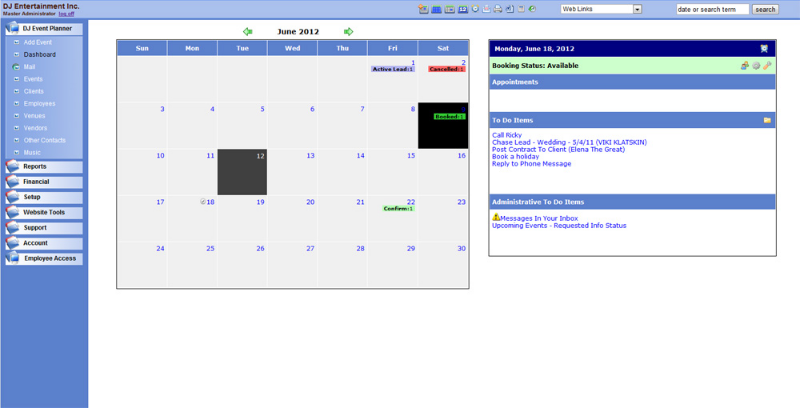
The couple's planner lives in DJEP beside their contract
For a mobile DJ company, each booking runs for months before the event itself. DJ Event Planner, which its own site shortens to DJEP, is web-based software built for that stretch: the inquiry, the quote, the signed contract, the deposit, and the planning with the couple that fills the weeks before a wedding.
It runs in any modern browser. Inquiries arrive through the availability checker and the request form on the DJ's own website. Contracts are signed online, payments come in through PayPal, Square, Stripe or Authorize.Net, and each couple gets a client portal with planning forms, a timeline and song lists, including the ones they never want to hear. Guests can add requests of their own before the night.
A single-op DJ uses it alone. A multi-op company adds employee logins, so each DJ sees their assigned events and what they expect to earn from each, submits timesheets and requests time off there. Plans run from StandAlone at $20 a month for 10 employees to Premium Plus at $50 for 500.
Between the booking and the first dance sit months of follow-ups
The DJ work happens on Friday and Saturday nights; the office work happens on a Tuesday afternoon, usually by the owner. Quotes sent in the spring need a follow-up before the couple books someone else. A planner that should be finished a month out still has the grand entrance names blank. A client changes the first dance song at eleven at night, and DJEP emails to say something changed without saying what.
With five DJs and a dozen weddings a month, the owner is checking who is assigned where, whose balance is unpaid three weeks out, and whether the inquiries came from the website or from a wedding marketplace listing that costs money every month.
DJEP's scheduled emails go out by event date, status and payment
The request form sends an auto-reply the moment an inquiry arrives. Event-based email templates fire on a day the owner picks, before or after the event date, filtered by event type, status, package and whether the event is paid in full, which covers planning meeting nudges, balance reminders and the evaluation request ten days afterwards. Scheduled Actions change an event's status once its date passes, and Client Lockout stops couples editing their forms from a cutoff the owner sets, counted in days or fixed to a weekday before the event.
In DJEP's own wedding setup guide, the planning reminders go to every booked wedding at 60 and 45 days out; skipping a couple who has finished means changing their event status by hand. The change alert tells the owner that a couple changed their planner, and DJEP's help says the email will not list the changes; the owner opens the planner to see them. Check Availability counts booked events on a date against a daily maximum, not the hours, and the hourly iCalendar feed, on StandAlone and above, puts DJEP's events on Google, Apple or Outlook calendars.
The Inquiry Source report counts where leads came from, while what each paid listing cost sits in the owner's statements. A lead from a wedding marketplace lands in the owner's email, to be entered in DJEP.

Each planner change reaches the assigned DJ as a list of what changed
When DJEP's change alert arrives, the assigned DJ gets one message with the difference against the last copy of the planner: first dance changed, two songs added to Do Not Play, grand entrance still missing the bridal party names.
Thirty days out, the DJ sends each couple whose timeline is still empty a note that names the sections left, instead of the same template everyone received at 45 days. Quotes still open after a week get a follow-up from the owner that mentions the date, the package and whether the date is still free.
Each month the Inquiry Source report sits beside what each paid listing cost, so the owner sees which listings turn into booked weddings. Every Monday the owner sees the weekend's bookings set against each DJ's own Google Calendar, so a family party a DJ forgot to block off shows up before Saturday.
Every WebRun visit to DJEP shows in the employee activity log
Comparing a planner with its last copy, or reading thirty days of planning forms, is page-by-page work in DJEP's client records. WebRun is an AI agent that works a real Chrome browser, signed in as you. DJEP treats it as an employee, so each visit lands in the record DJEP keeps of employee logins and edits, and it runs each evening or each Monday as the owner sets.
It sends nothing to a couple or a venue, marks no payment and changes no event status; each DJ reads the draft for their couple and sends it.
The questionnaire chaser is the DJEP workflow closest to the planner check described here, drafting a reminder to each couple who has not returned their music or timeline questionnaire.
Questions people ask
Do we keep the scheduled emails we already set up in DJEP?
Yes. The balance reminders filtered to events not paid in full, the planning-meeting nudges and the evaluation request do their job. WebRun adds the notes those templates cannot write, such as one naming the exact planner sections a couple has left.
Does WebRun read the planner after Client Lockout?
It reads it before the lockout date you set, so a couple still has time to fill the gaps it flags. After the lockout the forms are fixed, and they match what you print for the night.
What happened to Spotify playlists in the client portal?
DJEP removed its Spotify integration after Spotify stopped third-party companies from connecting, so couples can no longer import playlists that way. They can still add songs to the standard lists, such as Must Play and Do Not Play, from the client portal.
Does WebRun send contracts when an inquiry arrives?
No. A contract is a document your client signs and a deposit is money, so you send the contract from DJEP when you are ready. WebRun checks whether the date is free, reads the inquiry and drafts your reply.
Sources
- Simple Workflow Automation - Weddings | DJ Event Planner FAQ DJEP's own setup guide: the request form auto-responder, Scheduled Actions that change status after the event date, and event-based scheduled emails filtered by event type, status, package and payment.
- Client update alerts | DJ Event Planner FAQ DJEP emails the business when a client first changes their planner, but not what the change was; you log on to their planner account to see it.
- How is the availability determined based on the number of events per day? | DJ Event Planner FAQ Check Availability compares the number of booked events on a date with a daily maximum, and is not time specific.
- How does Spotify work within my account? | DJ Event Planner FAQ DJEP has removed its Spotify integration because Spotify stopped third-party companies from connecting; standard lists such as Must Play and Do Not Play remain.
- Client Portal - Setup & View | DJ Event Planner FAQ The Client Lockout setting decides when clients can no longer edit their forms in the portal: a number of days before the event, or a chosen day of the week of the event.
- Full Features List | DJ Event Planner Lists the PayPal, Square, Stripe and Authorize.Net gateways, hourly iCalendar updates for Google, Apple and Outlook calendars, the Inquiry Source report, individual employee logins and employee activity monitoring.
- Employee Tools | DJ Event Planner Employees see their assigned events and what they expect to earn from each, submit timesheets and request time off; every employee login and edit is recorded for the owner.
- Price Plans | DJ Event Planner StandAlone at $20 a month for 10 employees, Premium at $35 for 20 and Premium Plus at $50 for 500; hourly iCalendar updates come with StandAlone and above.
7 ready-made DJ Event Planner workflows
Each one names the apps it touches and the exact steps it takes. Open one to read what it will do, then turn it on.




Want one of these running on your own DJ Event Planner?
Show WebRun the process once and it will run it on schedule, in your own private browser environment.