How to Automate ChiroTouch
Let CT Engage, CT InForms and CT Verify handle reminders, recall campaigns, intake forms and eligibility first. What remains is work with outside parties: personal injury attorneys, workers' comp adjusters and benefits managers' portals, plus personal notes to patients falling behind a care plan. An AI agent like WebRun can draft that work on ChiroTouch Cloud.
 Written by
Nikhil Bhatt
Automation strategist
Written by
Nikhil Bhatt
Automation strategist
 Reviewed by
Sofia Marchetti
Marketing operations
Reviewed by
Sofia Marchetti
Marketing operations
ChiroTouch runs the adjusting schedule, the SOAP note and the ledger
Chiropractic care usually comes as a plan of visits rather than a single appointment: several a week at first, fewer as the patient improves, then maintenance. ChiroTouch is practice management and EHR software designed for that rhythm, and it holds the schedule, the SOAP notes, the patient ledger and the claims for each of those visits.
It comes in two forms: ChiroTouch Cloud, which staff use from a browser, and the older server-based version that runs on the practice's own server. Front desk staff book and check patients in. The doctor charts each visit, with CT Rheo turning intake answers into SOAP-ready drafts and transcribing what is said in the room, and the biller sends claims through CT ProClear, the clearinghouse built into ChiroTouch and powered by TriZetto.
The front desk chases PI cases and plan authorizations by phone and portal
A patient hurt in a car accident is treated on a personal injury case, and the attorney's office wants records and a bill, then goes quiet for months; a workers' comp patient waits on an adjuster to approve visits. A health plan routes chiropractic through a benefits manager that authorizes visits on its own website, and the authorization runs out before the care plan does.
Inside the practice, the front desk keeps care plans on track. A patient three weeks into a twelve-visit plan has missed two visits, and a maintenance patient has not been in since spring. The balance a patient owes after the plan paid needs a reminder, and at the end of the day the owner wants production and collections without logging in to find them.
CT Engage and CT Verify cover the patients already on the schedule
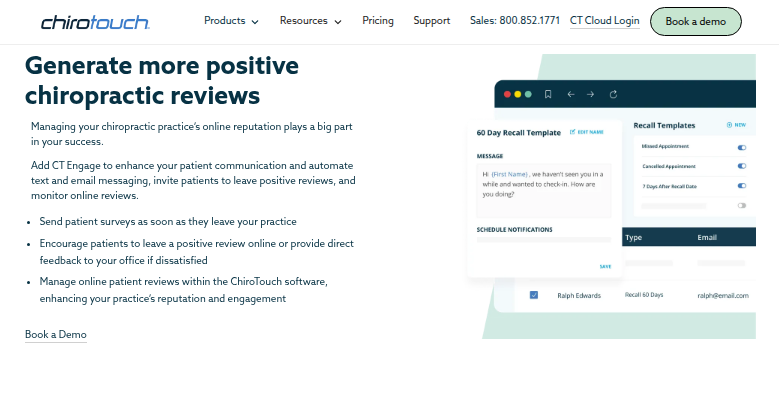
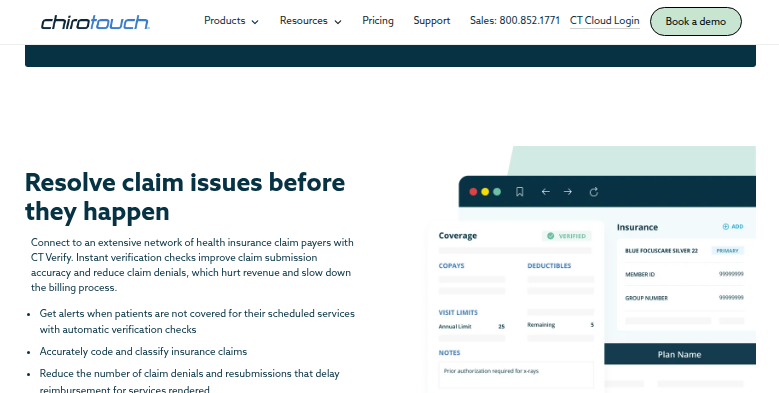
CT Engage sends automatic appointment reminders and runs recall campaigns for patients who have been away for a while, from templates the practice customizes. It also handles two-way texting and email, and follows a visit with a survey and a review invitation. CT InForms lets patients complete intake forms on any device before the visit and syncs the answers into ChiroTouch. CT Verify checks coverage against a large network of payers, alerts the office when a patient is not covered for a scheduled service, and shows the plan's visit limit with the visits remaining. Before a note is submitted, CT Rheo scans it against regulatory and payer standards. The end-of-day report shows the day's revenue, expenses and patient visits, and a collections report picks out patients who are overdue for payment.
Each of those faces the patient or a payer ChiroTouch already connects to. No part of ChiroTouch chases a personal injury attorney for a case update or reads a workers' comp adjuster's decision, and when a benefits manager authorizes the visits, its count of approved visits sits on that company's own website. CT Engage builds recall from templates, so the front desk writes any personal note about where one patient stopped in their care plan.
Stalled PI cases and low authorization counts reach the front desk each week
An attorney's office that has gone quiet on a personal injury case gets a status request the front desk can send after a quick look, with the visits and the balance from ChiroTouch in it. When an attorney asks for records, the front desk checks a visit list, the ledger and a cover letter that are already assembled, and nothing leaves until they have.
For patients whose plan routes chiropractic through a benefits manager, the doctor signs the re-authorization paperwork, already filled in, when two authorized visits remain.
A patient who has fallen behind their prescribed frequency hears from the practice in a short note about where they are in the plan, which the front desk approves first. The doctor opens the morning huddle with each patient's care plan stage and billing flags already listed, and the owner reads the day's production and collections on a phone after the last adjustment.
ChiroTouch Cloud runs in a browser, so an agent can work it
ChiroTouch Cloud's ledger and case screens open in a browser, and so do the benefits managers' provider websites. WebRun is an AI agent that works a real Chrome browser, signed in as you. Inside ChiroTouch Cloud it reads the ledger and the case details, then drafts what the front desk would write.
Records packets and attorney letters reach the front desk as files to check, and patient notes as drafts in the practice's email, so the front desk decides what leaves the office. The agent posts nothing to the ledger and submits no claims. Server-based ChiroTouch runs on the practice's own machines, not in a browser, so the agent cannot work it.
Pick up recall, care plan dropouts, patient balances or the morning huddle from the cards below.
Questions people ask
How do we know whether we are on ChiroTouch Cloud?
Check your account number. ChiroTouch's own FAQ says a Cloud account number starts with CTC, and any other number means the server-based version, which the agent cannot work because it does not run in a browser.
CT Engage already runs our recalls. What would this add?
Keep CT Engage for reminders and recall campaigns. The agent takes the work a template cannot do: a note about where one patient stopped in their plan, and the follow-up with attorneys, adjusters and benefits managers.
Will it touch SOAP notes or anything CT Rheo drafts?
No. The ChiroTouch workflows read the schedule, the ledger and case details, and put what they produce into drafts or a team message. Clinical documentation stays exactly as the doctor signed it.
Sources
- Chiropractic Patient Communication Software | CT Engage Vendor page for CT Engage: automatic reminders, recall campaigns built from templates, two-way texting and email, post-visit surveys and review requests.
- Insurance Verification | ChiroTouch States that CT Verify connects to a large network of payers and alerts the office when patients are not covered for their scheduled services.
- Chiropractic Intake Forms Software | CT InForms States that intake forms completed online sync automatically into the patient record in ChiroTouch.
- Chiropractic Software FAQs | ChiroTouch Distinguishes server-based ChiroTouch from ChiroTouch Cloud and says Cloud account numbers start with CTC; also names CT ProClear, the integrated clearinghouse powered by TriZetto.
- CT Rheo AI assistant | ChiroTouch CT Rheo turns intake responses into SOAP-ready note drafts, transcribes speech during visits and scans documentation against regulatory and payer standards before submission.
- All-in-One Cloud Chiropractic Practice Management Software | ChiroTouch Documentation, patient messages and treatment plans are created from the browser in ChiroTouch Cloud.
- Cloud-Based Chiropractic Software | ChiroTouch Cloud EHR The end-of-day report tracks the day's revenue, expenses and patient visits, and collections reports identify patients who are overdue for payment.
6 ready-made ChiroTouch workflows
Each one names the apps it touches and the exact steps it takes. Open one to read what it will do, then turn it on.


Want one of these running on your own ChiroTouch?
Show WebRun the process once and it will run it on schedule, in your own private browser environment.