How to Automate Canvas LMS
Canvas automates messaging inside the course: Message Students Who in the Gradebook, Parent app alerts for missing work and low scores, analytics on higher tiers and the IgniteAI Agent on Canvas Next. Chasing families without the app, unposted final grades and evaluation response rates in other systems stays manual, which an agent like WebRun can take on.
 Written by
Grace Okafor
Healthcare operations
Written by
Grace Okafor
Healthcare operations
 Reviewed by
Sofia Marchetti
Marketing operations
Reviewed by
Sofia Marchetti
Marketing operations
In Canvas LMS, the Gradebook is the record of every student's term
Open a course in Canvas and the Gradebook shows the term so far: which assignments went out, who submitted, who was late and what everyone scored.
Canvas LMS is the learning management system from Instructure, not to be confused with the design tool Canva, and it runs courses in K-12 schools, universities, businesses and government. Teachers build modules and assignments, students submit through the course or the Canvas Student app, and teachers mark in SpeedGrader, where they can annotate a submission as they grade it. A parent with an observer account follows along in the Canvas Parent app.
Institutions buy it in tiers, Canvas Core, Canvas Plus and Canvas Next, so what a teacher can switch on depends on which one the school or college pays for.
Every term ends with three chases: missing work, final grades and evaluations
Every week there is missing work: the student with four assignments outstanding whose parents never installed the app, the one who stopped logging in after midterm, the group project waiting on one name. A teacher writes to the students first, and later to the families and the student's advisor, each in a different place.
At the end of term the registrar needs final grades in the student information system by Friday, and the registrar's office works out which instructors have not posted them. Course evaluation response rates sit in a separate survey tool, and the sections lagging behind need a nudge before the window closes. Department heads want a Monday picture of every course: who is behind, which sections have gone quiet, where marking has slipped.
Message Students Who and Parent alerts work inside the course
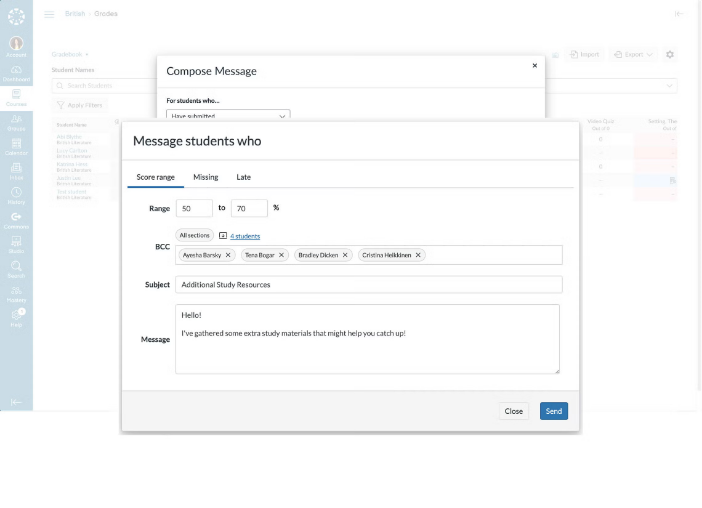
From the Gradebook, Message Students Who writes to the students who meet a condition the instructor picks, such as not having submitted. A parent with an observer account can set alerts in Canvas Parent for assignment and grade activity and message teachers from the app, which sends real-time notifications for missing work, low scores and new announcements.
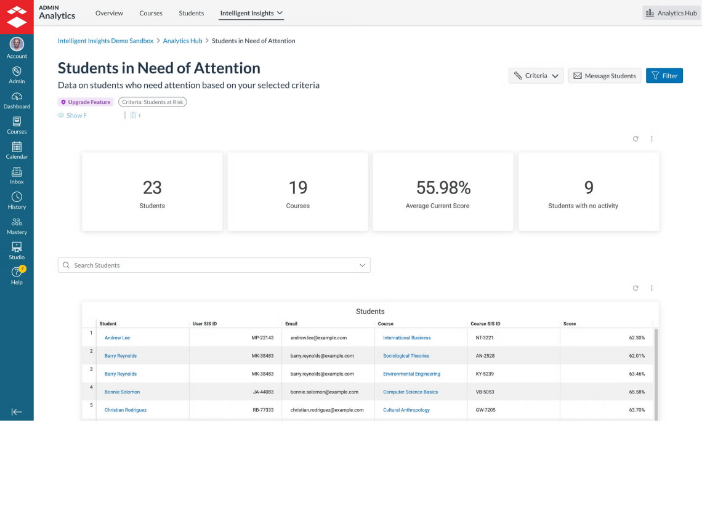
In-app reporting and Canvas Data cover the numbers. Canvas Plus adds advanced analytics meant to help educators intervene earlier, and in-app messaging through Impact. Canvas Next adds Ask Your Data, which answers questions about Canvas data in plain language with charts and dashboards, and the IgniteAI Agent, which completes tasks across Canvas from a single prompt, such as reorganising modules or adjusting every due date.
Those tools answer questions about Canvas for whoever asks them. A family without an observer account sees no alert, and an alert is not the teacher's own note. Final grades are due in the student information system, which is another login, and where course evaluations run in a separate survey tool, the response rates live there. On Core and Plus, a department's Monday picture still means opening every course.
Past-due work in the Canvas Gradebook reaches families as a teacher's note
Each family whose student has work past due has a note from the teacher that week, drafted from the Gradebook. Students with no parent observing them in Canvas come first, since no alert reaches their families.
An instructor's Monday email covers their own course only: missing work, students who have not opened the course in a week, and assignments still waiting in SpeedGrader.
At the end of term the registrar knows which instructors have not submitted final grades in the student information system, checked against what their Canvas gradebooks show, and sends each of them a reminder drafted in the registrar's name. During the evaluation window, instructors of lagging sections receive a draft announcement to share in class, based on that night's response rates in the survey tool.
Advisors hear about students who have both missed deadlines and gone quiet in a course, with a check-in drafted for each before the drop deadline.
Runs start from the Canvas login a teacher or registrar already has
A registrar checking four hundred sections for final grades opens each gradebook and then the student information system, section by section.
WebRun is an AI agent that works a real Chrome browser, signed in as you. It needs no LTI tool and no API token: with a teacher or admin login it reads the Gradebook, course activity and People pages in Canvas, checks the student information system or the evaluation tool when a job needs them, and returns the drafts to Gmail and the rest to a spreadsheet.
It sees student records only through the access that login already has. The teacher or registrar sends each note from Gmail, and the agent changes no grade and posts nothing in a course. The jobs below cover Canvas and the systems beside it.
Questions people ask
Is this about Canvas LMS or Canva?
Canvas LMS, the learning management system from Instructure. Canva is an unrelated design tool, and it has its own page.
Is the IgniteAI Agent in Canvas Next the same kind of tool?
Partly. The IgniteAI Agent carries out tasks across Canvas from a prompt someone types, on the Canvas Next tier, and Instructure describes it as working alongside partner tools. WebRun runs on a schedule on any tier and works in whatever its login reaches in a browser, such as the student information system or an evaluation survey site.
Is it allowed to read student records?
It uses your own login, so it sees only what you can already see, and your institution's rules on student data still apply. Check with your Canvas administrator and follow your institution's policy, including any privacy law that covers you, before connecting any tool; some institutions ask for approval first.
Can a business that runs staff training in Canvas use these jobs?
Yes. Instructure sells Canvas to businesses and government as well as schools, and the same checks work for overdue modules, course completions and learner follow-up in a training course.
Sources
- Canvas by Instructure: World Leading LMS for Teaching & Learning Lists SpeedGrader (grade, comment and annotate in one place), the Gradebook, in-app reporting, Canvas Data, Message Students Who and the Student, Teacher and Parent mobile apps, for K-12, higher education, business and government.
- Canvas LMS by Instructure: Core, Plus & Next with AI for Teaching & Learning | Instructure Sets out the Canvas Core, Plus and Next tiers: advanced analytics to help educators intervene earlier and in-app messaging with Impact on Plus, and on Next the IgniteAI Agent for admins and instructors and Ask Your Data for natural-language queries with charts and dashboards.
- Instructure Delivers on Its Agentic AI Promise with the Launch of IgniteAI Agent | Instructure Describes the IgniteAI Agent completing tasks such as organising course modules and adjusting all due dates from a single prompt, designed to work across Instructure products and alongside partner technologies, announced on 12 March 2026.
- What is the Canvas Parent app? | Instructure Community Instructure's guide: Canvas Parent can be used by any Canvas user with an observer account, and parents can set alerts for assignment and grade activity.
- Canvas Parent App - App Store Instructure's listing for Canvas Parent, which gives parents real-time notifications for missing work, low scores and new announcements and lets them message teachers.
5 ready-made Canvas LMS workflows
Each one names the apps it touches and the exact steps it takes. Open one to read what it will do, then turn it on.


Want one of these running on your own Canvas LMS?
Show WebRun the process once and it will run it on schedule, in your own private browser environment.