How to Automate Campminder
In Campminder, billing runs on its own, forms carry due dates and overdue flags in the parent app, report emails can be scheduled and drivers get a daily passenger list. Deciding which missing health forms to chase first, inviting returning families personally and checking counsellor certificates on other sites still takes a person, or an agent like WebRun.
 Written by
Owen Hartley
Workflow engineer
Written by
Owen Hartley
Workflow engineer
 Reviewed by
Rosa Lindqvist
Operations editor
Reviewed by
Rosa Lindqvist
Operations editor
Campminder runs a camp's whole year, most of it before the first bus arrives
A summer camp does most of its paperwork in the months when no campers are there. Enrolment opens in the autumn for the following summer, the director hires staff over the winter, and the spring goes on forms: health histories, travel plans, cabin requests.
Campminder, spelled CampMinder in its older materials, is camp management software for day and overnight camps of twenty to two thousand campers. Families fill in applications and forms, update medical information, set up travel plans and pay in CampInTouch, the parent portal. The Campanion app is where they re-enrol and, in summer, follow camp through microposts, letters and photos.
Behind both, each camper and staff member has one record, and what a family enters reaches bunking, the Health Center, activity scheduling and the bus routes.
Spring goes on forms, re-enrolment and staff paperwork
Say it is April. Two hundred families have unfinished forms, and the ones that matter most, the health history and the physician's form, are the ones still missing. The nurse wants them sorted by session, not by family, because the first session's campers arrive first.
Last summer's campers who have not re-enrolled need a note from the director before the early-bird price ends, and a note naming last year's cabin reads very differently from a mass email. When a family cancels session two in May, the office has that week to offer the place to the next family on the waitlist before they make other plans.
On the staff side, the director hired thirty-five counsellors, and each lifeguard or first aid certificate expires on its own date, sometimes in the middle of July.
Campanion flags overdue forms and the Communication Hub schedules the reminders
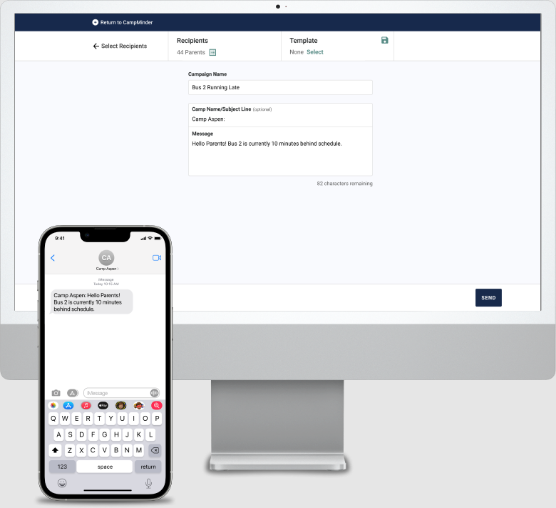
Forms in Campminder carry due dates, and the Campanion app shows parents which ones are overdue, updating as each is completed. The Communication Hub builds emails and texts, sends them to audiences drawn from pre-built reports, and can schedule messages or leave them running on their own, so a reminder to every family with a missing form is quick to set up.
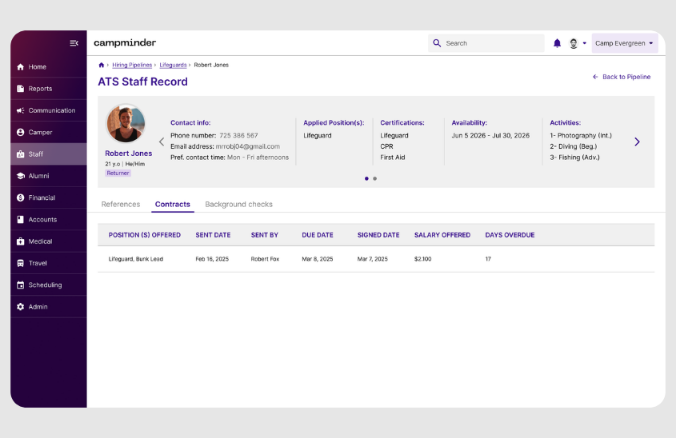
Campminder bills families automatically and reconciles card payments. Staff hiring runs through its own applicant tracking, with contracts, references and background checks beside each applicant, and the transportation tools hold the routes and stops and produce a Daily Passenger Update with each camper's details for the afternoon and the next day.
Those tools send to whichever group a report defines. Picking out the family that is missing only the physician's form, putting campers with allergies at the top of the nurse's sheet, or writing a returning family an invitation that mentions last year's cabin is a judgement the camp office makes record by record. Some of the evidence sits outside Campminder too: a doctor's form emailed to the office, a counsellor's certificate on the issuing organisation's site, the pickup change a parent sent at ten at night.
Missing forms and lapsing certificates show up months before opening day
The nurse works from a sheet of campers whose health history or physician's form is still missing, grouped by session start so the first session is cleared first, and each of those families has a reminder drafted that names the exact form.
The director sends every family from last summer that has not re-enrolled an invitation that mentions their session and cabin, drafted in Gmail before the early-bird date. A cancelled place in session two goes to the next family on the waitlist that week: the office sends the drafted offer and makes the enrolment in Campminder once they say yes. Counsellors whose lifeguard or first aid certificate lapses before the summer ends hear about it from the staffing director in April.
In summer, the evening before each travel day, the transportation director checks that the Daily Passenger Update carries every pickup change that came into the camp inbox. And on Friday the director edits a draft of the weekly letter to families, built from the week's microposts and camp news.
Night runs start from the reports the office already built in Campminder
For the nurse's sheet alone, the year-round office runs the forms report and opens every camper it names; the invitations and certificate checks take as long again.
WebRun is an AI agent that works a real Chrome browser, signed in as you. Overnight it opens Campminder with a staff login, runs those reports and reads the records behind them, checks the camp inbox or a certifying organisation's site when a job calls for it, and by morning has the drafts in Gmail and the nurse's sheet in Google Drive.
The director or office manager is the one who sends each draft to a family or counsellor, and enrolments, balances and Health Center records stay as the office left them. The health form and re-enrolment jobs below belong to the spring; the transport roster belongs to summer.
Questions people ask
Is it safe to let it near campers' medical information?
It reads only what its staff login can see in Campminder. The nurse's sheet names the missing form rather than any medical detail, the reminders to families do the same, and the results stay in your own email and sheets.
Where does it find a counsellor's certificate expiry date?
From the certificate the counsellor uploaded to Campminder, or from the issuing organisation's online lookup where one exists. It compares the expiry with the counsellor's contract dates and drafts a renewal reminder when the certificate lapses before the last week of camp.
Can it use the reports we have already built in Campminder?
Yes. It opens a saved report under its staff login and reads the records the report returns, so the forms report the office uses today can drive the nurse's sheet without being rebuilt.
Sources
- Campminder: Summer Camp, Streamlined Describes Campminder for day and overnight camps of 20 to 2,000 campers, with the Communication Hub, Health Center, activity scheduling, staff hiring with applicant tracking and integrated background checks, automated billing with credit card reconciliation, bunking and transportation.
- CampInTouch: Login and FAQ | Campminder Help Center Lists what parents do in CampInTouch: fill out forms and applications, update medical information, set up travel plans, check camp news, view photos and manage their account and payments.
- Campanion App: Parent Login and FAQ | Campminder Help Center Describes re-enrolment in the Campanion app, microposts, letters and photos, and required forms shown with clear due dates and automatic updates for overdue forms.
- Campminder Email & Text Messaging | Camp Communication Covers email and texting, automated set-and-forget and scheduled messaging, form reminders, and sending to specific audiences drawn from pre-built reports.
- Efficient Transportation Management with Campminder Establishes buses, routes, stops and schedules, the Daily Passenger Update report with each camper's details for the afternoon and following day, attendance check-ins and route changes delivered to staff in the Campanion app.
- Applicant Tracking System | Campminder States that the applicant tracking system reads live applicant data from Campminder and shows contracts, references, background checks and key Campminder fields beside each applicant.
7 ready-made Campminder workflows
Each one names the apps it touches and the exact steps it takes. Open one to read what it will do, then turn it on.




Want one of these running on your own Campminder?
Show WebRun the process once and it will run it on schedule, in your own private browser environment.