How to Automate ADD Systems
Fuel dealers on ADD Energy E3 can leave payments, dunning letters, dispatch texts and supplier price updates to E3 and ADD eServer, and forecasting keeps automatic-delivery customers on routes. Will-call customers who have gone quiet and safety checks coming due still need someone reading E360; WebRun, an AI agent, can do that and draft the messages for staff.
 Written by
Samuel Adeyemi
Integrations writer
Written by
Samuel Adeyemi
Integrations writer
 Reviewed by
Marta Ellison
Automation strategist
Reviewed by
Marta Ellison
Automation strategist
ADD Energy E3 holds every tank, route and budget plan
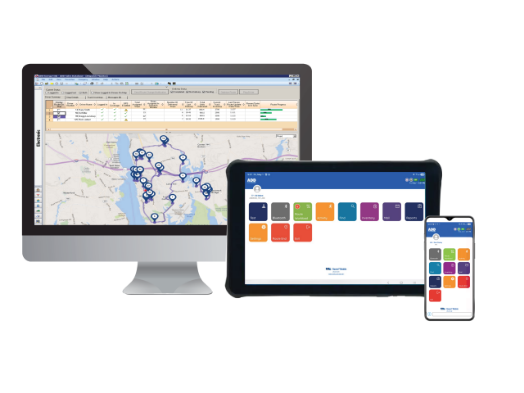
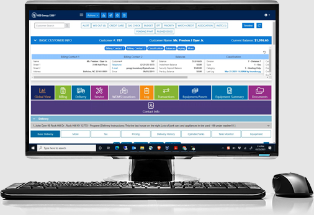
A propane or heating oil company runs on deliveries and the billing behind them, and ADD Systems writes back-office and mobile software for that trade and for neighbours such as commercial bulk fuel and convenience stores. ADD Energy E3 holds each customer's delivery locations and usage, and the payment plan: pre-buy, capped, budget or on installment. ADD Energy E360 is its browser-based screen, which staff can customize and open from any device.
Deliveries are forecast from usage and pushed to the Raven device in each truck, and service techs bill on site from Pegasus. The customer service rep, or CSR, answers the phones from the account screen, the dispatcher balances routes and watches the forecasts, the service manager keeps track of safety checks, and the owner follows the business through Atlas Reporting.
The first cold week fills the phones with will-call customers who waited
Automatic-delivery customers are on the forecast. Will-call customers order when they ring, and when the first real cold arrives, the ones who waited too long all ring at once, each call a check of the account, the balance and when a truck can get there. A customer who ran out may need a technician's visit before the gas goes back on.
The dispatcher checks the forecasts against tank monitor readings and adjusts by hand when a customer's usage changes, since ADD's own K-factor adjustment is capped by a setting. The service manager keeps a running eye on which customers' gas system checks are due, and asking satisfied customers to post a review on Google is left to the CSRs between calls.
ADD eServer runs the invoices, the price updates and the delivery notices
E3 processes card and EFT payments automatically, sends dunning letters when a customer exceeds or is about to exceed credit terms, and texts or emails customers when a truck or technician is dispatched and when the job is done. ADD eServer, part of ADD's Process Automation, sends billing documents, updates supplier costs and prices from sources such as DTN, and notifies a customer of an approaching or completed delivery or service call.
Forecasting adjusts each customer's K-factor after a delivery, up to the limit a setting allows. Tank monitors connected through ADD's SmartConnect feed readings into E3 and move the next forecast delivery date, and Raven puts tank-monitor orders on routes. Atlas Reporting runs reports on a schedule, puts delivery KPIs on a Delivery Analysis dashboard and emails Alert Subscriptions when something falls outside the normal range, and ADD's AI reporting can connect to Microsoft Power BI and Copilot for questions typed as prompts.
Will-call accounts sit outside the forecast until the customer calls, and E3 keeps the date of each one's last fill for someone to read. Gas Check records sit in the service history, where the service manager looks up who is due.
Will-call accounts gone 45 days without a fill come to the CSR first
The CSRs work a morning list in Slack of will-call accounts whose last fill was more than 45 days ago or whose usage history puts the tank under 20 percent, longest gap first, customers with a past run-out at the top, and a text drafted for each one. Anyone who has phoned in an order since is already off the list.
The dispatcher gets an alert within the hour when a monitored tank reaches its low-level threshold, with the level and the days of supply, and anything under three days marked urgent; a sheet keeps every event. The morning's confirmed stops arrive grouped by route as well, and on Mondays last week's stops, gallons and revenue by route go into a sheet beside the week before, incomplete stops counted.
The service manager's Monday list shows which customers have a leak check, regulator inspection or appliance check falling due within a month, with overdue ones flagged, and the manager sends the reminders drafted for each. Yesterday's residential deliveries become review requests in the CSRs' Gmail, leaving out accounts marked do-not-contact or with an open complaint.
The dispatcher still schedules every delivery in E3
Will-call delivery history and service records are both open in ADD Energy E360, the browser screen. WebRun is an AI agent that works a real Chrome browser, signed in as you, and reads them there account by account, with whatever its login can see. Its route digest and weekly delivery figures go to Slack and a Google Sheet, beside the reports Atlas already sends.
It creates no order and moves no K-factor. A CSR releases each will-call text from Twilio, the service manager sends the inspection reminders from Gmail, and every delivery, including one for a tank flagged urgent, is scheduled by the dispatcher in E3.
Questions people ask
Does the delivery-due email repeat ADD eServer's own notices?
It can. eServer already notifies customers of an approaching or completed delivery. The workflow drafts a notice for each automatic-delivery customer due within five days and gives the dispatcher the list in Slack, so a dealer already sending eServer's notices only needs the list.
Are tanks on SmartConnect already covered?
Mostly. With SmartConnect, E3 updates the next delivery date from each reading and Raven routes tank-monitor orders. The hourly Slack alert adds a running list of low tanks with days of supply for the dispatcher, with anything under three days marked urgent.
Can a will-call text go out before a CSR reads it?
No. Each text is drafted in Twilio and held for the team to review; a customer who called in an order that morning is dropped from the list before anything is drafted.
Does it work with ADD Energy E3 or only with E360?
It works in E360, ADD's browser-based screen for E3, so it reads the same accounts, deliveries and service records your login sees there, plus Atlas reports where that login has them.
Sources
- ADD Energy E3 and ADD Energy E360 | ADD Systems Describes automatic credit card and EFT processing, automatic dunning letters, payment plans, the browser-based E360 interface, tank monitor interfaces and automatic texts or emails when a truck or technician is dispatched and when a job is complete.
- Process Automation | ADD Systems Lists ADD eServer sending billing documents, importing and matching supplier invoices, updating costs and prices from supplier websites and DTN, scheduled quotes and reports, and automatic notices of an approaching or completed service call or delivery.
- Atlas Reporting | ADD Systems Describes reports that run automatically or on demand, the Delivery Analysis dashboard, Alert Subscriptions that email activity outside an acceptable range, and ADD AI reporting that integrates with Microsoft Power BI and Copilot.
- Raven Mobile Delivery | ADD Systems Shows forecasted, internet, tank-monitor and phone orders assigned to routes and pushed to each driver's device, with automatic texts and emails to customers.
- The Importance of K-Factors, Hot Water Gallons, and Dispatchers | ADD Systems August 2026: the system raises a customer's K-factor after deliveries only up to a set limit, and dispatchers adjust the rest by hand after talking to customers.
- Tank Monitoring: A Step Ahead with SmartConnect | ADD Systems SmartConnect pulls tank readings into ADD Energy E3 and adjusts the forecast of the next delivery date automatically.
- Propane | ADD Systems Propane features including forecasting, tank and cylinder tracking, Gas Check capability, tank monitoring and the SmartConnect Web Services Gateway for customer self-service.
7 ready-made ADD Systems workflows
Each one names the apps it touches and the exact steps it takes. Open one to read what it will do, then turn it on.




Want one of these running on your own ADD Systems?
Show WebRun the process once and it will run it on schedule, in your own private browser environment.