
A tool with "computer use for AI agents" written on the front of it sounds like the end of the Monday report. Vercel Labs released one on 31 October called agent-desktop, open source and free to install.
Whether it is any use to you turns on a line in its own documentation: "A tool that agents call. It is not an agent." That is worth reading before anybody installs anything. It is the difference between something that does the job and a part that something else has to be built around.
What Vercel Labs actually shipped
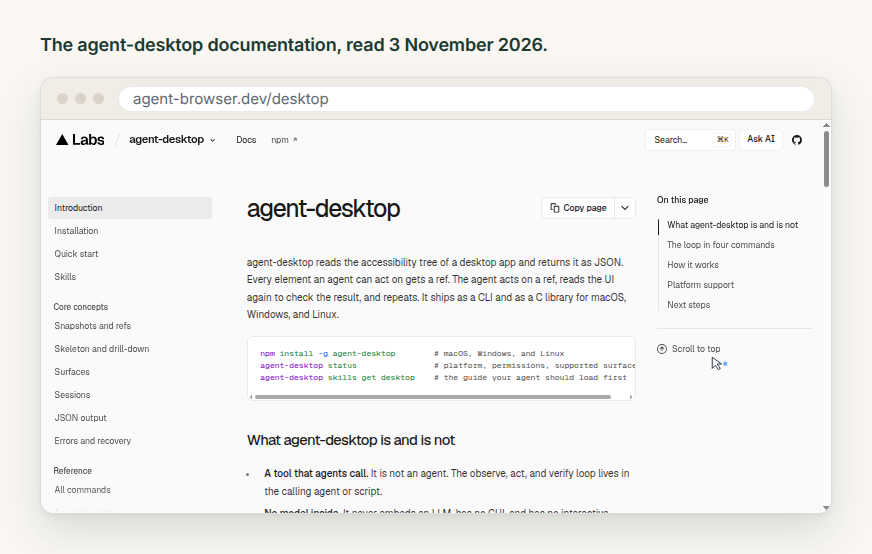
agent-desktop "reads the accessibility tree of a desktop app and returns it as JSON", and "every element an agent can act on gets a ref". An agent acts on a ref, reads the interface again to check what happened, and repeats. It ships as a command line tool and a C library for macOS 13 and later, Windows 10 1809 and later, and Ubuntu 24.04 and later, and it installs with one npm command. The licence is Apache 2.0, so there is nothing to buy.
It never looks at the screen. Instead of screenshots and pixel matching it reads the structure an operating system already publishes so that screen readers can work. That keeps the amount of text an agent has to wade through small, and it keeps the tool steady when a button moves a few pixels to the left.
It has an older sibling: agent-browser, from the same team and also Apache 2.0, does the same job for a web page: "open pages, read them as an accessibility tree, and act on elements from the shell". It drives Chrome for Testing by default and installs the same way.
A tool your agent calls is not an agent
The documentation lists its own limits on the front page, and all four of them matter to the decision.
"A tool that agents call. It is not an agent." The loop lives in whatever is doing the calling.
"No model inside. It never embeds an LLM, has no GUI, and has no interactive prompt."
"Desktop apps only. It does not automate web pages." That is what agent-browser is for.
"Limited to what apps expose. It reads accessibility trees and does not match pixels." An app that publishes nothing is invisible to it.
Read together, those say: you bring the model, you bring the loop, and you bring the computer it all runs on. For a developer with a coding agent already open in a terminal, that is the right division of labour, and the price is zero. For somebody who wanted last week's supplier report pulled and sent round on Monday morning, everything is still to build.
One more line from the repository deserves a second read if the desktop in question holds client records. "Snapshots, clipboard reads, screenshots, command output, and debug artifacts can contain private desktop content. Keep them out of public logs and uploads."
Three shapes, side by side
There are three answers on the market to "make the computer do this by itself", and they are not competing so much as sitting at different distances from the job.
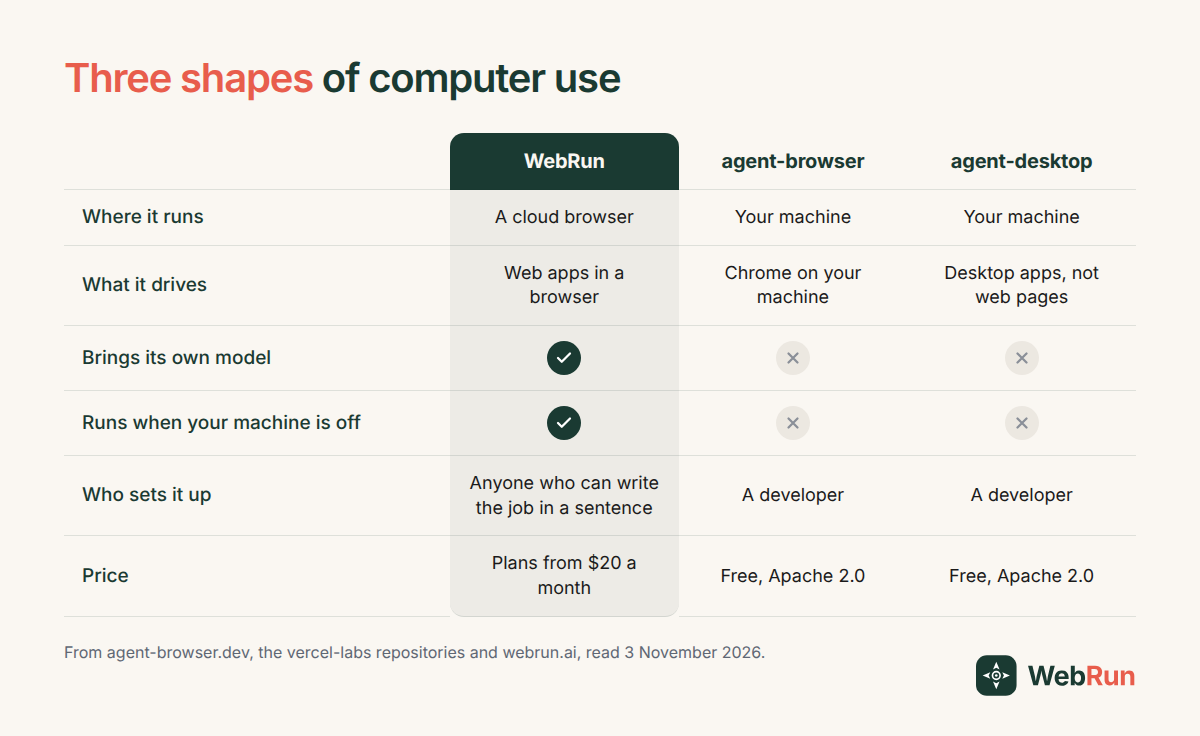
The first column is a hosted agent with a model in it. The other two are parts, excellent ones, that something else has to assemble.
Where each one is the better pick
Pick agent-desktop when the thing you need driven is an application installed on a machine. A desktop accounting package, a design tool, an old client for a system that never got a web version. No hosted browser agent can reach those, ours included: we work in a browser, so if it is not a web page we are no help at all. agent-desktop can reach it, as long as the app exposes an accessibility tree. The project is clear that some do not.
Pick agent-browser when the target is a web page and you want it driven from your own script, on your own machine, with the code in your own repository. It costs nothing and you can read every line of it.
Pick a hosted agent when the answer to "who is at the keyboard when this runs" is nobody.
When nobody is at the keyboard
That last question settles more cases than any argument about what the software can do.
A command line tool on a laptop runs when the laptop is open. The Monday report wants to happen at eight whether or not anyone has had coffee yet. Someone who does not write code has to be able to see what it did. And the sign in it uses often belongs to a client, which is an argument against it living in a browser profile on somebody's personal machine.
That is the shape WebRun is built for. The agent works in a real browser in the cloud, inside the tools you are already signed in to. An environment holds the sign in, so you "log in once and every subsequent session on the same environment skips authentication", and each client or team can have an environment of their own.
The job "runs on your schedule and sends you the result, with a full session recording and action log for every run", which means the question of what happened at eight on Monday has an answer you can watch back. Guardrails stop the run and wait for a person when something sensitive comes up, a payment or a login screen, and anything irreversible is drafted for your approval rather than done unattended. Plans start at $20 a month.
None of that makes it a choice of one. Developers get the same engine as an MCP server and an API, so a team can run the hosted agent for the recurring business jobs and keep a CLI in the repository for the parts they would rather own outright.
Three questions that settle it
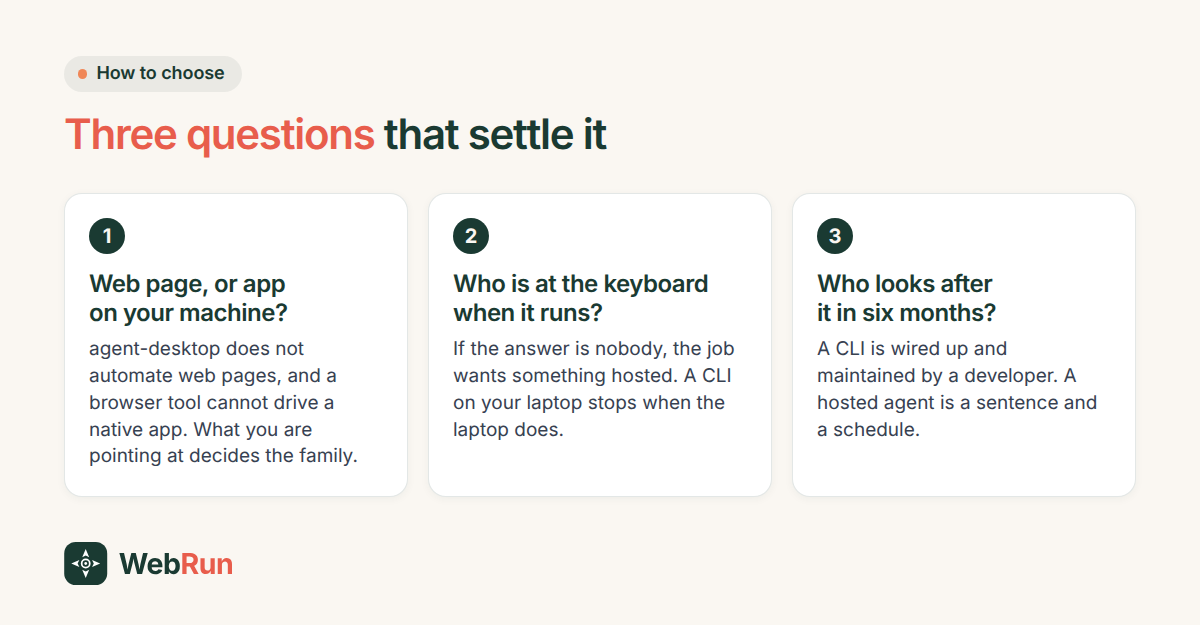
If all three answers point at a developer, take the free tools. They are well documented and the licence asks nothing of you.
If the answers point the other way, the quickest way to find out whether a job suits an agent at all is to describe it once and watch it run. Writing that instruction takes more care than people expect and less than they fear. The template library collects jobs that are already written down, which beats starting at a blank box. When one of them looks like your Monday morning, set it on a schedule and leave it alone.