Get your half finished drafts back in front of you
Every Monday, WebRun opens Typefully, reads every draft that never reached the queue, sorts them by how long they have sat untouched, writes the list into Google Sheets with the opening line of each, and messages you the oldest few on WhatsApp to finish this week.
- No credit card
- Under $0.01 per run
- Cancel anytime
How do I find the drafts I started and never finished?
WebRun reads your Typefully drafts every Monday and finds the ones that never reached the queue, sorted by how long they have sat untouched. It writes each draft's opening line, format, and age into Google Sheets, then messages you the three oldest on WhatsApp to finish this week.
- Good drafts get finished instead of buried under new ones
- One ranked list of ideas you already had
- Published drafts marked done without you tidying the sheet
Built for creators · founders building in public · content marketers · ghostwriters
What does WebRun do on every run?
The exact actions WebRun takes, in order - in plain language, so you can adjust anything.
-
WebRun signs in and gets to work
Opens
typefully.comin a real browser with your saved login - no setup, no API keys. -
1
Typefully - find untouched drafts
typefully.com
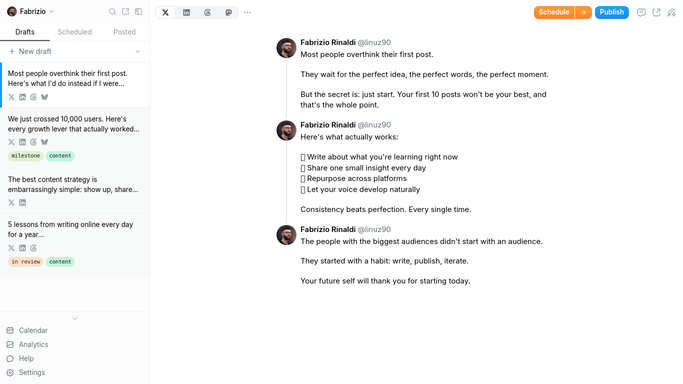
WebRun opens Typefully to find untouched drafts. - Open Typefully and list every draft that is not scheduled and not in the queue
- Read the last edited date for each and work out the days since you touched it
- Capture the opening line, whether it is a single post or a thread, and its length
- Keep only drafts older than the age you set, so this week's work in progress is left alone
Done when Every draft past your age limit is listed with its age and opening line.
-
2
Google Sheets - write the draft list
google.com How to Automate Google Sheets

WebRun opens Google Sheets to write the draft list. - Open your drafts sheet and write one row per stale draft, oldest first
- Fill in opening line, format, last edited date, and days untouched
- Carry over any note you added last week against the same draft
- Mark drafts that have since been scheduled or published as done
Done when The stale draft list is written to the sheet with your earlier notes kept.
-
3
WhatsApp - message you the oldest few
whatsapp.com How to Automate WhatsApp

WebRun opens WhatsApp to message you the oldest few. - Message yourself the three oldest drafts with their opening lines
- Say how many drafts are sitting untouched in total
- Send the reminder only. WebRun never publishes, schedules, or edits a draft
Done when You have this week's three drafts to finish on your phone.
How is each run configured?
Secure by default
Connect once, stays signed in
WebRun signs in once and keeps each session in a persistent environment, so every run picks up right where it left off.
Every action is checked against this policy before it runs.
Questions, answered
Will it publish or schedule anything?
No. WebRun only reads your drafts and reports which ones have gone stale. It never posts, schedules, queues, or edits a draft, so nothing reaches your audience without you writing and sending it.
How old does a draft have to be?
You set the number of days. Anything edited more recently is treated as live work in progress and left off the list, so this week's writing does not get chased.
What happens when I finally publish one?
The next Monday run reads the live state in Typefully, sees the draft is scheduled or published, and marks its row done in the sheet rather than listing it again.
Related templates
Put this on autopilot.
Turn it on in minutes - or have our team set it up for you.