Automated Sunsama Overloaded Day Alerts
Every morning, WebRun opens Sunsama, totals the time estimates on today's planned tasks, posts a digest of the day's plan to Telegram, and drafts a Twilio text alert if the total planned time runs well past your normal daily capacity.
How do I get warned when my Sunsama day is overloaded?
Every morning, WebRun totals the time estimates on today's planned Sunsama tasks, posts a digest of the day's plan to Telegram, and drafts a Twilio text alert when the total runs well past your normal capacity. Overloaded days get flagged before they start instead of discovered at 9 PM with half the list still open.
- An overloaded day gets flagged at 7:30 AM, not discovered at 9 PM
- The day's plan is visible in Telegram without opening Sunsama
- Only genuinely overloaded days trigger an alert
Built for Founders · consultants · freelancers · individual contributors managing their own calendar
What does WebRun do on every run?
The exact actions WebRun takes, in order - in plain language, so you can adjust anything.
-
WebRun signs in and gets to work
Opens
app.sunsama.comin a real browser with your saved login - no setup, no API keys. -
1
Sunsama - total today's planned time
sunsama.com
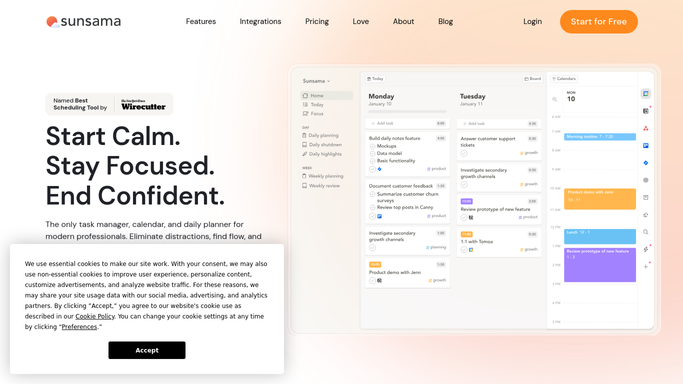
WebRun opens Sunsama to total today's planned time. - Open Sunsama and read today's planned tasks
- Total the time estimate assigned to each task
- Compare the total against your normal daily capacity
Done when Today's planned time total is calculated and compared to capacity.
-
2
Telegram - post the day plan digest
telegram.org

WebRun opens Telegram to post the day plan digest. - Post a short digest of today's planned tasks and total time
- List the largest or highest priority tasks first
- Note how the total compares to a normal day
Done when Today's day plan digest is posted in Telegram.
-
3
Twilio - draft the overload alert
twilio.com

WebRun opens Twilio to draft the overload alert. - Draft a short text alert when today's planned time runs well past capacity
- Name how many hours over the plan is
- Leave the alert queued, unsent, for the owner to review
Done when An overload alert is drafted whenever today's plan exceeds capacity.
How is each run configured?
Secure by default
Connect once, stays signed in
WebRun signs in once and keeps each session in a persistent environment, so every run picks up right where it left off.
Every action is checked against this policy before it runs.
Questions, answered
Does the text alert send on its own?
No. WebRun only drafts the Twilio alert and leaves it queued. You review and send it, so nothing about your schedule goes out unchecked.
How does it define an overloaded day?
It totals the time estimates on your planned Sunsama tasks and compares that total against the daily capacity you set, so the alert only fires on a genuine overload, not a normal busy day.
Does it move or reschedule any tasks?
No. It only reads your plan and reports on it. Moving tasks to another day inside Sunsama stays your own call.
Related templates
Put this on autopilot.
Turn it on in minutes - or have our team set it up for you.