How to Automate Workday
In Workday, most automation is configuration: business processes route each hire, job change and termination to the right security group, and Schedule a Report delivers reports on a timetable. Chasing a step that stalls in someone's My Tasks, and following up in systems with no integration, can go to WebRun, an AI agent that works in a browser.
 Written by
Tom Kessler
Field operations analyst
Written by
Tom Kessler
Field operations analyst
 Reviewed by
Hannah Vogel
Finance operations
Reviewed by
Hannah Vogel
Finance operations
Every change in Workday travels as a business process
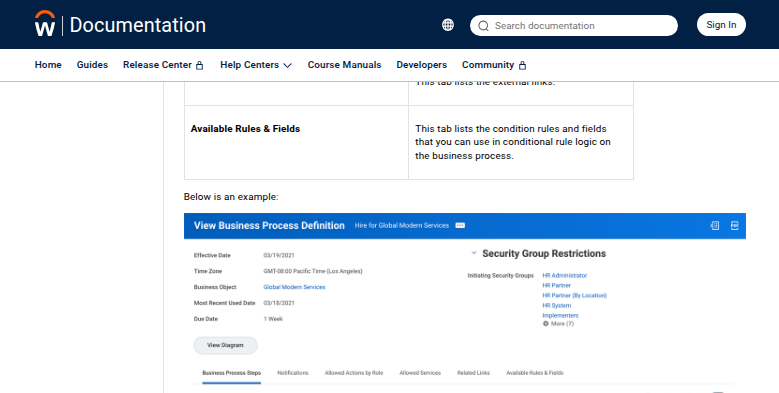
A promotion in Workday runs as a business process, starting with an initiation step and moving through approval steps routed to security groups, with a record of who acted and when. Hires, job changes and terminations move the same way. A hired worker who never turns up on the first day has a process of their own, No Show, which keeps them out of headcount reports without running a full termination.
Workday counts more than 65 percent of the Fortune 500 among its customers. Core HCM holds the worker record and the supervisory organizations that group workers into a management hierarchy, and around it sit Global Payroll, talent acquisition and learning, time tracking and scheduling, and contingent worker management.
Most employees see a corner of it, such as a payslip or a task waiting in My Tasks. HR partners and recruiters work across the tenant while the HRIS team configures it. Managers mostly meet Workday as approvers.
Business processes stall in somebody's My Tasks
A requisition waits with a finance approver who is travelling. An approval routed to a security group sits in the My Tasks of every member until one of them acts. A hire cannot complete because the manager has not finished a To Do. Approval notices land in inboxes that already hold forty others, so the HR partner runs a report of the oldest steps and writes the reminders one by one.
When a start date is set, the HR coordinator books the desk and asks IT for the laptop in systems Workday does not touch. Recruiters copy requisition status into a spreadsheet for hiring managers who never log in. After a termination, the HR partner emails the parking office and updates the expense tool, and when a contingent worker's assignment ends, a recruiter logs in to the staffing agency's own portal to close it there.
Workday's business processes route only inside the tenant
An approval step goes to a security group, and the approver can approve, deny or send it back; a denial ends the business process and restores the changed data. To Do steps remind a worker of something to do inside or outside Workday.
Email notifications go daily or immediately, and mobile push and SMS go immediately. Slack and Teams carry only Job Requisition approvals, through Workday Everywhere. Schedule a Report runs a custom report on a recurring schedule and delivers it as Excel, PDF or CSV.
Beyond the tenant, Workday connects through its own integration tools: Cloud Connect connectors for simple loads and extracts, Orchestrate for building integrations without code, and Workday Studio for developers. Someone on the HRIS or integration team builds each integration and keeps it running.
A To Do can remind the coordinator to order the laptop, and a notification tells an approver once that a step is waiting. Neither opens the IT portal or the badge system to see whether anyone did the work, and neither reaches a system that has no integration.
Stalled steps and start dates get followed up from outside the tenant
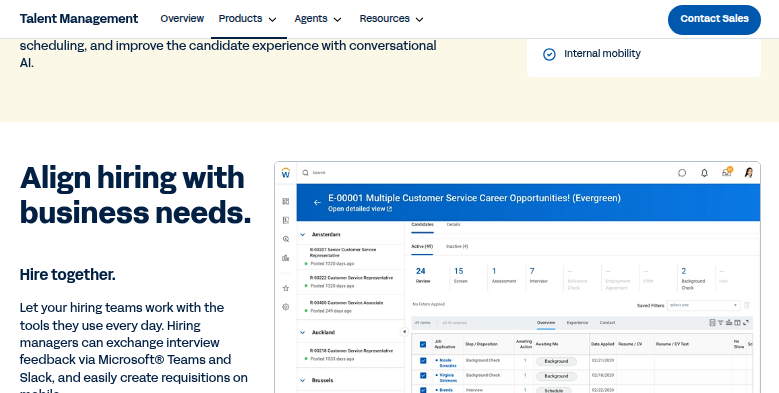
An approver who has left a hire waiting for six days gets a reminder naming the worker and the step, sent by the HR partner from the Notion page that tracks the ageing queue. Every hiring manager receives the status of their open requisitions in a message, without logging in: candidates by stage, days open and this week's interviews.
On the day a start date is set, the HR coordinator can confirm that the desk booking, the laptop order and the badge form are in, and the manager has a welcome message ready to send. After a termination, the HR partner can see whether the benefits carrier and the expense tool still show the person as active.
The recruiter reviews candidates an agency submitted through its own portal against the right requisition in Workday, and catches a duplicate before the agency claims a fee. When an HR partner records a No Show on Monday, whoever ordered the laptop and the welcome pack hears the same morning and can cancel both.
Approve, deny and send back stay with the people Workday routes to
The follow-up needs a Workday account with the right security groups, plus logins to the IT portal and the agency portals.
WebRun is an AI agent that works a real Chrome browser, signed in as you. Workday's security groups decide what that account can see, and the agent sees no more. Each morning's run starts from the steps waiting and the start dates just set.
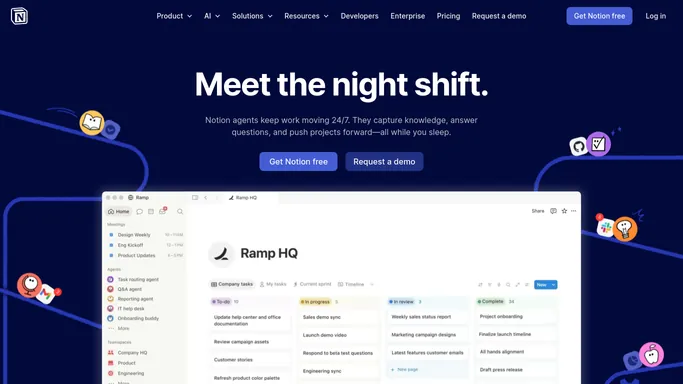
The approver Workday routed a step to still decides it. The HR partner reads each reminder before it goes out. Business process definitions stay with the HRIS team, since the agent's account needs no security group that edits them. Among the setups below, the approval chase keeps the ageing queue in Notion and drafts a text to each approver holding a step.
Questions people ask
Will a step in someone's My Tasks ever be approved by the agent?
No. Only the security group Workday routed the step to can approve, deny or send it back. The HR partner gets a drafted reminder saying how long the step has waited, and sends it.
What does the HRIS team need to set up for this?
A Workday account and its security groups. The account's security groups have to cover the processes involved. No connector, Orchestrate flow or Studio project is needed, and no business process definition changes, because the work happens in the browser like any other user's.
Why would a reminder get a response when Workday's notification did not?
Because it says more, in a channel the approver reads. A Workday notification tells the approver once that a step is waiting, and outside Job Requisition approvals it arrives by email, push or SMS, not in Slack or Teams. The drafted reminder names the worker, the step and the days it has waited, and a person sends it.
Can it work alongside Workday's Recruiting Agent and Paradox?
Yes. The Recruiting Agent, powered by HiredScore, and the Candidate Experience agent, powered by Paradox, work inside Workday's hiring process. The agent works around it, in agency portals and hiring managers' inboxes, and leaves Workday's screening and candidate conversations as they are.
Sources
- Business Process Framework Describes Workday's business process framework: an initiation step, then action, approval and To Do steps routed to security groups, with To Do steps covering activities inside or outside Workday, and notifications to participants.
- Concept: Approval Step Sets out that an approver can approve, deny or send back a business process, that a denial restores the changed data, and that Workday notifies everyone in the assigned security group.
- Report Administration Documents the Schedule a Report task, with daily, weekly, monthly and custom recurrence and output as Excel, PDF or CSV.
- Talent Acquisition and Recruiting Software Names Workday's HiredScore Recruiting Agent and the Paradox candidate experience agent within its talent acquisition suite.
- Concept: Notifications Lists Workday's notification channels and frequencies, and states that the Slack and Teams channels are available only for Approvals on the Job Requisition business process for Workday Everywhere.
- Workday Integrations Overview Describes Workday's integration tools: Cloud Connect connectors for simple loads and extracts, Orchestrate for building integrations without code, Document Transformation, and Workday Studio for developers.
- Termination and Business Process Templates Explains the No Show business process for a hired worker who does not report on the first day, which keeps them out of headcount reports without a full termination.
- Overview of Workday HCM Core Concepts Defines supervisory organizations as grouping workers into a management hierarchy, one of six core HCM concepts alongside business processes and security.
- Human Capital Management (HCM) Software Lists Workday's HCM products, including Core HCM, Global Payroll, talent management, workforce management and contingent worker management, and states that more than 10,000 organizations and 65%+ of the Fortune 500 use Workday.
3 ready-made Workday workflows
Each one names the apps it touches and the exact steps it takes. Open one to read what it will do, then turn it on.


Want one of these running on your own Workday?
Show WebRun the process once and it will run it on schedule, in your own private browser environment.