How to Automate WordPress
Scheduled posts, Jetpack Social and, on paid WordPress.com plans, MCP cover the publishing end: posts go live at a set time, get shared to Facebook, LinkedIn, Threads and other networks, and an assistant can edit on request. WebRun, an AI agent, can take on drafts from the calendar, images with empty alt text and threads for X.
 Written by
Marcus Deleon
Support operations
Written by
Marcus Deleon
Support operations
 Reviewed by
Ben Kirkwood
Solutions engineer
Reviewed by
Ben Kirkwood
Solutions engineer
A business blog's finished posts go live in WordPress
WordPress is the open-source publishing software behind a great many business websites and blogs. It comes in two forms: the free software from WordPress.org, installed on hosting the business pays for, and WordPress.com, Automattic's hosted service, which runs the same software and takes care of the hosting and updates.
Either way, the daily screens are much the same: posts and pages written in the block editor, images in the Media Library, categories and tags, and plugins that add SEO fields or a shop. Roles decide who can do what, from Contributors who write but cannot publish to Editors who manage everyone's posts.
The content lead plans the calendar, freelance writers hand in drafts, and the editor checks and schedules. In a small business the owner often does all of it.
Every post is copied in from somewhere else before it is scheduled
A post rarely starts in WordPress. The calendar lives in Notion or a spreadsheet, the draft in Google Docs, the images in a shared folder. Someone pastes the text into the block editor, fixes the headings the paste broke, uploads the images, picks a featured image and a category, writes the meta description in the SEO plugin's box and sets the date.
The checks come afterwards, if at all. Images go up with the Alternative text field empty, and on a site with years of posts the Media Library holds a back catalogue of images no one ever described. Links to older posts that would help readers never get added, because nobody remembers everything the site already covers.
Then the post is live and the promotion starts from nothing: the same article rewritten as a thread, a LinkedIn post and a newsletter paragraph, usually by the person who just spent the afternoon on the post itself.
WordPress publishes on schedule from what is already in the editor
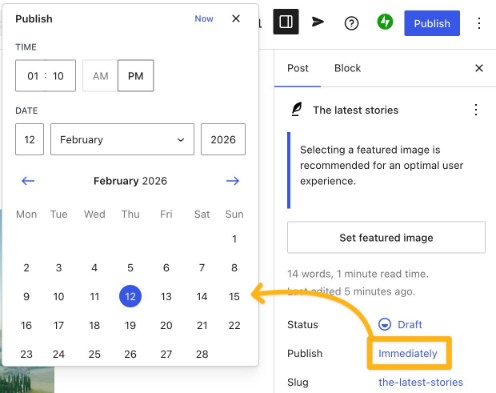
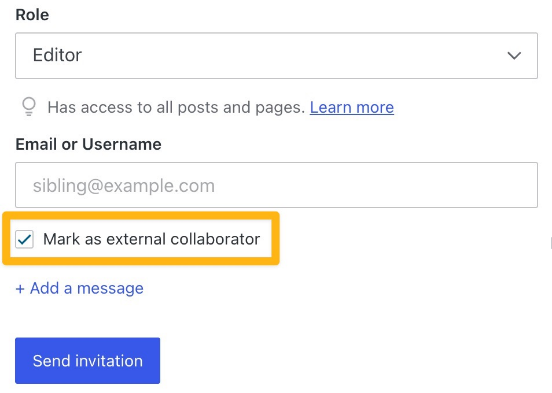
The editor can schedule any post or page for a future date and time, WordPress.com holds up to 100 scheduled posts at once, and revisions keep earlier versions. Jetpack Social shares each new post to the connected social accounts as it publishes, with a custom message per post, and the Image block gives every image an Alternative text field.
WordPress.com also supports MCP, so an assistant such as Claude or ChatGPT can read and edit a site when someone asks it to, within that user's role, and switching it on turns on both read and write tools by default. It comes with every paid WordPress.com plan, with 30 days on a free site, and with self-hosted sites connected through Jetpack on a Jetpack AI or Complete plan.
Scheduling starts from a draft already in the editor, and on WordPress.com a scheduled post goes live with the first visit after its time rather than on the clock alone. The Alternative text field is filled one image at a time. Jetpack Social cannot currently post to X or Pinterest, and what it shares is the post with one message rather than a thread written for each network. MCP acts when someone asks.
Calendar posts go onto the WordPress schedule once their checks pass
Today's posts from the Notion calendar go into WordPress and onto the schedule once each has a featured image, a category and a meta description. A post with a missing image credit or a headline over length stays a draft, and a message in the #content channel in Slack tells the editor why.
The editor fills in a week's missing alt text in one sitting from a Google Doc that lists every published image whose Alternative text field is empty, each with a short description drafted from the page it sits on.
Suggested internal links reach the same Slack channel weekly, each with the sentence it would sit in and the older post it would point to, drawn from the site's archive and the pages Ahrefs shows ranking, and the writer adds the ones that fit. Once a long post is live, a thread built from its main points sits in Buffer's drafts, ready for X.
WordPress roles decide what WebRun may publish
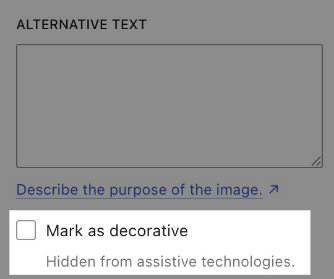
Pasting a Google Doc into the block editor and fixing the headings the paste breaks is repeated for every post on the calendar. WebRun is an AI agent that works a real Chrome browser, signed in as you. Its WordPress user has the role you choose: Editor if it schedules other people's posts, Author if it only handles its own, Contributor if nothing it writes may be published without a person. It runs in WordPress.com and in a self-hosted admin alike, with no plugin and no application password.
Scheduling from the calendar is the only WordPress job here that writes into WordPress itself. The alt-text and internal-link jobs report to the editor, and the thread job drafts in Buffer.
Questions people ask
Can it use a self-hosted WordPress admin as well as WordPress.com?
Both. It signs in to whichever admin the site uses and works in the same editor screens, so nothing is installed on the site.
Why did a scheduled post go out late on WordPress.com?
WordPress.com publishes a scheduled post on the first visit to the site on or after its time, so a quiet site can publish late. On Business and Commerce plans, downtime monitoring checks the site every five minutes, which helps the schedule run on time.
Which networks can Jetpack Social post to?
Facebook, Threads, LinkedIn, Mastodon, Tumblr, Nextdoor, Bluesky and professional Instagram accounts. WordPress.com cannot currently auto-share to X, Pinterest or personal Instagram accounts, so a thread for X needs another route, such as a Buffer draft.
Can it look after several WordPress sites?
Yes, if its login can reach them. One WordPress.com account can manage several sites, and for self-hosted sites it signs in to each admin separately, with results reported per site.
Sources
- Schedule posts and pages in WordPress WordPress.com posts and pages can be scheduled for a future time, up to 100 scheduled posts at once; a scheduled post is triggered by the first visit on or after its time, and Business and Commerce sites can use downtime monitoring to help.
- Post automatically to social media Jetpack Social shares new posts to Facebook, Threads, LinkedIn, professional Instagram, Mastodon, Tumblr, Nextdoor and Bluesky with a custom message per post, and cannot currently auto-share to X, Pinterest or non-business Instagram.
- Model Context Protocol (MCP) settings MCP is on all paid WordPress.com plans, for 30 days on free sites, and on self-hosted sites with Jetpack AI or Complete; it respects the user's role and turns on read and write tools by default.
- Roles and Capabilities Defines WordPress roles: Editors publish and manage everyone's posts, Authors publish their own, and Contributors write but cannot publish.
4 ready-made WordPress workflows
Each one names the apps it touches and the exact steps it takes. Open one to read what it will do, then turn it on.
 WordPress›
 WordPress›
 WordPress›
 WordPress›
Want one of these running on your own WordPress?
Show WebRun the process once and it will run it on schedule, in your own private browser environment.