How to Automate Snapdocs
Around Snapdocs, three jobs are worth automating: emailed signing requests typed into orders, fees that changed after the QuickBooks Online sync, and the day's at-risk orders. Confirmations, appointment checks, FedEx returns and the QuickBooks sync already run inside Notary Connect. An AI agent working in a browser, WebRun, can prepare each of them for schedulers and bookkeepers to approve.
 Written by
Dimitri Vasilev
Logistics analyst
Written by
Dimitri Vasilev
Logistics analyst
 Reviewed by
Rosa Lindqvist
Operations editor
Reviewed by
Rosa Lindqvist
Operations editor
Snapdocs Notary Connect books the notary for a mortgage signing
A refinance closing needs a borrower, a notary and the loan documents at one kitchen table on Thursday at six. Snapdocs calls itself the mortgage industry's number one eClosing platform, and its Notary Connect side is how title companies and signing services book that notary.
A scheduler or a client user creates the order in Notary Connect. With the Enhanced Automation Suite switched on, the Automator starts searching the moment the order exists and can auto-assign a notary who accepts, limited if the company chooses to Snapdocs Verified notaries above a minimum score. Notaries join the network free, and schedulers can also favorite, exclude or assign particular notaries.
Mobile signings and remote online notarizations run through the same workflow. Each order holds the documents, which the client releases to the notary, and an Activity section with every message on the order. Lenders use the wider eClosing platform, with an eVault for eNotes and automated quality control.
A signing order leaves office work behind after the notary goes home
A title officer emails a signing request instead of placing it, and a scheduler retypes it into a new order. The loan officer wants to know why a borrower has not confirmed tomorrow's appointment. A scanback is due by four and the notary has stopped answering. When a notary cancels on the morning of a signing, the scheduler rings the title officer and the loan officer, then rings them both again once a replacement accepts.
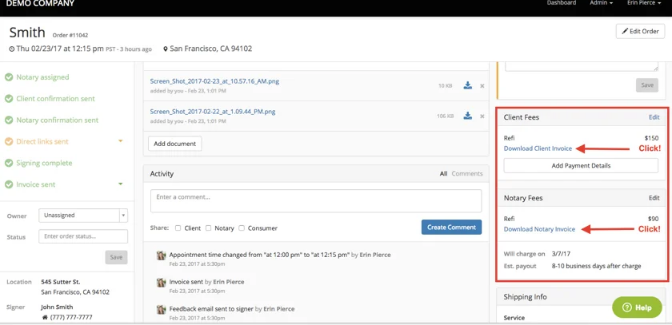
After the signing, each closed order produces a client invoice and a notary invoice. The bookkeeper gets both into the books, fixes any fee that changed after the order closed and records the title company's payment against the client invoice when it arrives. Clients ask at month end how many signings the service completed for them and how quickly.
Snapdocs closes the order itself when FedEx marks the package delivered
Once a notary is assigned, Snapdocs emails the notary a confirmation at once, and the client and borrower get theirs after a five-minute countdown that an admin can cancel. With appointment confirmation on, the notary is prompted to call the signer, and the borrower can confirm from an email.
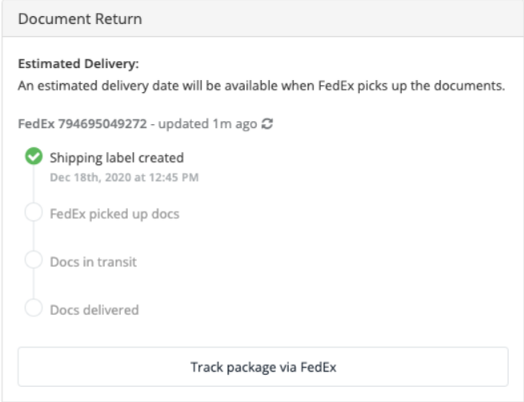
Snapdocs can generate a FedEx return label with every order, shows the tracking on the order page and closes the order when FedEx marks the package delivered. It also generates client and notary invoices at close. With QuickBooks Online Essentials or Plus, an admin connects QuickBooks under Admin and Accounting Tools, and each press of Sync sends the closed orders not yet synced across as client invoices and notary bills; a payment marked in QuickBooks marks the order paid in Snapdocs.
The sync runs when someone presses it, and each order crosses once: a fee changed afterwards, or a check number added in Snapdocs, stays out of QuickBooks until the bookkeeper corrects it there. Simple Start, the lowest QuickBooks Online plan, is not sufficient for it. A request emailed by a client whose title production software, such as Resware, RamQuest or SoftPro, is not connected to Snapdocs is not an order until a scheduler types it in. Unconfirmed signings and late scanbacks show up as statuses, for whoever looks at the right moment.
The bookkeeper catches every Snapdocs fee that changed after its QuickBooks sync
The bookkeeper sees each synced order whose fee changed in Snapdocs afterwards, with the Snapdocs figure set against the QuickBooks invoice, and corrects only those. A service on QuickBooks Online Simple Start, which the sync does not support, gets a draft invoice and bill for each closed order to approve instead. Each account manager sends a client a monthly report of its signings and cancellations, drafted from that client's Snapdocs orders.
An emailed signing request reaches the scheduler as a Snapdocs order form already filled in, address, signing type and scanback deadline included. The scheduler checks it against the email and places it. At noon the schedulers see the day's unconfirmed signings and every scanback past its deadline in their Slack channel, and spend the afternoon on those files. When a notary drops a signing on the day, the title officer hears from the scheduler within minutes, and again with the replacement's name once the Automator finds one.
Schedulers place the orders and the bookkeeper makes every QuickBooks change
Between phone calls, a scheduler already copies requests from the inbox into Snapdocs and opens each open order to see where it stands. WebRun is an AI agent that works a real Chrome browser, signed in as you. It does that copying with a Snapdocs scheduler login, reading each order's status and Activity section, and at noon it checks every open order for a missing confirmation or a late scanback. Each evening it sets the fees on synced orders against QuickBooks.
The scheduler checks each order form against its email before pressing submit, and the bookkeeper makes every correction in QuickBooks. Your schedulers assign every notary and set every fee. The confirmation, reminder and scanback jobs all start with a Snapdocs order.
Questions people ask
Where does borrower information go?
Borrower details stay in Snapdocs unless a task names another place for them, such as a status update to the title officer. The agent opens only the orders that task needs, under the Snapdocs login you give it.
Is this useful to a notary, or only to signing services?
Both, with different jobs. A notary on the free Notary Connect network can have each accepted signing copied into a personal calendar and a mileage log, while a signing service uses it for orders, fee checks and client reports.
Is there anything to automate on the lender side of Snapdocs?
Less. The eClosing platform connects to LOS and POS systems through open APIs and automates quality control, so a lender's use for an agent is narrower: carrying closing statuses into the reports and systems those integrations do not reach.
Sources
- Notary scheduling platform for title companies | Snapdocs Describes Notary Connect for title and escrow companies: mobile and RON signings in one workflow, a managed tier and the self-serve Flex tier with a communication portal, real-time status updates, notary filters and APIs.
- Auto Sending Client Confirmation Emails Snapdocs support: confirmation emails can be sent automatically to the client, the consumer and the notary after a notary is assigned; the notary's goes at once and the client's after a five-minute countdown in which an admin can preview, send now or cancel.
- Autogenerate FedEx Labels and Tracking Snapdocs support: FedEx return labels can be generated with every order and tracked, and the order closes automatically when FedEx marks the package delivered.
- Viewing Client and Notary Invoices Snapdocs support: client and notary invoices are generated automatically after an order closes and downloaded as PDFs.
- Enhanced Automation Suite Settings Snapdocs support: with the suite on, the Automator starts when an order is created, can auto-assign favorited or other notaries who accept, can be limited to Snapdocs Verified notaries above a minimum score, and alerts the scheduler and searches again when a notary removes themselves.
- Automatically Prompt Notaries to Confirm Signing Appointments Snapdocs support: an optional company setting prompts the notary to call the signer and report the status, and signers confirm by email with an I am available button.
- eClosing Platform | Snapdocs Describes the eClosing platform for lenders, title companies and signing services: every closing type, an eVault for eNotes, automated quality control and open APIs to LOS and POS providers.
- Join Our Notary Network | Snapdocs Says notaries can join the Snapdocs Notary Connect Network for free to access signing opportunities from Snapdocs clients.
- Snapdocs: The Mortgage Industry's #1 eClosing Platform Snapdocs describes itself as the mortgage industry's number one eClosing platform, serving lenders, title companies, signing services and notaries.
- Snapdocs integrations Lists Snapdocs' integrations with loan origination, point-of-sale, RON and title production systems (Resware, RamQuest, SoftPro), warehouse lending and data connectivity.
- Quickbooks Online Integration Snapdocs support: the integration needs QuickBooks Online Essentials or Plus (Simple Start is not sufficient) and is connected under Admin, Accounting Tools; each press of Sync sends closed orders not yet synced as a client invoice, a notary bill, a customer and a vendor; an order syncs once, so later changes and payment details entered in Snapdocs do not reach QuickBooks, while payments marked in QuickBooks mark the order paid in Snapdocs.
6 ready-made Snapdocs workflows
Each one names the apps it touches and the exact steps it takes. Open one to read what it will do, then turn it on.


Want one of these running on your own Snapdocs?
Show WebRun the process once and it will run it on schedule, in your own private browser environment.