How to Automate Simpro
Inside Simpro, the Maintenance Planner raises due-asset alerts, BI Reporting emails scheduled reports and, on Lightning, JustAsk answers questions. Outside it, an AI agent like WebRun can post the lists that arrive on a schedule: Tuesday's finished but unbilled jobs, jobs over their quoted cost within half an hour, mismatched invoices and due assets with no job.
 Written by
Julian Adeniyi
Retail operations
Written by
Julian Adeniyi
Retail operations
 Reviewed by
Sofia Marchetti
Marketing operations
Reviewed by
Sofia Marchetti
Marketing operations
A Simpro job holds its quote, its hours, its stock and its invoice
Simpro began in 2002, when an electrical business owner teamed up with a software engineering student because the software of the day had not been built for job sites. Electrical, HVAC, plumbing, security and fire protection businesses run on it, from teams of five to franchise networks, and its owner, Simpro Group, also runs AroFlo, BigChange and ClockShark.
A job starts as a quote priced from synced supplier catalogs, accepted online and turned into a single or recurring job. The scheduler sends the closest available technician with the right qualifications, and in Simpro Mobile techs track their time on site and record notes and asset test results. Materials come from stock or from a purchase order, and Simpro Premium flags a supplier invoice whose prices differ from the order.
Every job keeps its estimated and actual costs side by side. Invoices go out on site, or as progress claims on staged projects, and flow through to the accounting package.
The accounts team inherits every job the field has finished
On Tuesday the accounts manager goes through last week's finished jobs. A switchboard upgrade was completed on Thursday and still has no invoice, because the labour never got attached to the job, and two service calls from the previous week are stuck for the same reason.
A rooftop unit replacement ran eight hours over the quoted labour because the crane was late, and nobody noticed until the job closed. Another job went out invoiced below its costs, and the gap turns up weeks later in the profit report.
Forty emergency lights in an apartment block come due for their six-monthly test. The Maintenance Planner raises the alert, and the maintenance coordinator still has to check whether anyone has already booked the job.
BI Reporting and JustAsk answer whoever asks them
The Maintenance Planner add-on sets service levels and testing frequencies for each asset and raises an alert when one falls due or fails a test, and recurring maintenance invoices can be emailed to the customer on a schedule. The Data Feed add-on reads incoming emails and attachments, such as supplier invoices, quotes and leads, and creates the matching record by rules you set.
Simpro Premium's BI Reporting comes with more than 70 reports, including Job Productivity, Profit and Loss, Sales Invoice and Cost to Complete, and can deliver a favorite report to your inbox automatically. Lightning, the AI layer Simpro Group launched in May 2026 as an upgrade to existing contracts, adds JustAsk, which answers plain-language questions such as overdue invoices or margins by technician, alongside agents that brief technicians before a job and write the customer's summary after it.
Each of these answers the person who opens the alert, builds the report or types the question. Which of last week's completed jobs still has no invoice, which invoice came in under its job's costs, and which due asset has no job booked are comparisons someone sets up or makes by hand. If BI reports built for those comparisons already reach the office each week, most of this is covered.
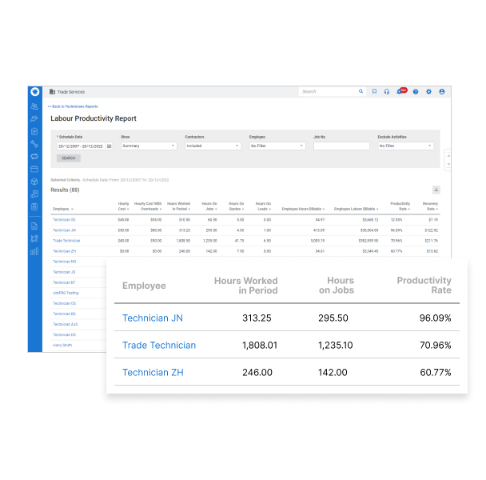
A job running over its quote is on the project manager's phone within half an hour
At eight on Tuesday the Teams operations channel lists every completed job with no invoice, oldest first, with the customer, the value, the days since completion and anything blocking the invoice, such as labour never attached, under a total of what is sitting unbilled. The office group in WhatsApp hears only about jobs older than two weeks, and nothing at all in a week without any.
Every half hour in business hours, active jobs whose actual cost has passed the quoted cost go to the project manager's Telegram with both figures and the size of the overrun. Anything past the threshold you set, such as 15 percent, also arrives as a text.
On Monday the accounts team has a summary waiting in Gmail of last week's completed jobs whose invoices do not match their costs, each one also logged in Airtable as needs review.
The maintenance coordinator's Trello board gains a card each morning for every asset due inside the booking window with no job yet, carrying the site, its due date, the service level and the technicians qualified for it. A dated record in the Google Drive compliance folder shows how long each one waited.
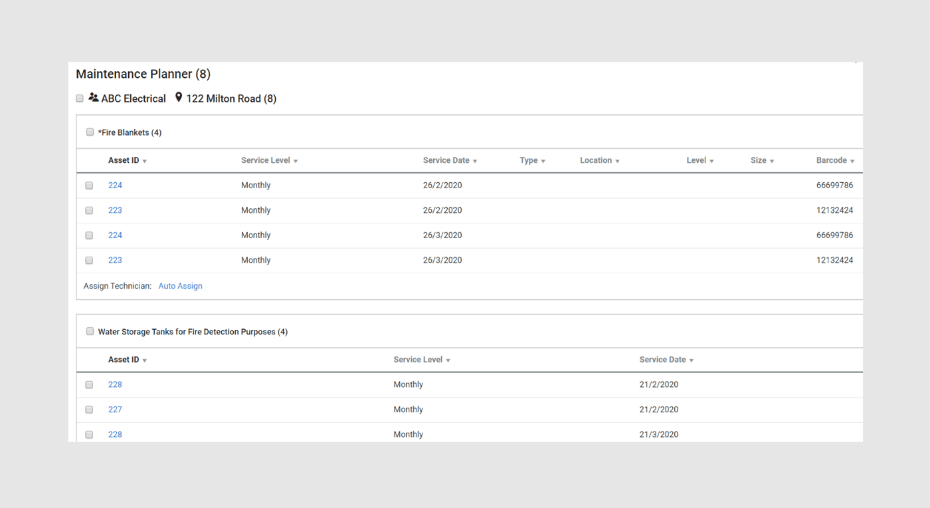
Simpro stays read-only while the lists go to Teams, Telegram and Trello
The Tuesday billing list is Simpro's completed jobs filtered to those with no invoice, the same filter the accounts manager would run. WebRun is an AI agent that works a real Chrome browser, signed in as you. Each list goes where that team already reads, posted through a Simpro login reserved for it: Teams for accounts, Telegram for the project manager, Trello for the maintenance coordinator.
Reading is all it does in Simpro. The accounts team raises every invoice, the coordinator books every maintenance job and contacts the site, and the Gmail summary goes no further until someone in accounts sends it on. The billing list goes first for a contractor whose finished jobs wait weeks for an invoice.
Questions people ask
Does JustAsk already answer which jobs are unbilled?
It answers plain-language questions from your Simpro data, such as overdue invoices or margins by technician, when someone asks and if your contract includes Lightning. The Tuesday list arrives in Teams without anyone asking, oldest job first, with the blockers and the total.
What counts as a cost mismatch in the Monday check?
Any completed job whose invoiced amount differs from its job cost total in Simpro. You set how large a difference is worth a record, so rounding on a small service call does not clutter Airtable.
Does the Trello card book the maintenance job?
No. The card carries the site, its due date, the service level and the qualified technicians, and the coordinator creates the job in Simpro and contacts the site.
How often does the overrun check run?
Every 30 minutes during business hours, on jobs still marked active. Closed and invoiced jobs are skipped, and a check that finds nothing new posts nothing.
Sources
- Enterprise Field Service Software | Simpro Premium (archived May 2026) Simpro's own Premium page as captured in May 2026: the trades it serves, online quote acceptance into single or recurring jobs, flagged price discrepancies between purchase orders and supplier invoices, BI Reporting with automated delivery, and its add-ons.
- Asset Maintenance Software for Field Service Trades | Simpro (archived June 2026) Describes the Maintenance Planner add-on's testing frequencies and alerts when an asset is due or fails testing, and recurring invoices emailed automatically.
- Save Money And Time With Simpro Integrations | Simpro (archived May 2026) Explains the Data Feed add-on, which scans incoming emails and attachments such as supplier invoices, quotes and leads and creates the matching action in Simpro by rules.
- Simpro Group Announces Lightning Launch | Press Release (archived May 2026) Simpro Group's 13 May 2026 announcement of Lightning, its AI layer across Simpro, AroFlo and BigChange, with the Cooper AI and specialist agents.
- Simpro Lightning (archived May 2026) Simpro's Lightning page as captured in May 2026: JustAsk answers plain-language questions about the business, such as margins by technician and overdue invoices, alongside FieldReady, JobReady, JobScribe and JobBrief.
- About Simpro Group (archived June 2026) Simpro began in 2002 when an electrical business owner teamed up with a software engineering student.
4 ready-made Simpro workflows
Each one names the apps it touches and the exact steps it takes. Open one to read what it will do, then turn it on.







Want one of these running on your own Simpro?
Show WebRun the process once and it will run it on schedule, in your own private browser environment.