How to Automate SAP Concur
Start with SAP Concur's own tools: ExpenseIt reads receipts, the card feed imports charges, audit rules flag policy breaks and Email Reminders chase employees and approvers. They act only on what Concur holds. Checking a leaver in the HR system or fetching a folio from a hotel's site takes a browser agent such as WebRun, signed in as you.
 Written by
Rosa Lindqvist
Operations editor
Written by
Rosa Lindqvist
Operations editor
 Reviewed by
Yara Haddad
Data operations
Reviewed by
Yara Haddad
Data operations
Every business trip finishes as a Concur expense report
SAP Concur is the travel and expense system most employees just call Concur, and SAP sells it to companies from ten staff to more than ten thousand. Concur Expense holds the expense reports, Concur Travel books trips, and Concur Invoice handles supplier bills.
An employee back from a trip finds the hotel and taxi charges from the company card already waiting in Concur, and adds the receipts before submitting a report. The manager approves it or sends it back. Where the company uses an expense processor, an approved report then waits in Pending Accounting Review until the processor has checked it.
Finance owns the rules underneath: the expense types, the daily limits, the cost centre each charge is coded to, and when reimbursements are paid. Until a report is approved, nobody is repaid for a train fare put on a personal card, and finance has no report to reconcile the card statement against.
Card charges sit in Available Expenses until someone chases them
A company card charge lands in the cardholder's Available Expenses when the card feed imports it, and it stays there until the cardholder puts it on a report. Some cardholders do that the next morning; others leave it for the week the statement closes, when finance starts asking.
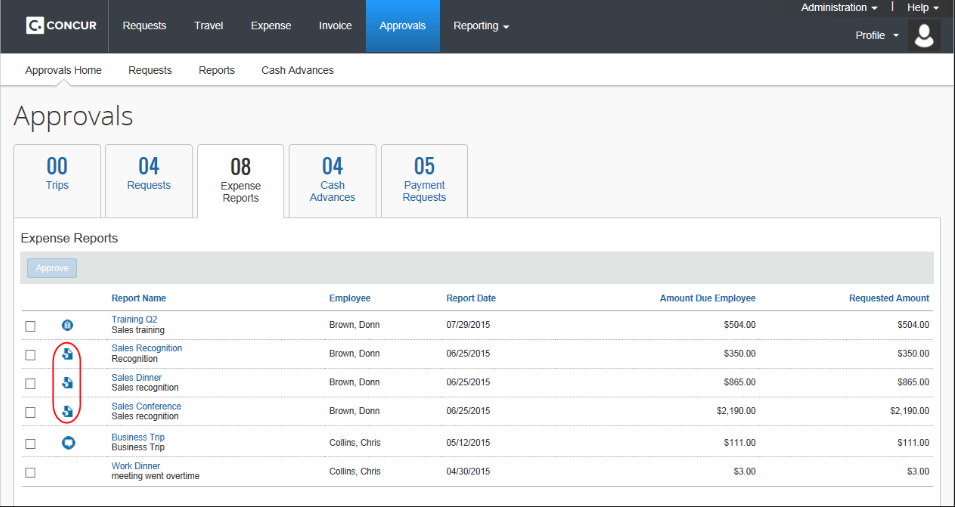
Approvers are the second queue. A regional manager back from four days of site visits approves the clean reports and leaves the three carrying exceptions for later. Later tends to mean the afternoon before the reimbursement run, when someone in finance works down the list sending one email per manager.
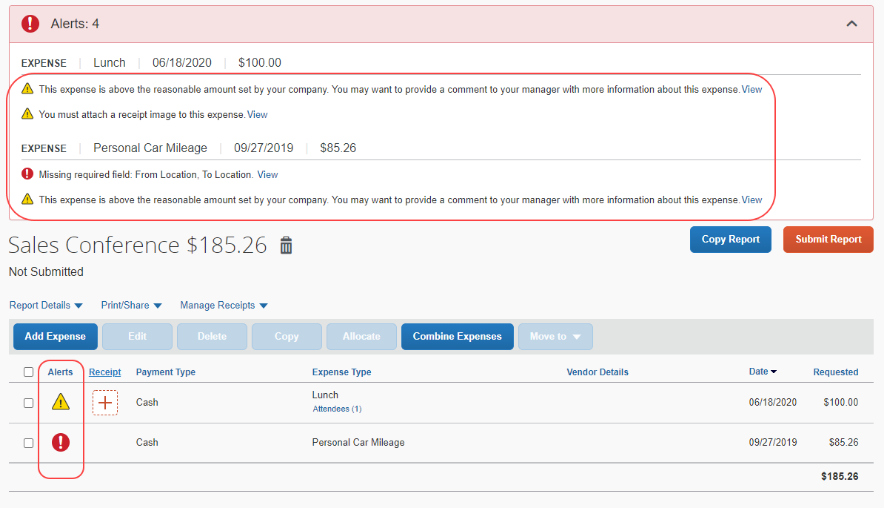
One employee never attached the hotel folio, so the line sits without its receipt. A cardholder who left in March still has charges unassigned, and a mistyped project code means the trip cannot be billed to the client until finance notices. At month end a finance analyst exports the unsubmitted charges to a spreadsheet so the accountant can accrue for them.
Audit rules and Email Reminders act on what Concur already holds
ExpenseIt reads a photographed receipt and fills in the expense, and the card feed imports company card transactions without anyone keying them. Custom audit rules, written by the admin, flag a breakfast over the limit or a hotel that is not a preferred vendor. Some companies add Intelligent Audit, where SAP Concur's auditors check each line against its receipt.
Email Reminders do the routine chasing. The admin builds each one in Expense Admin from a rule and a Reminder Type. A Company Card reminder goes to cardholders with unused card transactions, and an Approval Request reminder goes to whoever holds a report in Pending Approval or Pending Accounting Review, as one email covering all of their overdue reports. Copy to Approver sends an employee's reminder to the manager as well.
Every check in that list runs on data inside Concur. Whether the owner of a pile of unassigned charges still works at the company is recorded in the HR system, and a folio the hotel never sent is still on the hotel's website.
A leaver's card charges can reach a manager before the statement closes
The AP lead paying Friday's reimbursements could know on Wednesday which reports will miss the run: every report still in Pending Approval, with the manager holding it and its submission date, oldest first. Each of those managers could hear from finance which reports they hold and since when.
The card program administrator could get the unassigned company card charges seven days before the statement closes, grouped by cardholder and totalled. Where the HR system shows that a cardholder has left, the administrator could send those charges to the manager instead of an email address that no longer works.
The controller could have a row for each new policy exception in a shared sheet, with the expense line, the rule it tripped and the employee's comment, and decide which submitters to question. An approver could know before opening a report that its project code was closed last month in the project system.
An employee missing a folio could have it downloaded from the hotel chain's website and ready to attach. For the month-end accrual, the accountant could have the unsubmitted charges totalled by cost centre.
The Approve and Send Back buttons stay with the approver
Concur already has a way for one user to read a manager's queue without approving anything: an Expense delegate with Delegate can preview for approver ticked and Can Approve left clear.
WebRun is an AI agent that works a real Chrome browser, signed in as you. Signed in as an analyst who holds that delegation, it reads the approval queue, each cardholder's Available Expenses and the exceptions on each report on a schedule. What Concur cannot answer it looks up in the HR system or on the hotel's or airline's website, and the results go to the sheet finance works from.
The agent never presses Approve, Send Back or Submit Report, and your WebRun policy can bar it from Expense Admin, where the audit rules and reminders are set. It saves its notes to managers as drafts in the finance analyst's mailbox, and the analyst picks which ones go. Each workflow below begins on one of those Concur screens.
Questions people ask
How often can Concur's Email Reminders go out?
As often as the admin sets: daily, on weekdays only, every so many days, on chosen days of the month, or once when the condition is met. SAP Concur clears its sent flags every 60 days, so a once-only reminder can come back unless its rule has a date or status condition. Scheduling needs SAP Concur Support.
Does Concur chase sent-back reports and open cash advances too?
Yes. The Expense Report reminder type covers reports with the status Sent back to Employee, and unsubmitted ones when the admin sets Include Unsubmitted to Yes. The Cash Advance type covers advances that still have a remaining balance.
Can it get hotel folios that never reached Concur?
Suppliers that send e-receipts to Concur already put them in Available Expenses. For a hotel that does not, the agent can download the folio from the hotel's website, where your login gives it access, and save it for the employee to attach.
Sources
- Concur Expense SAP Concur's product page naming AI-powered receipt capture with ExpenseIt, corporate card integration that brings transactions in automatically, built-in policy controls, and use by companies from 10 to over 10,000 employees.
- Email Reminders: Configuration (Concur Expense) SAP's own setup guide: reminders are rules and email configurations created in Expense Admin, and scheduling them requires the assistance of SAP Concur Support.
- Create Email Reminders (Concur Expense) SAP's field reference: the Reminder Types (Approval Request for reports in Pending Approval or Pending Accounting Review, Company Card for unused card transactions, Expense Report including Sent back to Employee), Include Unsubmitted, the frequencies, the 60-day flag reset, and one grouped email per approver.
- Custom Audit Rules (New UI) Documents custom audit rules that monitor preferred vendors, cap amounts for expense types such as breakfast, and track attendee spending.
- Intelligent Audit Describes SAP Concur's audit offering, in which a team of global auditors working with AI checks receipts and policy compliance on expense reports.
- Available Expenses - Overview (Concur Expense) End-user help: company card transactions, e-receipts and ExpenseIt expenses are imported into the Available Expenses library at a frequency the company sets.
- Add Expense Delegate (Concur Expense) Lists the delegate options, including Can Prepare, Can View Receipts, Delegate can preview for approver and Can Approve.
6 ready-made SAP Concur workflows
Each one names the apps it touches and the exact steps it takes. Open one to read what it will do, then turn it on.




Want one of these running on your own SAP Concur?
Show WebRun the process once and it will run it on schedule, in your own private browser environment.