How to Automate MassageBook
MassageBook automates reminders, confirmations, review requests, waitlist emails and a fixed set of Autopilot campaigns. What it cannot do is change those rules per client, expire series credits, chase memberships stuck in Billing Error or build a year-end statement. Reading its reports on a schedule and drafting that follow-up is work for an agent like WebRun.
 Written by
Ben Kirkwood
Solutions engineer
Written by
Ben Kirkwood
Solutions engineer
 Reviewed by
Julian Adeniyi
Retail operations
Reviewed by
Julian Adeniyi
Retail operations
MassageBook keeps the schedule, the client record and the directory listing in one account
MassageBook works on two sides of a massage practice at once. Clients find therapists on massagebook.com, a public directory covering the United States and Canada, and book there or through the practice's own website. The therapist runs the business from the other side, signed in at massagebook.com in a web browser or in the MassageBook Manager phone app.
That side holds the schedule with its rooms and staff, and each client's record with intake forms and SOAP notes. Sales go through the Cash Register, including memberships that renew on the card on file each month and series that sell sessions in advance. The Practice and Clinic plans add text and email reminders and a sync with Google Calendar.
MassageBook says it has served the massage industry for more than fifteen years. Its accounts run from a solo therapist doing outcall visits to clinics with several rooms and a front desk.
The follow-up waits until the last client has left the table
A therapist on the table all day does the office work in the gaps and after the last client. The regular who came every three weeks has not booked since early spring. Two memberships failed to renew overnight, and one of those clients has changed cards before.
The series sold last September had a one-year limit written into its name, and three clients still have credits on it. In January, HSA and FSA clients ask for a statement of everything they paid last year. A clinic owner also wants to know, before tomorrow starts, which therapist has an empty afternoon.
MassageBook holds the facts for every one of those, spread across the client list, each client's Memberships tab, the Pre-Sold Series report and the sales reports.
Bring 'Em Back waits 33 days whether a client comes weekly or once a year
MassageBook sends a confirmation when a client books, and on the Practice and Clinic plans it emails a reminder 24 hours ahead and texts another two hours before, by default. The Cancellation Waitlist tells waiting clients about a newly free slot, in an order the practice chooses.
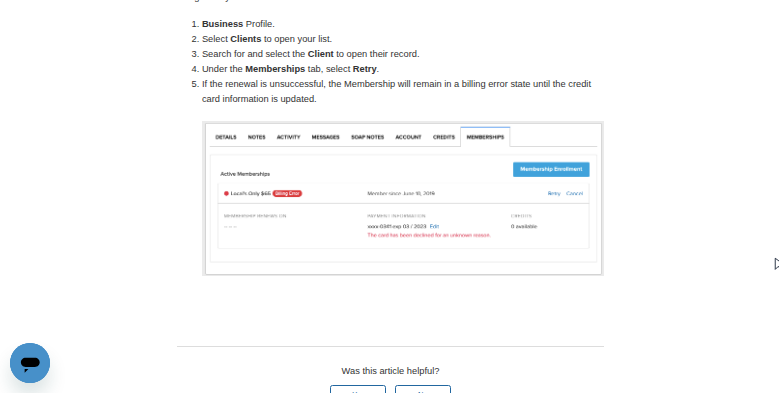
Autopilot adds seven automated emails. The Weekly Availability Announcement goes out on Sunday nights to clients with no visit in the past two weeks and none booked in the next two, and Bring 'Em Back starts when a client has not booked within 33 days of their last appointment. Memberships renew on their own, and a failed card puts the membership into Billing Error, with a Retry button on the client's Memberships tab.
According to MassageBook's help centre, Autopilot's sending criteria are predefined and cannot be adjusted, so the regular who comes every two weeks and the client who came once get the same trigger, and Bring 'Em Back runs only once per client. Series credits and gift certificates cannot expire automatically; the suggested workaround is to watch purchase dates on the Pre-Sold Series report and remove credits by hand.
For a year-end statement, MassageBook's instructions are to export the Income by Payment Type report and sort it by client name in a spreadsheet. A membership in Billing Error does not leave it until the client or the practice updates the card.
Rebooking notes can follow each client's usual gap between visits
The Appointments report already holds each client's rhythm. A client who has booked every three weeks for a year and is now at week five is a different case from a one-off visitor at day 33. At week four, the therapist can send that regular a message that is already written, with a link to the practice's booking page, long before Bring 'Em Back would start.
Whoever handles the desk works through the memberships in Billing Error once a week from one list, each with the decline message MassageBook shows on the Memberships tab and a polite note drafted asking the client to update the card. Clients whose series credits are close to the limit in the series name hear from the therapist in time to book before anything is removed.
Before the day ends, a clinic owner has tomorrow's open slots by therapist and room, with that therapist's unbooked regulars listed under each empty afternoon.
The therapist signs off on every note the agent prepares
MassageBook's own reports hold everything those lists need, and WebRun, an AI agent that works a real Chrome browser under a MassageBook login you create for it, reads them on a timetable and returns each list with its messages drafted.
Make that login a staff profile switched to Support Staff. It keeps access to the business but does not appear on the schedule, on the practice's MassageBook website or in the directory.
The agent never presses Retry on the Memberships tab or edits a balance on the Pre-Sold Series report; the therapist does both, and sends each note from their own email after reading it. The rebooking and series-credit jobs have cards of their own below.
Questions people ask
Should we turn off Bring 'Em Back?
No, leave it on. It catches clients who drift past 33 days and costs nothing to keep. The agent works earlier and more personally for the regulars whose usual gap is much shorter, and its notes are drafts the therapist sends, so the two do not compete.
Will adding a login for the agent put us on the Clinic plan?
Not if it is set up as Support Staff. MassageBook's Clinic tier is for accounts with two or more service providers taking client bookings, and its own FAQ says a single provider with additional Support Staff does not need it.
Can it put together year-end statements for HSA and FSA clients?
Yes, as drafts. It exports Income by Payment Type for the year, splits it by client and prepares a statement for each one to check and send. Receipts on the Practice and Clinic plans can also carry the provider's license number and NPI, which helps a client claim from their HSA or FSA.
Will the agent's login be able to open SOAP notes?
Only if its permissions allow it, and these workflows have no use for treatment notes: rebooking, memberships and series run on the schedule and the sales reports. MassageBook sets staff permissions by section, and a new staff member starts with every section ticked, so the business owner, the only one who can change them, should untick what the agent's login does not need.
Sources
- Autopilot Overview | MassageBook Support Lists the Autopilot emails, including Bring 'Em Back, Automated Birthday Greeting and Weekly Availability Announcement, and states that their sending criteria are predefined and cannot be adjusted.
- Autopilot Sending Criteria | MassageBook Support Bring 'Em Back starts when a client has not booked within 33 days of their most recent appointment and sends only once per client.
- Can I add an expiration date to Series Credits? | MassageBook Support Series credits cannot expire automatically; the workaround is to write the limit into the series title and remove credits by hand using the Pre-Sold Series report.
- Getting a Client's Membership out of Billing Error | MassageBook Support A failed renewal puts a membership into billing error until the card is updated, and the business can retry the charge from the client's Memberships tab.
- Generating End of Year statements for your clients | MassageBook Support A client's year-end statement is not built in: MassageBook says to export the Income by Payment Type report as a CSV file and sort it by client name in a spreadsheet.
- Choosing How Far in Advance Email and Text Reminders Send | MassageBook Support By default, email reminders send 24 hours before an appointment and text reminders 2 hours before.
- Adding Staff Who Are Not Service Providers | MassageBook Support Support Staff can work in the business under the owner's permissions but do not appear on the schedule, on the business's MassageBook website or in the directory.
- Assigning Permissions | MassageBook Support Permissions are set by section, new staff receive all of them by default, and only the Business Owner can change them.
- Clinic Tier Overview & FAQs | MassageBook Support The Clinic tier is for accounts with two or more service providers taking client bookings; a single provider with additional Support Staff does not need it.
4 ready-made MassageBook workflows
Each one names the apps it touches and the exact steps it takes. Open one to read what it will do, then turn it on.


Want one of these running on your own MassageBook?
Show WebRun the process once and it will run it on schedule, in your own private browser environment.