How to Automate Marketo
Automation in Marketo Engage is built from programs: smart campaigns react to form fills, engagement programs cast nurture emails, and approval gates every send. Checks that need other websites, like following each link before a send or matching exhausted streams to new blog posts, can go to WebRun, an AI agent signed in to Marketo and those sites.
 Written by
Ben Kirkwood
Solutions engineer
Written by
Ben Kirkwood
Solutions engineer
 Reviewed by
Dimitri Vasilev
Logistics analyst
Reviewed by
Dimitri Vasilev
Logistics analyst
Marketo Engage runs the programs that turn a form fill into a sales lead
A visitor downloads a buyer's guide on Tuesday. By the following Monday, Marketo has added points to her score, placed her in a nurture stream and emailed her details to a sales rep. The product's full name is Adobe Marketo Engage, Adobe's marketing automation platform for B2B teams within Adobe Experience Cloud.
Work is organised into programs. A webinar is a program and so is a six-month nurture, with smart lists deciding who is in it and smart campaigns deciding what happens when someone fills out a form, visits the pricing page or crosses a score. Engagement programs carry the long nurtures: streams of content sent one piece per cast, on a cadence.
The marketing operations manager owns the scoring model and the sync with Salesforce or Microsoft Dynamics. Campaign managers build the emails and landing pages, and the SDR team meets the result as MQLs in the CRM.
Tomorrow's send gets checked by hand the evening before
The quarterly webinar invitation is scheduled for 8:00 tomorrow to the whole EMEA database. Before leaving, the marketing operations manager opens the program, compares the smart list count with the last invitation, previews the email, clicks every link, and checks that the registration page still shows the date the email promises.
Nurture needs watching too. A stream written last year has people reaching the end of it, and Marketo holds them idle until someone adds more. The content marketer has published three new guides since, but they sit on the website, not in the stream.
Period costs are a monthly chore of their own: one figure per program, typed into its Setup tab so the ROI reports have a cost to work from. The ops manager collects them by hand, paid social from LinkedIn Campaign Manager, search from Google Ads and last month's trade show from an invoice in the shared inbox.
Marketo checks a program before it sends, but not the pages its emails link to
An email program does not go out until someone approves it, and approval reports any issues Marketo finds. Before that, the email editor warns about an empty link or a missing opt-out link, and it stops on a missing subject line.
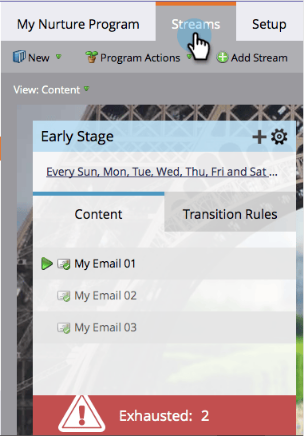
Engagement programs send each stream's next piece at every cast. People who reach the end wait idle until more content arrives; the stream shows how many, and with Exhausted Content Notifications switched on, Marketo emails a notice as well.
Send Alert emails a lead's details to the sales owner, the account owner or any other address. Where the CRM is Salesforce, Marketo syncs its tasks and events, so a smart list with the Not Activity was Logged filter already shows MQLs with no sales activity.
Approval does not open the registration page to check the webinar's date, or the offer page to confirm the offer is still up. The exhausted-content email reports that people are waiting, without naming which of last month's guides could go next. Period costs go in program by program, in the Setup tab or through the REST API's program endpoint; Marketo Measure, Adobe's attribution product, pulls spend from ad accounts connected to it, for its own ROI reports. A trade show's invoice still needs a person to read it.
A mismatched webinar date reaches the ops manager before 8:00
The checklist for tomorrow's webinar invitation puts the smart list count beside the last invitation's, follows every link to its page, and opens with a mismatch: the registration page now says Thursday, and the email still says Wednesday. The ops manager corrects the email that evening and approves the edited version.
Every stream with people waiting at its end gets its own Trello card, naming the guides and posts the website has published that the stream does not hold yet. The content marketer picks which one becomes the next cast, and adds it.
One sheet holds last month's spend for every program, each figure taken from where the money went: LinkedIn Campaign Manager, Google Ads, the trade show's invoice. The ops manager checks the sheet against the budget and types the figures into the programs' Setup tabs.
Marketo's role permissions set what the agent can change
Each evening's link check covers every program due tomorrow in Marketing Activities and every page its email points to, including the registration page for the 8:00 webinar invitation. WebRun is an AI agent that works a real Chrome browser, signed in as you. Its Marketo login is a separate user your admin creates, and the same browser carries on to the pages outside Marketo.
Marketo builds roles from individual permissions, so that user's role can leave out approving email programs and activating or scheduling campaigns altogether. What comes back is a checklist, a card or a sheet, and an email program goes out only once someone holding the approval permission approves it. Setting up any of the Marketo workflows on this page starts with creating that user.

Questions people ask
Which Marketo permissions should the agent's user leave out?
Approve Email Program, Activate Trigger Campaign, Schedule Batch Campaign and Edit Marketing Asset, all under Access Marketing Activities. A role that keeps Access Marketing Activities and Access Database without those four can open programs and read people, while every email program it looks at still needs a person to approve it.
Does the link check cover rendering problems too?
No, rendering belongs to Litmus. Marketo Engage's email designer runs Litmus previews across popular desktop, mobile and web email clients for anyone with an active Litmus account, from the Simulate Content button. The link check covers what a rendering test does not: whether each link opens a live page that says what the email promises.
How does it choose new content for an exhausted stream?
It doesn't choose. It lists what the website has published that the stream does not hold yet, and the content marketer decides what goes in next. Adding a piece ends the wait, since exhausted people sit idle only until new content is added.
Can period costs go in as estimates?
Yes. Adobe's documentation says a period cost can be an estimate and edited once the exact amount is known. Each one is a whole number, with no decimals or commas, for a month picked in the program's Setup tab, and one program can carry several months.
Sources
- Disable and Enable Exhausted Content Notifications | Adobe Marketo Engage Adobe's documentation that Marketo can email a notification, and mark the stream, when people exhaust all content in an engagement stream.
- Send Alert | Adobe Marketo Engage Describes the Send Alert flow step, which emails person information to the sales owner, the account owner or other addresses.
- Approve/Unapprove an Email Program | Adobe Marketo Engage States that an email program that is not approved will not go out, and that Marketo reports issues it finds on approval.
- Descriptions of Role Permissions | Adobe Marketo Engage Lists the permissions roles are built from, including Approve Email Program, Activate Trigger Campaign, Schedule Batch Campaign and Edit Marketing Asset under Access Marketing Activities.
- SFDC Sync: Activity Sync | Adobe Marketo Engage Marketo syncs Salesforce Events and Tasks one way into Marketo, with the Activity was Logged and Not Activity was Logged filters.
- Email authoring | Adobe Marketo Engage Lists the email editor's warnings (empty link, missing opt-out link) and errors (missing subject line); none checks a link's destination.
- Test Email Rendering with Litmus | Adobe Marketo Engage Litmus previews in desktop, mobile and web email clients, available to Marketo Engage users with an active Litmus account.
- People Who Have Exhausted Content | Adobe Marketo Engage People who receive every piece in a stream wait idle until more is added; the count shows on the stream in the Streams tab.
- Using Period Costs in a Program | Adobe Marketo Engage Period costs are added per month in a program's Setup tab as whole numbers, can be estimates edited later, and feed ROI reporting.
- Programs | Marketo Engage REST API The program update endpoint accepts a costs array with startDate, cost and an optional note.
- Spend Management Methods | Marketo Measure Marketo Measure pulls spend automatically from ad accounts connected to it by API, for its own ROI reporting, with manual upload for other channels.
3 ready-made Marketo workflows
Each one names the apps it touches and the exact steps it takes. Open one to read what it will do, then turn it on.




Want one of these running on your own Marketo?
Show WebRun the process once and it will run it on schedule, in your own private browser environment.