How to Automate Expensify
Expensify handles the routine itself: SmartScan reads receipts, submissions run on a schedule, and workspace rules, RuleBot and Advanced settings flag, route, approve and pay compliant reports. The checks outside the workspace stay manual, such as confirming an export landed in QuickBooks or Xero, which a browser agent such as WebRun can take on.
 Written by
Nora Whitfield
Editorial lead
Written by
Nora Whitfield
Editorial lead
 Reviewed by
Clara Bennett
Revenue operations
Reviewed by
Clara Bennett
Revenue operations
SmartScan made the receipt photo the start of every expense
For most employees, Expensify is SmartScan: they photograph a receipt and the merchant, date, total and currency are filled in for them. Behind that sits a workspace where an admin sets the categories, approvers and rules, and where approved reports are paid and exported to QuickBooks, Xero, NetSuite or Sage Intacct.
New Expensify, the current version, is built around an Inbox where approval requests and comments on reports arrive like messages, and Concierge, Expensify's AI assistant, answers questions there too. The Expensify Card, company cards linked from other banks, travel booking and bill pay sit alongside.
Accounting firms get a program of their own, ExpensifyApproved!, with a central admin dashboard for all client spend. Expensify's partner guide has the firm create one dedicated email, such as accounting@ at the firm's domain, and add it as a Workspace Admin in each client's workspace.
Month end still means opening each client workspace in turn
Say a bookkeeper has a dozen clients on Expensify. Month end means opening each workspace in turn to see which reports are still open, which wait on a manager who is travelling, which reimbursements have not been paid and which exports failed. Each answer goes into the firm's close checklist by hand, client after client.
A failed export is an errand of its own. ONL442 on a QuickBooks Online export means only part of the report arrived, so the bookkeeper finds and deletes the half-created bills in QuickBooks before exporting again. ONL888 means the export date falls in a period the client has already closed.
At a single company, a card from a bank with no feed into Expensify leaves the bookkeeper ticking its statement against the receipts by eye. When a feed breaks, transactions stop arriving until an admin reconnects it, and on Fridays the owner asks how much is waiting to be reimbursed, and to whom.
RuleBot acts on reports, not on the client's ledger or bank
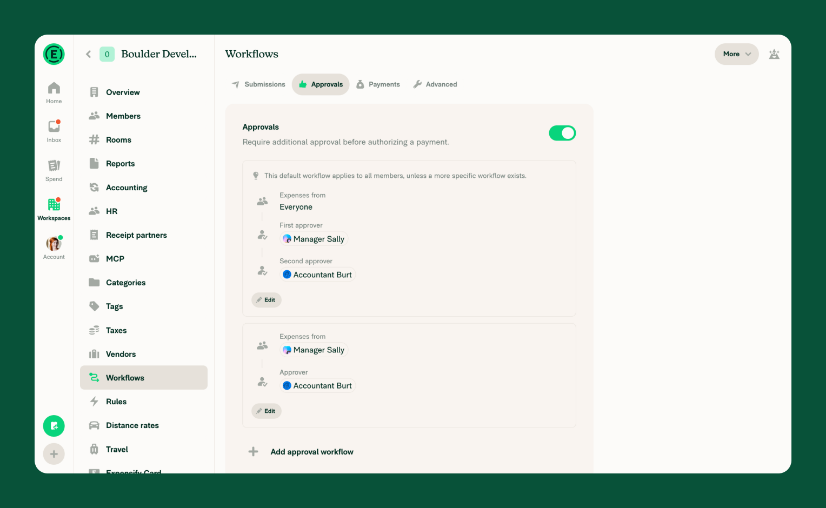
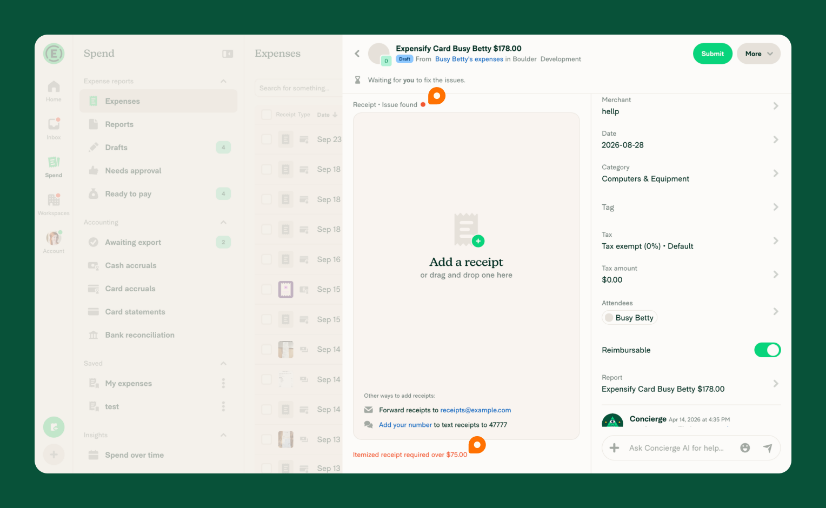
Scheduled submission sends reports in without anyone pressing Submit, daily, weekly, twice a month, monthly or by trip. By trip means Expensify submits once two full days pass with no new expense. Workspace rules on the Control plan flag expenses above an amount or older than a given number of days, require receipts over a threshold and flag receipt line items such as alcohol, gambling or tobacco.
Under Advanced, Expensify can approve compliant reports automatically while randomly auditing a percentage of the rest, and pay approved reports under an amount the admin sets. Agent rules, written in plain language by a Workspace Admin, are enforced by RuleBot, which can ask the submitter a question, edit an expense, forward a report to an approver or approve it.
Each of those acts on reports inside the workspace, and RuleBot leaves reports alone once they are Paid or Done. Whether an exported report arrived whole in QuickBooks or Xero is a question for the ledger, and a card with no feed shows its charges only on the bank's statement. The admin dashboard gathers every client's spend, but the firm's close tracker is a separate system.
The bookkeeper can hear about an ONL888 the day the export fails
An ONL888 on a client's report means the export date falls in a period already closed in QuickBooks Online. The bookkeeper who owns that client could hear about it the day it happens, with the report and the closed period named, instead of meeting it at close.
In the last week of the month, the close tracker could already hold a row per client for the partner who runs close: open reports, approvals stuck with a travelling manager, unpaid reimbursements and failed exports. Before the month closes, the bookkeeper could learn which approved reports never became a bill in QuickBooks or Xero. Any ONL442 export that left half-created bills behind would show up too.
For a card with no feed, the bookkeeper could get the bank statement already ticked against the receipts in Expensify, with the charges that have no receipt named. The owner of a small company could get Friday's answer by email without opening Expensify at all: what is waiting to be reimbursed, to whom, and since when.
One pass covers every client workspace and leaves each ledger alone
A firm with a dozen Expensify clients has twelve workspaces and twelve ledgers to go through at month end, plus a bank portal for each card with no feed. WebRun is an AI agent that works a real Chrome browser, signed in as you. The firm's Expensify login lets it open the client workspaces one after another and note the open reports and export errors. Then it checks each client's QuickBooks or Xero and the bank portal, and writes the results into the close tracker.
The agent leaves the Approve, Pay and Export shortcuts in Expensify's Spend tab to the bookkeeper and makes no entries in a client's ledger. A text to a submitter about a policy flag goes into that client's row of the close tracker, and the bookkeeper who owns the client decides whether it goes out. Every card below starts on an Expensify screen.
Questions people ask
Does it matter whether we use New Expensify or Expensify Classic?
No. It runs in whichever version the workspace opens in, so there is nothing to migrate or reconnect for it. The menus differ between the two, and Expensify keeps separate help articles for each.
Can the agent use an Auditor seat instead of the firm's admin login?
Yes, and for reading it is the safer choice. An Auditor can view and comment on every report and has read-only access to the workspace settings pages, but cannot change a setting or take workflow actions such as approving or paying. A Workspace Admin or a People admin can add an Auditor to each client's workspace.
What happens to card transactions while a company card feed is broken?
They may import once the connection is restored. A workspace admin or card admin reconnects the feed under Workspaces, then the workspace name, then Company cards. After too many login attempts, Expensify asks you to wait 24 hours before trying again.
Sources
- Workspace Workflows (New Expensify) Expensify's help page on automatic submissions on a schedule, approvers and over-limit approvers, payments, and Advanced settings that auto-approve compliant reports and auto-pay approved reports under a set amount.
- Create Agent Rules Explains that Agent rules are written in natural language by a Workspace Admin and enforced by RuleBot, which can ask questions, edit expenses, forward reports or approve them, and that rules do not apply to Paid or Done reports.
- Workspace Rules Lists workspace rules such as flagging expenses above an amount, requiring receipts and flagging restricted receipt line items like alcohol or gambling.
- ExpensifyApproved! accountants program Describes Expensify's program for accounting firms, including a centralized admin dashboard to manage and monitor all client spend.
- Partner Billing Guide Tells accountants to create a dedicated email for managing client workspaces and add it as a Workspace Admin in each client's workspace.
- ONL442 Export Error in QuickBooks Online A partial export: the fix is to delete the partially created bills, checks or journal entries in QuickBooks Online and export the report again.
- ONL888 Export Error in QuickBooks Online The export date falls in a reporting period that is closed in QuickBooks Online; reopen the period or change the export date.
- Managing Workspace Members in New Expensify Defines the workspace roles, including the Auditor, who can view and comment on reports but cannot change settings or take workflow actions such as approving or paying.
- Fix a Broken Company Card Feed Connection A workspace admin or card admin reconnects a broken feed under Company cards; missed transactions may import once it is restored, and too many attempts mean a 24-hour wait.
3 ready-made Expensify workflows
Each one names the apps it touches and the exact steps it takes. Open one to read what it will do, then turn it on.


Want one of these running on your own Expensify?
Show WebRun the process once and it will run it on schedule, in your own private browser environment.