How to Automate Enerflo
Automating Enerflo mostly means keeping Install Tracker's milestones true to the county and utility portals, because Enerflo's own milestone texts, task reminders and reports all run from those milestones. An AI agent such as WebRun can check each permit and interconnection portal daily and post what changed to the ops team in Slack.
 Written by
Rosa Lindqvist
Operations editor
Written by
Rosa Lindqvist
Operations editor
 Reviewed by
Julian Adeniyi
Retail operations
Reviewed by
Julian Adeniyi
Retail operations
Enerflo runs the solar sale and the install on one project
A residential solar sale can be signed at a kitchen table in one evening. Switching the system on takes a permit from the building department, the install, an inspection and the utility's permission to operate, known as PTO. Offices outside the company grant the permit and PTO.
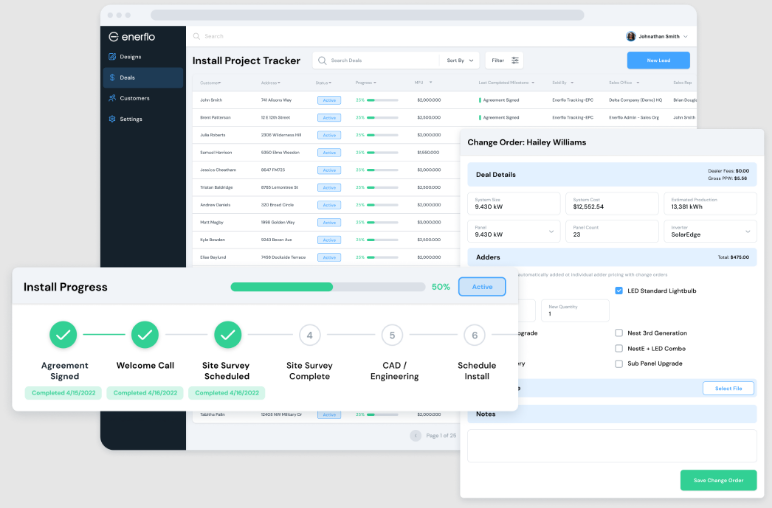
Enerflo is the platform residential solar installers, sales dealers, hybrid companies and vertically integrated providers run that stretch on, from first knock to PTO. On the sales side it holds the lead, a design from Aurora or OpenSolar, the proposal with loan, lease or PPA options from integrated lenders, and the contract sent for e-signature. After the sale, Install Tracker moves the project through the milestones each company sets up for its own path to glass on the roof. The homeowner follows along in a white-labeled Customer Portal that shows upcoming site surveys and installs.
The wait after the signature belongs to the county and the utility
Once the contract is signed, the permit sits with the building department (the AHJ, on the paperwork) and the interconnection application with the utility. Someone books the inspection after the install, and PTO arrives as a letter or as a status change on the utility's own site.
An ops coordinator keeps up with all of it by hand, one portal at a time: log in, search the address, read the status, go back to Enerflo and move the milestone. An installer working four counties and two utility territories has six logins to keep. Meanwhile the lender wants a stip cleared, the rep wants to know why the customer has not been installed, and the homeowner rings to ask when the panels will start producing.
A permit approved on Tuesday still shows the old milestone in Install Tracker until someone reads the county portal and moves it, and Enerflo's milestone text to the homeowner waits with it.
Milestone notifications fire only when somebody moves the milestone
Project Submission keeps a deal away from the ops team until it has a utility bill, signed loan documents and cleared stips. When a key milestone is reached, Enerflo can text or email the customer and the rep without anyone writing the message. Project Action Groups auto-assign an owner to each task and notify that person when it is their turn, and reminders go out on tasks left unfinished. For a company with a developer, there are REST and GraphQL APIs with webhooks, and Zapier appears on the integrations page beside CRMs such as Salesforce and HubSpot.
Install Tracker is where installers track permits, inspections and utility approvals, yet nothing on the integrations page connects to a building department or a utility's interconnection system. The status in Install Tracker is whatever someone last read off a portal and typed in, and the milestone text to the homeowner goes out only when that person moves the milestone.
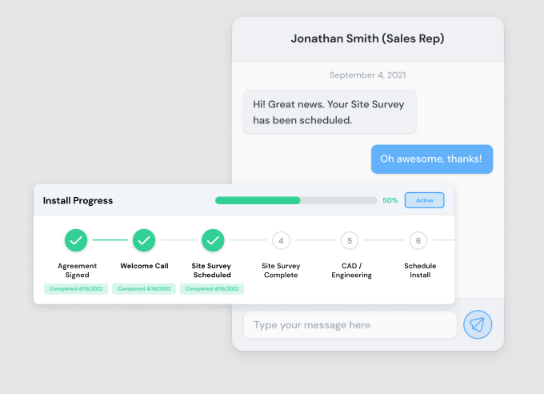
Ops can see each county and utility status beside its Enerflo milestone
The ops manager can read all six portals in one Slack post each morning: each open permit as its jurisdiction's portal reports it and each interconnection application as the utility reports it, beside the milestone in Install Tracker, with every mismatch at the top. If you allow it, the milestone itself moves, and Enerflo sends its usual text to the homeowner as it would for any other update.
A Slack alert tells the install coordinator which inspections fall in the next seven days and which PTO dates are slipping past their target. A rep hears about a project with no activity for five days before the homeowner has to ask, and the sales manager reads the weekly pipeline by stage, with stalled projects named, in the sales leaders' Slack channel. When financing is approved, the rep opens a drafted request to the homeowner for the missing documents, and a few weeks after PTO the rep approves a referral request to the same household.
Install Tracker stays current when an agent reads the portals
The portal round is a login per county and per utility, an address search for each project, and a milestone moved by hand in Install Tracker. WebRun is an AI agent that works a real Chrome browser, signed in as you. It works from the project list in Enerflo, and for each project it visits the permit and utility portals your team already uses and notes what changed.
Start it under a read-only policy, which blocks typing, so it lists the changes and an ops coordinator moves each milestone. Once its lists hold up, you can let it move milestones itself, knowing each move sends Enerflo's own milestone text. The stalled-project alert and the PTO and inspection tracker below read Install Tracker alone, so they need no portal logins at all.
Questions people ask
Can it sign in to utility interconnection portals?
Yes, with a login your ops team already uses for that utility. A portal with no API is no obstacle, because the agent reads the application status off the page, and each utility's site is one more domain on its allowlist.
Will moving a milestone send the homeowner a text?
It will if your milestone communications are set up to, because Enerflo sends them when a key milestone is reached, whoever moved it. That is why the agent starts read-only, with a coordinator moving milestones until its lists have proved reliable.
Can it help collect financing documents from homeowners?
Yes. When financing is approved, it can list the documents still missing on the project and draft the request to the homeowner for the rep to send. The upload to the lender stays with your team.
We sell the systems and a partner installs them. What is there for a sales dealer?
The sales side. A dealer's Enerflo work is mostly deal status and customer follow-up, so the financing follow-ups, the referral requests and the pipeline summary fit it. The permit and utility checks belong to whoever holds the install.
Sources
- Enerflo | Enerflo Solar Software Platform Features | Project Management Describes Project Submission (utility bill, signed loan docs, cleared stips), SMS or email sent when key milestones are reached, Project Action Groups, reminders on uncompleted tasks and custom reports.
- Enerflo | Enerflo FAQ | Solar Platform Features, Pricing & Integrations States that installers track permits, inspections and utility approvals in Install Tracker, lists the REST and GraphQL APIs and webhooks, the design integrations, and the white-labeled Customer Portal.
- Enerflo | Integrations for Residential Solar Sales & Fulfillment Enerflo's integration list: design, finance, CRM, productivity, dialer and SMS, welcome call, storage and reporting partners, with no permitting, utility interconnection, inspection or PTO integrations listed.
- Enerflo | The Operating System for Residential Solar Describes Enerflo as connecting solar CRM, design, financing, contracting and project management from first knock to Permission to Operate.
8 ready-made Enerflo workflows
Each one names the apps it touches and the exact steps it takes. Open one to read what it will do, then turn it on.


Want one of these running on your own Enerflo?
Show WebRun the process once and it will run it on schedule, in your own private browser environment.