How to Automate D-Tools
Automating D-Tools mostly means comparing dates it already holds: each item's expected arrival against its install start, open pre-install items, unsigned change orders and quiet proposals. D-Tools Cloud sends its own proposal reminders; an AI agent like WebRun can run the comparisons each morning and draft the emails a person sends.
 Written by
Hannah Vogel
Finance operations
Written by
Hannah Vogel
Finance operations
 Reviewed by
Dimitri Vasilev
Logistics analyst
Reviewed by
Dimitri Vasilev
Logistics analyst
An AV job is sold and built from the D-Tools bill of materials
Every integration job comes down to a list: the projector and screen, the AV receiver, eleven in-ceiling speakers, the lighting keypads, the motorized shades, the rack, the network switch and the cable to join them up. D-Tools makes the software that list is built in for audio-video, security and low-voltage integrators, as D-Tools Cloud and as the System Integrator platform, SI.
In D-Tools Cloud the salesperson builds the quote from the Integrated Product Library, with integrator pricing on each product, and can drop devices straight onto a photo of the room. The client gets a multimedia proposal and can sign it and pay in one sitting.
After that, the same bill of materials drives purchase orders, change orders, the schedule by project and phase, the technicians' mobile app with barcode scanning, and the service plan with automated payments that follows the install.
Install dates hinge on the builder, the distributor and the client
A proposal for a media room went out two weeks ago. Both reminder emails have gone, and the client's last look at it was eight days ago.
On another job the projector is on order, and the expected arrival date on the PO now falls two days after the media room trim-out. Next Tuesday's install still has open questions: the builder's superintendent has not confirmed site access, the engineered drawings are unsigned, and the low-voltage permit is not in. The change order for two outdoor speakers has sat unsigned since last Tuesday.
Meanwhile a home theater inquiry arrives through the website form. It needs a record in D-Tools, a row in the pipeline sheet and a word to the salesperson.
D-Tools Cloud tracks each item's order and install status
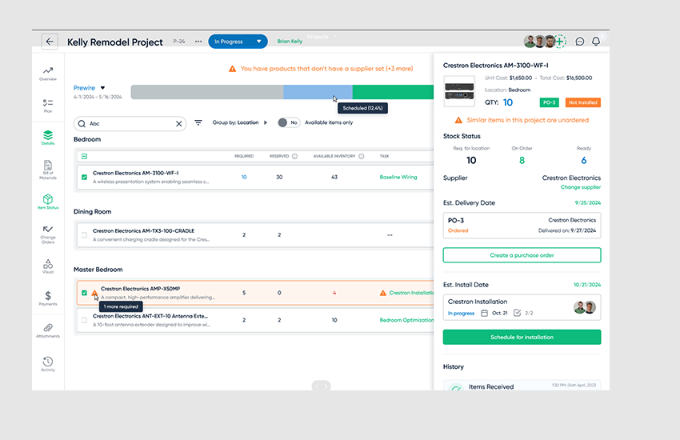
Item Status gives every product in a project an order status, such as Ready to Order, Ordered or Received, and an install status, such as Staged, Picked or Installed. Once the office marks a PO as Ordered, it can enter each item's tracking number, expected arrival date and received quantity, and the tracking number opens the carrier's status page.
A shared proposal can carry an end date with up to two reminder emails before it, and Proposal Analytics shows how the client has viewed it. External change orders go to the project manager for approval, then to the client as a CO proposal to accept, and the accepted changes flow into the bill of materials. POs can be emailed to suppliers from D-Tools, and ADI orders go electronically with protected pricing.
The two dates that matter most sit apart: the expected arrival on the PO and the install start on the schedule, and the project manager reads both to notice that the projector lands after trim-out. After the second reminder, a quiet proposal waits for the salesperson to pick up the phone. For a firm with a handful of projects, reading Item Status beside the schedule takes minutes, and the ETA check adds little.
The project manager learns of a late projector before the crew does
The project manager reads a 7:30 list in the project management channel of every ordered item whose expected arrival falls within three days of its project's install start, or after it, grouped by project with the supplier and the days at risk. Anything due after the install has begun carries an urgent flag, and the delay sheet keeps each item until it clears.
At seven, the readiness digest lists projects starting within the week that still have a pre-install item open, such as site access, equipment delivery, signed drawings or the permit, and the project manager has an email to the project contact ready, naming what is missing. The same digest shows projects with nothing open as clear.
The eight o'clock list in the project channel holds every unsigned change order, whether draft, pending or sent, with its value and days outstanding; anything past five days is urgent, and each has a DocuSign envelope prepared. Proposals with no activity for five business days get a follow-up to the client that refers to the scope and the proposal date, written for the salesperson to send, and the sales channel lists them by value. A website inquiry becomes a D-Tools record marked Prospect, assigned to a salesperson and posted in the sales channel.
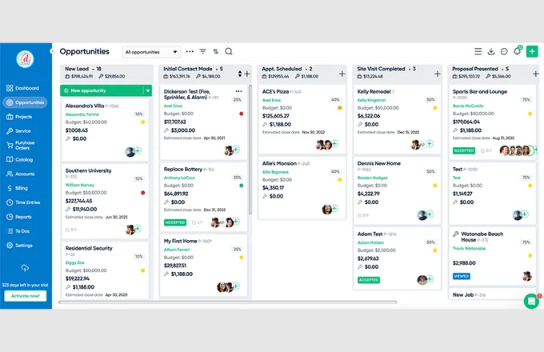
The inquiry job is the only one that writes to D-Tools
With twenty projects open, a project manager would have to open each one's purchase orders and schedule every morning to catch the late projector. WebRun is an AI agent that works a real Chrome browser, signed in as you. Its D-Tools login belongs to a user group you set up, and that group lacks the Approve or reject change orders permission.
Apart from opening a Prospect record for each new inquiry, WebRun only reads D-Tools. The project manager or the salesperson reads each client email in Gmail, and each DocuSign envelope, before it goes anywhere. The ETA check matters most in a month crowded with installs, when a late projector is easiest to miss.
Questions people ask
Do we still need DocuSign for change orders?
Not on D-Tools Cloud, where an external change order is accepted as a CO proposal inside D-Tools. The change-order job prepares DocuSign envelopes for shops that send change orders that way; on Cloud alone, its list of unsigned change orders is the part to keep.
Where does the ETA come from?
From the expected arrival date your team enters on each item once its PO is marked Ordered. WebRun compares that date with the project's install start. It does not look up ETAs on distributors' sites, so the check is only as current as the dates on your POs.
Does the proposal follow-up wait for D-Tools' own reminders to finish?
No. It looks at the proposal's last activity rather than at the reminders, so a client can get both. Keep the end date and the two reminder emails, and send the drafted note only when a client has gone quiet for five business days.
Can the inquiry job reply to the prospect?
No. It sets up the Prospect record, logs the inquiry in the pipeline sheet and tells the sales channel. The salesperson decides when and how to get in touch.
Sources
- D-Tools Cloud Features D-Tools' feature overview: the Integrated Product Library with dealer pricing, visual quoting on photos and plans, multimedia proposals with e-signature and payment, change orders, service plans, recurring payments and barcode receiving in the mobile app.
- Setting the end date and reminders | D-Tools Help Center Shows that a shared proposal can have an end date and up to two reminder emails before it, and that Proposal Analytics tracks how customers view it.
- Can I track the product shipments that were ordered from D-Tools Cloud? | D-Tools Help Center Explains that the supplier's shipment number is entered by hand in a purchase order's Shipment Tracking field, which links to a carrier tracking page.
- Let ADI Manage Your Pricing and Purchase Orders | D-Tools Help Center Describes the ADI integration: real-time protected pricing on quotes and purchase orders sent electronically to ADI from D-Tools Cloud.
- Item Status Every product in a D-Tools Cloud project carries an order status (Unordered to Received, Client Supplied, In Stock) and an install status (Not Scheduled to Installed).
- Configuring a purchase order Once a PO is marked Ordered, each item's tracking number, expected arrival date and received quantity can be updated.
- External change order External change orders are approved by the project manager, shared with the client as a CO proposal, and factored into the bill of materials once accepted.
- Project Manager Approval for change orders Approving change orders needs the Approve or reject change orders permission on the user's group.
5 ready-made D-Tools workflows
Each one names the apps it touches and the exact steps it takes. Open one to read what it will do, then turn it on.




Want one of these running on your own D-Tools?
Show WebRun the process once and it will run it on schedule, in your own private browser environment.