How to Automate CompanyCam
Use CompanyCam's own connections first: new photos land on the matching job in JobNimbus, AccuLynx or Jobber, and a Checklist can hold a field open until its photo is added. What is left is carrying photos into portals and estimating tools with no integration, and noticing missing shots, which an AI agent such as WebRun can do.
 Written by
Sofia Marchetti
Marketing operations
Written by
Sofia Marchetti
Marketing operations
 Reviewed by
Marta Ellison
Automation strategist
Reviewed by
Marta Ellison
Automation strategist
A CompanyCam project is the dated record of what the crew saw
CompanyCam (also written Company Cam) is the photo app a contractor puts on every phone in the truck. A roofer shoots the decking before the new shingles go down, and a restoration tech photographs the wet drywall behind the vanity. CompanyCam stamps each photo with the time, saves it by location in the project the crew is working on, and shows it to the whole team at once.
At a desk, the project manager follows the same jobs through the Project Feed. Tags and Labels mark the shots that matter, and an Annotation drawn over a photo points at the soft spot in the decking. Homeowners get their own view: a Timeline link that fills with photos as the crew takes them, or a Gallery of the shots the office chose to share.
Months later, when a homeowner disputes the charge for replaced decking, the office opens the project and finds the tear-off photo with its date on it.
Office staff carry the photos to every system that asks for them
The estimator pricing Tuesday's gutter job has to ask the crew lead which project the measurements went into. At a cabinet shop nothing gets cut until the field measure photos arrive, so someone opens that project each morning to see whether they have. An adjuster's portal wants the damage photos attached one claim at a time. A supplier will credit a split bundle of shingles only against a picture of it.
On a garage floor coating, the crew forgets the after shots, and the office learns of it when the homeowner asks to see the finished floor. When the shots do exist, a coordinator picks the two good ones and writes the recap email by hand.
The Chrome Extension still waits for a person to pick the photos
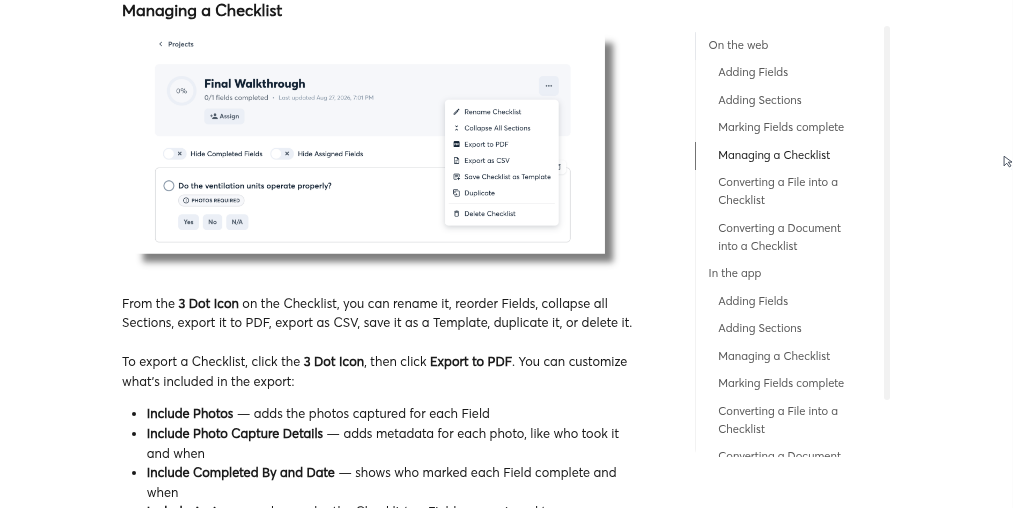
Once JobNimbus, AccuLynx or Jobber is connected, a photo taken in CompanyCam shows up on the matching job in the CRM straight away. AccuLynx gets the tags and documents as well. For the crew's side, the office saves a Checklist as a template and assigns it to people. Photos Required, on by default, stops anyone marking a field complete until it has a photo. Four AI tools write up what the crew captured: Walkthrough Note turns a narrated site walk into a document, AI Summary and Progress Recap build updates from selected photos, and Daily Log records the day.
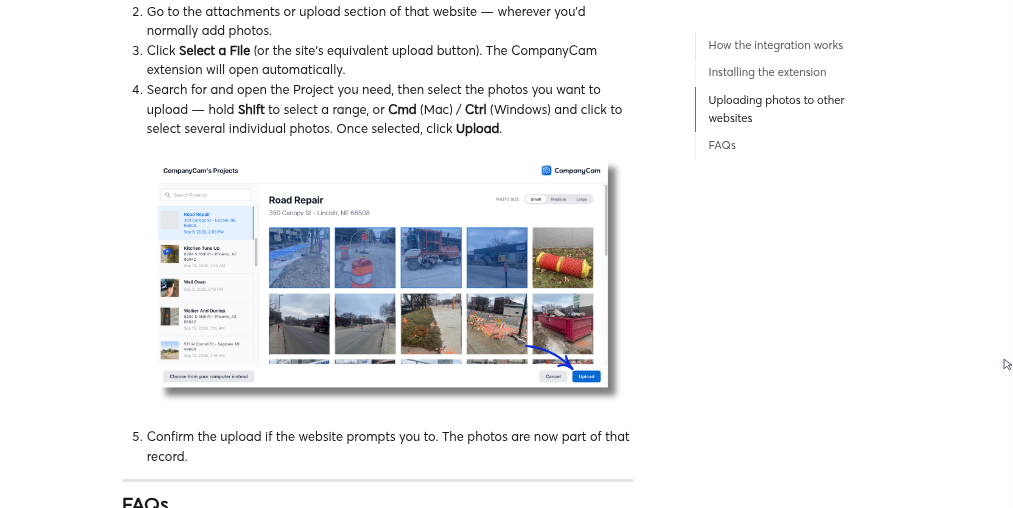
Everywhere else, CompanyCam offers a Chrome Extension that puts its photos on almost any website with a file upload. Its help article lays out the routine: click the site's upload button, let the extension open, search for the project, select the photos, upload. Someone at the keyboard goes through those steps for each upload.
So a carrier portal or a supplier's credit form gets its photos by extension or download rather than by sync. Photos Required holds that field open inside CompanyCam, and the checklist feed shows it to anyone who looks. The estimator in a separate estimating tool hears about the missing photo only when somebody checks the feed.
The estimator can open a proposal already drafted from the gutter photos
A gutter tech measures the runs and photographs each downspout. Before the truck is back at the shop, the estimator can have a linear-foot proposal waiting in the estimating tool at the company's price per foot, with the quote email written and nothing sent.
A cabinet installer photographs the punch list on site. Back at the shop, the foreman gets each fix matched to the job spec and assigned to the crew that owns it. When a field measure was booked for Thursday and the dimension photos are still missing on Friday morning, the crew lead hears about it before anyone cuts a panel.
Before a roofing week begins, the production manager sees every upcoming project beside the material order placed for it, and an order email to the supplier waits in the inbox for any project that has none, before a crew arrives with nothing to install. At the end of a coating job, the office opens a homeowner recap with the first and last photos already in it, ready to read and send.
CompanyCam's search-and-select routine no longer needs a person at the keyboard
A coordinator can spend whole afternoons in CompanyCam picking photos for somebody else's system. WebRun is an AI agent that works a real Chrome browser, signed in as you. In CompanyCam it can have a user of its own on your account, and it signs in to the estimating tool or the carrier portal the same way, so the destination does not have to be on CompanyCam's integrations list.
Make that user a Standard one. CompanyCam lets Standard users trash only the photos they took themselves, so nothing a crew shot is within the agent's reach. The proposal it builds stays unsent in the estimating tool, and the homeowner recap sits in the office's email drafts until the estimator or the office manager sends it. Below, the gutter proposal is written for DripJobs and the punch-list follow-up for Cabinet Vision and Asana.
Questions people ask
Why not just use the CompanyCam Chrome extension?
Use it whenever a person is already at the keyboard. On another site the extension still needs someone to open it, search for the project and pick the photos. The agent does the searching and picking by a rule you give it, such as every photo with a Damage tag, fills in the rest of the page and stops before anything is submitted.
Which CRMs does CompanyCam sync photos to by itself?
JobNimbus, AccuLynx and Jobber get each new photo on the matching job straight away, and AccuLynx also gets the tags, videos and documents. CompanyCam's integrations page lists more, including JobTread, Leap, Roofr, ServiceTitan and QuickBooks Online. Keep those connections running. The agent is for the systems that are not on the list, and for checks a sync never makes, such as whether the after photos exist.
Our crews forget the after photos. Can the agent catch that?
Yes. It can open each project that closed this week, look for photos taken after the work finished, and list the projects with none. If your crews work from a Checklist with Photos Required on, CompanyCam already holds that field open; the agent's list also catches the jobs where nobody started a checklist.
Does CompanyCam have review requests built in?
Yes, with the Marketing Suite, an add-on that includes review requests. Before the ask goes out, the agent checks that the job is closed and paid in your CRM.
Sources
- CompanyCam Integrations Lists CompanyCam's integrations (AccuLynx, Jobber, JobNimbus, JobTread, Leap, QuickBooks Online, Roofr, ServiceTitan and others), describes photos syncing back to the matching job in the CRM, and introduces the Chrome Extension for other websites.
- Installing and Using the CompanyCam Chrome Extension CompanyCam's help article showing that on another website a person opens the upload dialog, searches for the project and selects the photos each time.
- 4 AI Reporting Tools That Generate Project Reports Without Typing a Word CompanyCam's own description of Walkthrough Note, AI Summary, Progress Recap and Daily Log, and what each builds from photos and voice.
- CompanyCam Pricing Plan list (Core, Crew, Scale, Enterprise) showing checklists standardised across teams from the Crew plan up and the Marketing Suite offered as an add-on.
- CompanyCam Features Names the Project Feed, Tags and Labels, Annotations, Galleries and Timelines, and says every photo is time-stamped, saved by location and visible to the whole team.
- Creating a Checklist CompanyCam's help article: Checklist templates, assigning a checklist or a field to people, and each field requiring a photo to be marked complete by default.
- How to Delete Photos and Videos CompanyCam's help article: all users can move photos to the Trash, but Standard and Restricted users only photos or videos they took or uploaded, and restoring needs the Admin or Manager role.
8 ready-made CompanyCam workflows
Each one names the apps it touches and the exact steps it takes. Open one to read what it will do, then turn it on.


Want one of these running on your own CompanyCam?
Show WebRun the process once and it will run it on schedule, in your own private browser environment.