How to Automate ClinicSense
On the Standard and Premium plans, ClinicSense emails reminders, birthday notes, wellness check-ins and review requests by itself. Notes about a particular certificate, package, piece of feedback or unpaid invoice still have to be written one client at a time; that reading and drafting is work for an AI agent such as WebRun.
 Written by
Samuel Adeyemi
Integrations writer
Written by
Samuel Adeyemi
Integrations writer
 Reviewed by
Priya Raghavan
Solutions lead
Reviewed by
Priya Raghavan
Solutions lead
ClinicSense sends the intake form before the client arrives and the invoice after
ClinicSense is clinic management software for massage therapists above all, with physical therapists and chiropractors among its users, from part-time solo practitioners to clinics with several practitioners.
A client books on the practice website, gets the intake and consent forms by email without anyone sending them, and fills them in at home. After the treatment, the practitioner writes the SOAP note from a template built for that service, ClinicSense generates the invoice, and the payment goes through Square.
The plan decides how much of the business lives there. Lite covers 20 appointments a month and Standard 200, with Premium unlimited, and only Standard and Premium sell gift certificates and treatment packages. Canadian practices on those plans bill insurers through TELUS Health eClaims.
Unredeemed gift certificates and unpaid invoices wait for the end of the day
The hands-on day ends around six, and the desk work starts after it. An invoice from Tuesday still shows no payment because the client said they would send a transfer. A five-session package bought in the spring has two sessions left, and that client's last booking was in June; another client used the last session of theirs three weeks ago and has not been offered the next one.
Gift certificates sold in December are sitting unredeemed in March, and the people holding them have never been in. A regular left private feedback saying the room was cold and the pressure too light, which deserves a personal reply. A new Google review is waiting for a response, and the bookkeeper wants last month's figures.
ClinicSense's automatic client emails start on the Standard plan
Appointment reminders go out by email on every plan and by text on Standard and Premium, and a client confirms attendance with a button in the reminder. On Standard and Premium, each client gets a birthday email with an optional promo code, and a wellness check-in goes to clients who have not booked for a length of time the practitioner chooses.
The day after an appointment, those plans ask the client for feedback and a Google review, no more than once a month, with a way to answer privately. Clients with three appointments behind them get an email saying the practice is taking new clients. The availability summary emails the open slots for the next two weeks on a schedule the practitioner picks, and No-Show Guard can require a card on file, a deposit or full prepayment at online booking.
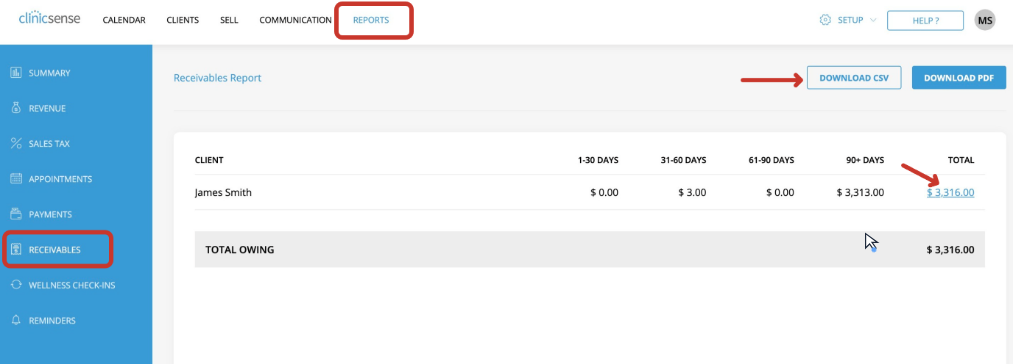
The practitioner writes each of those emails once, and it goes to everyone who meets its rule, so a client with two sessions left on a package gets the same check-in as anyone else. Gift certificate balances sit under Sell, the receivables report lists who owes, and the eClaims reconciliation report shows which insurer has paid; the practitioner reads them to decide whom to write to.
Half-used packages and forgotten gift certificates each get a personal note
Gift certificates with a balance and no booking behind them come to the practitioner oldest first, each with a short draft to the buyer naming whom it was for, what it covers and the link to book online.
The practitioner sends package clients notes that say what each bought and how many sessions remain: one to a client with sessions left and nothing booked, another to one who has just used the last session, offering the next package. A practice on Lite, which has no birthday email, can send its own: a draft for each client whose birthday falls that week, taken from the client list.
Replies to private feedback and to new Google reviews start as drafts the practitioner edits the same morning, and the practitioner posts the review reply on Google. Invoices still showing a balance on Friday turn into payment reminders for the practitioner to send, and the bookkeeper receives the month's financial reports as CSV files.
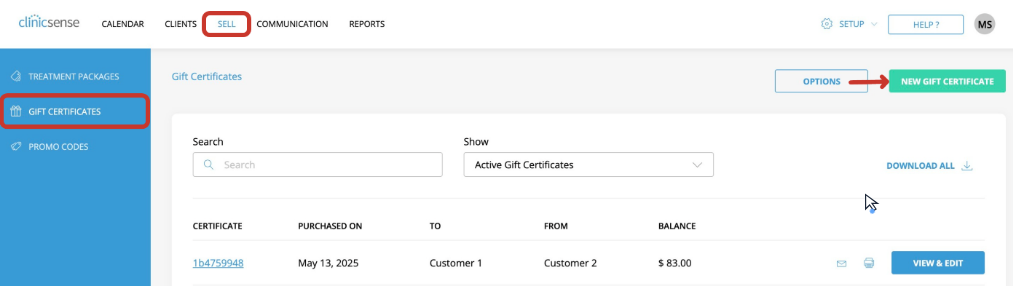
The Sell screens and the receivables report are a weekly round in ClinicSense
Matching each certificate and package under Sell against the calendar, one client at a time, is slow work between treatments. WebRun is an AI agent that works a real Chrome browser, signed in as you. On Standard and Premium, ClinicSense lets the practice invite office staff with limited access, so WebRun can work from an office staff account rather than the practitioner's login.
The practitioner reads and sends every note, and posts any reply to a Google review; invoices, refunds and certificate balances stay exactly as they are.
The gift card balance reminder runs that Sell-screen check and drafts the note to each buyer.
Questions people ask
I'm on the Lite plan. Which of these apply to me?
Fewer of them. Lite has no gift certificates, treatment packages, review requests or office staff accounts, so the useful jobs are unpaid invoices and month-end reports, and WebRun works under your own login.
Should I turn off the wellness check-in?
No. Keep it for clients who have simply drifted away. The notes WebRun drafts are for clients with a specific reason to hear from you personally, such as sessions left on a package or a certificate nobody has used.
Who posts the reply to a Google review?
You do. WebRun drafts it, and you edit it and post it on Google, so nothing appears under your business name until you have.
Sources
- Birthday emails | ClinicSense ClinicSense scans the client list every day and sends each client a personalised birthday email, with an optional promo code.
- Feedback & Google Reviews | ClinicSense An automatic email the day after an appointment, no more than once a month, asks for feedback and a Google review and lets unhappy clients reply privately.
- Selling gift certificates online | ClinicSense Gift certificates sell from the practice website, arrive by email and keep their balance automatically when redeemed.
- Financial reports | ClinicSense Reports cover revenue, sales tax, appointments, payments, receivables and client retention, export to CSV or PDF, and an accountant can be invited as office staff with limited access.
- Pricing | ClinicSense Lite, Standard and Premium plans: Lite allows 20 appointments a month and leaves out text reminders, gift certificates, treatment packages, birthday emails, wellness check-ins, feedback and Google review requests, referral emails, the availability summary, No-Show Guard, office staff accounts and TELUS eClaims; Standard allows 200 appointments and 5 office staff, Premium unlimited appointments and 15.
- TELUS Health eClaims | ClinicSense eClaim forms fill in after each appointment, the insurer responds at once with the coverage amount and the client's balance, and a reconciliation report checks that every claim was paid.
4 ready-made ClinicSense workflows
Each one names the apps it touches and the exact steps it takes. Open one to read what it will do, then turn it on.

Want one of these running on your own ClinicSense?
Show WebRun the process once and it will run it on schedule, in your own private browser environment.