How to Automate City Hive
In City Hive, Inventory Insights marks low stock, Autopilot sends emails and texts on the Pro and Expert plans, and Create Purchase Order reaches integrated distributors directly. Other distributors, and the invoices every distributor sends, are where WebRun comes in, an AI agent that prepares a reorder sheet by distributor and a Monday check of invoices against receivings.
 Written by
Tom Kessler
Field operations analyst
Written by
Tom Kessler
Field operations analyst
 Reviewed by
Hannah Vogel
Finance operations
Reviewed by
Hannah Vogel
Finance operations
Inventory Insights is the screen a City Hive buyer works from
City Hive gives a wine or liquor store a website and app in its own name, email and text marketing, and listings on marketplaces including DoorDash, Uber Eats, Instacart and Grubhub, kept in step with the store's inventory. Distributors and suppliers buy from City Hive too. A store can sync the register it already has, or run City Hive POS, whose help centre covers register pairing and house accounts and often spells the name CityHive.
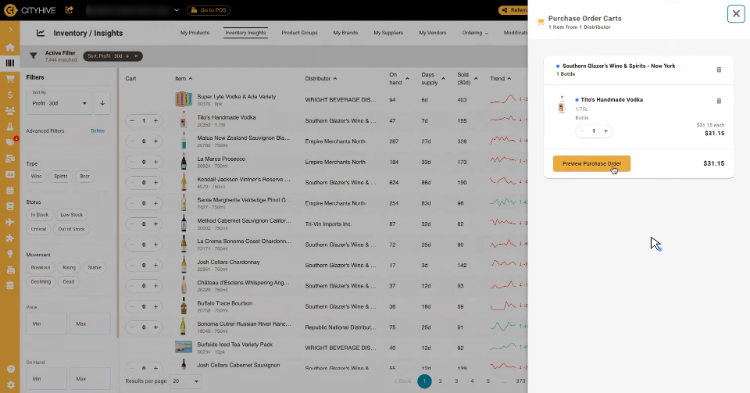
The buyer works from Inventory Insights. Every item shows what is on hand, how many days that stock will last at its real rate of sale, units sold over 30 days, cost, retail and margin, and a movement tag running from Breakout and Rising down to Declining and Dead. A Market column shows how the store's price compares with nearby stores. Purchase orders start there too: the buyer adds items from the list to carts grouped by distributor, then receives each order in City Hive when the truck comes.
Receiving day is where the invoice and the shelf disagree
A buyer at a busy shop orders from three or four distributors a week, and every rep has a different cut-off and a different way of confirming what will be on the truck.
When the truck arrives, six bottles were ordered and five came. A case is damaged. The unit cost on the invoice is not the one on the purchase order, because the price moved at the start of the month. The buyer ends up with the invoice beside the receiving, line by line, writing a credit request before the next statement lands.
Customers wait on the same trucks. A regular asked for a particular Barolo three weeks ago and wants to know whether it came in. The holiday gift sets went up as pre-order items in October, each carrying the quantity the buyer typed in when creating it, and nobody is sure how that number compares with what the distributor has promised since.
Only an integrated distributor receives the purchase order directly
Inventory Insights refreshes every 24 hours, and straight away when an item's price, cost or quantity changes, so its Status column shows Low Stock and Out of Stock as they happen. Stores on City Hive POS also get report cards under Analytics, such as Product Movement and End of Day, each exportable to CSV.
Autopilot, part of the Marketing Suite on the Pro and Expert plans, sends emails, texts or push notifications after something a shopper does, or on a schedule. Its recommended flights include a welcome series, an abandoned cart four hours on and a nudge to customers inactive for 21 to 30 days, and a flight can also alert staff to low inventory or fast sellers.
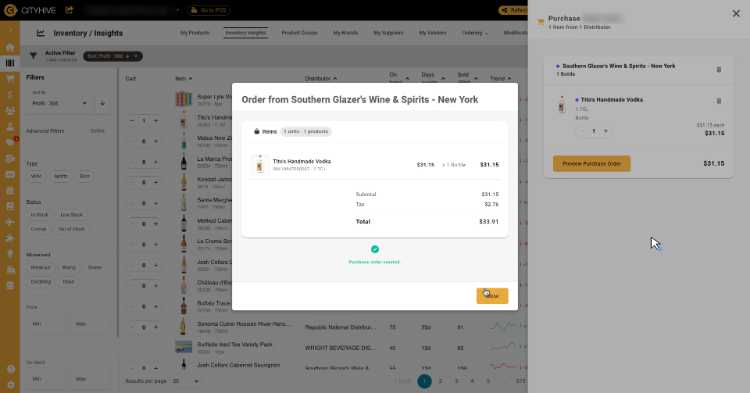
Create Purchase Order sends an order straight into an integrated distributor's ERP. For any other distributor the same button only records the order in the dashboard, and City Hive's help centre still lists sending orders to a distributor rep as coming soon. Receiving records what came off the truck and at what cost, while the distributor's invoice arrives separately, so holding the two side by side falls to the buyer or the bookkeeper. City Hive's own AI, Tipsy Bot, works for shoppers, recommending bottles and checking out from local stores' live inventory.
Short deliveries and repriced lines reach the bookkeeper every Monday
The bookkeeper pays distributor statements from a reconciliation that sets last week's City Hive receivings against the invoices the team saved to a sheet, matched by SKU and delivery date. On it sit the line where five bottles came against six ordered and the line billed two dollars a bottle above the purchase order, each with its distributor and the dollar amount.
The buyer orders each morning from a dated tab on the reorder sheet, where every item at or below its reorder point sits under its distributor with a quantity, unit cost and line total. Integrated distributors still get theirs through Create Purchase Order; the other reps get an email the buyer writes from the tab.
On the Expert plan, City Hive's Extended Shelf sells special orders. When the regular's Barolo shows as arrived, a pickup email with the order reference and store hours is waiting in Gmail drafts, and whoever opens up sends it and marks the order notified in City Hive.
Through the holiday window, the manager checks the management channel in Slack before opening: each gift set's pre-orders against the stock the distributor committed, with Near Capacity beside any set within ten percent of it.
The owner adds WebRun as a City Hive team member under Settings
The sheets, the drafts and the Slack posts all start on City Hive screens a buyer would otherwise open every morning, among them Inventory Insights and the purchase order history. WebRun is an AI agent that works a real Chrome browser. Inside City Hive, the store owner gives it a login under Settings, Users, with whatever role the owner picks.
It writes nothing in City Hive, so Create Purchase Order and the Commit that adds received stock at new prices remain the buyer's clicks. City Hive's other cards are reports for the owner: yesterday's sales by category, last week's margin by category and top SKU, and slow movers ranked by the cash they hold.
Questions people ask
Which invoices does the Monday reconciliation compare?
Only the ones your team saves to the distributor invoice sheet in Google Sheets during the week. WebRun matches each line to City Hive's receiving records by SKU and delivery date, then flags a quantity that differs or a unit price off the agreed cost by more than your tolerance. An invoice nobody saved there goes unchecked.
Do pre-order customers hear from City Hive when their order is ready?
Yes, once you approve the order: City Hive then sends a confirmation that it is ready for pickup or out for delivery. Approve within seven days, or the card authorization expires. The help centre itself notes limits in how pre-order customers are told a product is ready.
Is the slow-mover list different from the Dead tag in Inventory Insights?
It overlaps. Inventory Insights tags items Dead and shows their inventory value. The card lists bottles with no sale in 60 days, ranks them by the cash tied up and posts the top ten to Slack every Monday, which suits a buyer who would rather not open Insights to look.
Sources
- Inventory Insights City Hive help centre: lists On Hand, Days Supply, Sold (30d), movement tags from Breakout to Dead, Cost, Retail, Market, Margin % and a Status of In Stock, Low Stock or Out of Stock, refreshed every 24 hours or when price, cost or quantity changes.
- Integrated Purchase Orders & Receiving Explains that Create Purchase Order sends an order directly to an integrated distributor's ERP, that for a non-integrated distributor it is only created in the dashboard, and that sending orders to a distributor rep is coming soon.
- Create a PO and Receive From Your POS Walks through purchase order carts grouped by distributor and receiving with received, backordered and damaged quantities, cost and margin updates, and a final Commit.
- Autopilot Describes Autopilot flights triggered by an event or a schedule, recommended welcome, abandoned cart and inactive-customer flights, and internal alerts for low inventory or fast-selling products.
- City Hive retailer pricing Standard, Pro and Expert plans: the Marketing Suite of SMS blasts, push notifications and automated emails starts on Pro, and Extended Shelf, which sells special orders, is on Expert.
- Reporting (POS) City Hive POS reports appear as cards under Analytics, including Order Status, Product Movement and End of Day summaries, each exportable to CSV.
- Create a Pre-Order Item Pre-order items carry the quantity the store wants to pre-sell; customers get a ready message when the store approves the order, which must happen within 7 days, and the article notes limits in how customers are notified.
- City Hive marketplaces Lists the marketplaces City Hive connects a store to, including DoorDash, Uber Eats, Instacart and Grubhub.
- City Hive Revolutionizes Alcohol Shopping with First AI Assistant That Actually Completes Local Purchases City Hive's announcement of Tipsy Bot, a shopper-facing AI assistant that recommends bottles and completes purchases from local stores' live inventory.
7 ready-made City Hive workflows
Each one names the apps it touches and the exact steps it takes. Open one to read what it will do, then turn it on.


Want one of these running on your own City Hive?
Show WebRun the process once and it will run it on schedule, in your own private browser environment.