How to Automate Buffer
A Buffer queue publishes by itself once each channel has weekly time slots, posting goals track the week, and Team-plan approvals hold drafts for sign-off. Checking queued posts against the shop or booking page before they go out, and drafting posts about new stock or menus, needs an AI agent such as WebRun, signed in to those sites.
 Written by
Clara Bennett
Revenue operations
Written by
Clara Bennett
Revenue operations
 Reviewed by
Ben Kirkwood
Solutions engineer
Reviewed by
Ben Kirkwood
Solutions engineer
A week of posts waits in the Buffer queue
Buffer is a social media scheduler for creators, small businesses, agencies and nonprofits. Each connected channel, such as an Instagram account or a Google Business Profile, has its own posting schedule: a set of weekly time slots in that channel's own time zone. A post added to the queue takes the next free slot, and one that is not ready waits in Drafts.
The people filling those slots rarely do it full time. A bakery owner writes the week's posts on Sunday evening. A marketing coordinator at a twelve-person accountancy fits them around the newsletter, and a freelancer may run social for five local businesses. They keep the Buffer app on their phones as well, and finish some posts there between other jobs. Ideas that are not posts yet sit in the Create space, grouped on a board, until someone writes one up.
The owner's sign-off arrives as a thumbs-up on WhatsApp
Thursday's post invites people to Saturday's workshop. Its photos are on the owner's phone, so the coordinator texts for them and waits, and the approval comes back two days later as a thumbs-up. On Tuesday the workshop sells out, and the post asking people to book is still sitting in Thursday's slot.
A Reel set to a track from Instagram's music library goes out by notification: at 12:30 the phone buzzes, and whoever is holding it finishes the post inside Instagram.
On Monday the freelancer opens each client's queue in turn, looking for a channel with nothing booked before Friday. Once a month comes the report, an Insights export with the three best posts pasted into a slide deck as screenshots. The client's first question on the call is whether any of it brought in customers, and the bookings that would answer it are in another system.
Buffer publishes each slot on time, whatever changed since
Posting goals give each channel a weekly target of one, three or five posts, with a tracker under the channel name counting what has gone out. Content feeds pull new articles from a blog or news site into the Create space, where any item becomes a post or an idea; the Free plan allows 3 feeds and paid plans 50. Buffer's AI Assistant writes and reworks captions from a prompt, in the composer and in the Create space.
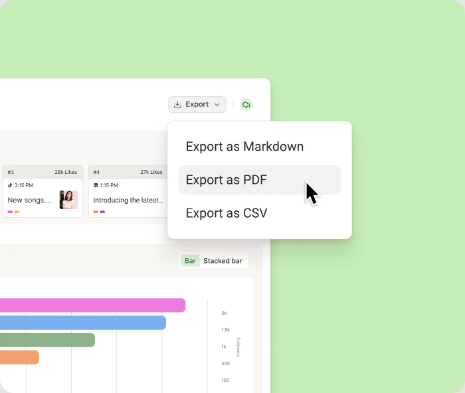
Insights tracks follower growth and engagement, and paid plans export it as CSV, Markdown or PDF. Buffer's notice retires Buffer Analyze, with its custom PDF reports, on October 7, 2026, and the help centre says Insights has no drag-and-drop report builder.
With campaign tracking switched on in a channel's settings, Buffer adds UTM tags to the links it shares, so the visits appear in Google Analytics; links on Instagram, Pinterest and Mastodon are left untagged. Matching those visits to the bookings and orders that followed is left to whoever writes the report.
The queue publishes Thursday's workshop post at its slot whether or not the booking page still has seats. A feed brings the blog's new article into the Create space but not the shop's stock levels, and the AI Assistant's help page says it cannot open or read a URL it is given.
The week's queue, read against the booking page and the shop
Thursday's workshop post links to a booking page that shows no seats by Tuesday. The coordinator hears that afternoon and turns the post into a waiting-list invitation before its slot comes round. The owner sees a note on Saturday's new-season carousel, two of its four sizes gone from the shop, and picks a different jacket for the photo.
In each client's monthly report, the top posts from Insights sit beside the visits Google Analytics recorded from Buffer's tagged links and the bookings or orders taken in the same weeks. The freelancer reads it through and sends it before the call.
When the LinkedIn page has one post queued toward a goal of three, the owner chooses among drafts written from that week's news, such as the autumn menu that went on the website on Friday or a product the shop added yesterday. The two that fit go into the queue after the owner's edits.
Drafts land in Buffer and wait for an approver
Following each queued post's link to the booking page or the shop admin and counting what is left is the daily job to hand over, because a sell-out only shows if someone looks. WebRun is an AI agent that works a real Chrome browser, signed in as you. Buffer's queue gives it each post's slot and link, and what it writes goes back into Buffer as a draft.
Its instructions stop it short of Add to Queue and Schedule Post, so every Buffer workflow here ends at a draft or a report, and the coordinator decides what goes into each time slot. On Free and Essentials, which have one user each, the agent works under the owner's login. Posts that Buffer sends by notification still need whoever holds the phone.
Questions people ask
Can Buffer itself stop the agent from scheduling a post?
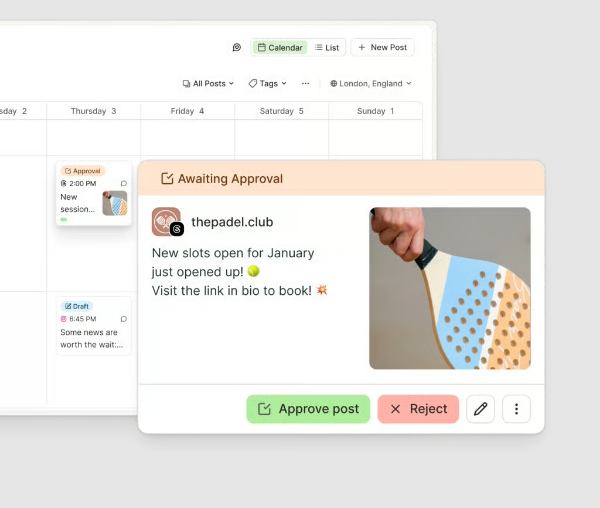
Yes, on the Team plan. Give the agent's login the Needs Approval role and Buffer saves every post it creates as a draft awaiting approval, whether it comes from the dashboard, the mobile apps or the API. Only the account owner or a team member with Full Access can approve it, from the Awaiting Approval tab.
What replaces Buffer Analyze for client reports?
Insights, inside the Buffer dashboard. Once Analyze retires, Buffer gives 90 days to request its archived data. Insights exports CSV, Markdown or PDF on paid plans, but a report that also shows website visits and sales has to be put together outside Buffer, and that monthly assembly is work the agent can take on.
Can it finish the posts Buffer sends to my phone as notifications?
No. Buffer falls back to notification publishing when a post uses something Instagram's API does not accept, such as music on a Reel, a link or text on a Story, or product tags, and for every post on a personal Instagram account. A person finishes those in the Instagram app. The agent can list the ones due that day for whoever holds the phone.
Does Buffer's MCP server cover the same jobs?
Partly. Buffer's API, included on every plan, and its MCP server create and edit posts, add ideas, and fetch channels, scheduled posts and sent posts. Buffer calls the API's post metrics experimental and advises against relying on them for reporting. Neither one opens the booking page or the shop admin, where a sell-out shows first.
Sources
- Managing and approving draft posts | Buffer Help Center States that approving drafts is only available on the Team plan, that requests appear in the Awaiting Approval tab for the account owner and Full Access users, and that Needs Approval posts are always saved as drafts, including via the API.
- Using Buffer Analyze | Buffer Help Center Buffer's notice that Analyze, which builds custom PDF reports, retires on October 7, 2026, that analytics move to Insights, and that archived data can be requested for 90 days afterwards.
- Getting started with Buffer's analytics features | Buffer Help Center Describes Insights as a lightweight view with CSV, Markdown and PDF exports on paid plans and no drag-and-drop custom report builder.
- What is Buffer's API? | Buffer Help Center Covers what the API and Buffer's MCP server can do, that API access is on every plan, and that analytics are not offered through the API in a full or reliable way yet.
- Setting posting goals in Buffer | Buffer Help Center Posting goals are set per channel at 1, 3 or 5 posts a week, with a progress tracker under the channel name.
- Using content feeds in Buffer | Buffer Help Center Feeds from blogs and news sites appear in the Create space, where items become posts or ideas; 3 feeds on the Free plan, 50 on paid plans.
- Using Buffer's AI Assistant | Buffer Help Center The AI Assistant works in the publishing composer and the Create space, and cannot open, read or access URLs given to it.
- Understanding UTM parameters and Google Analytics | Buffer Help Center Campaign tracking adds UTM parameters to shared links for Google Analytics; not supported for Instagram, Pinterest or Mastodon.
- Why aren't my Instagram posts sending automatically? | Buffer Help Center Automatic publishing needs a Business or Creator account; music, Story links and text, and product tags go out as notifications.
- Buffer pricing Free and Essentials include one user account; Team adds unlimited team members and approval workflows.
5 ready-made Buffer workflows
Each one names the apps it touches and the exact steps it takes. Open one to read what it will do, then turn it on.


 WordPress›


Want one of these running on your own Buffer?
Show WebRun the process once and it will run it on schedule, in your own private browser environment.