How to Automate BigCommerce
For a BigCommerce store, the automation worth adding sits outside the control panel: checking whether the 3PL received an order stuck in Awaiting Fulfillment, or what a supplier charges today. Low-stock notifications, the Abandoned Cart Saver on Growth and up, analytics and webhooks cover the store itself. An AI agent like WebRun can run those outside checks.
 Written by
Clara Bennett
Revenue operations
Written by
Clara Bennett
Revenue operations
 Reviewed by
Nora Whitfield
Editorial lead
Reviewed by
Nora Whitfield
Editorial lead
Every BigCommerce order carries a status the whole team reads
Online retailers and B2B sellers, from small shops on BigCommerce Essentials up to enterprise brands, run their stores on BigCommerce. Its parent company now goes by Commerce and also owns Feedonomics and Makeswift, but the product merchants sign in to is still BigCommerce.
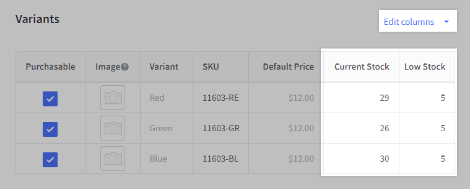
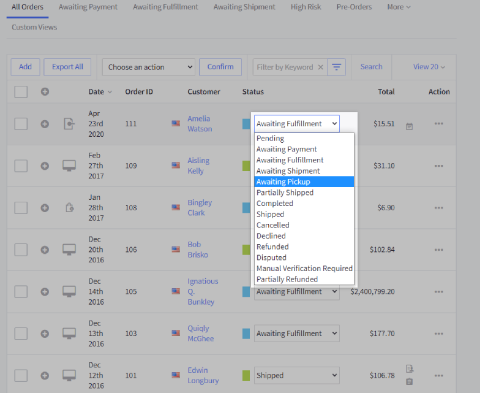
In the control panel, the catalog holds each product and its variants, every SKU with its own stock level. Orders from the website and from marketplaces such as Amazon and eBay arrive in one list, each with a status like Awaiting Payment or Awaiting Fulfillment.
B2B Edition adds quotes, purchase orders, net terms and a buyer portal. On a normal weekday the owner, the ops lead, customer service and whoever does the buying all have the control panel open at once.
Awaiting Fulfillment is where orders go quiet
The ops lead filters the Orders list by status before anything else. Anything in Awaiting Payment since yesterday needs a look. Anything in Awaiting Fulfillment since Friday needs a harder one, because from the control panel a warehouse that is picking an order and a warehouse that never received it look identical.
The ops lead then pastes those order numbers one at a time into the 3PL's client portal. When a low-stock notification arrives for a best-selling SKU, whoever does the buying signs in to the supplier's trade site to see the price, the stock and the lead time before raising a purchase order.
The ops lead also copies last week's revenue, order count and top products from Analytics into a slide for the Monday meeting, then adds returns and stock-outs from two other screens.
BigCommerce's alerts report on the store's own stock and orders
Set a low-stock level on a product and BigCommerce notifies you when stock reaches it, while inventory syncs both ways with the channels you sell on, so a sale in one place updates the count everywhere. The Abandoned Cart Saver sends shoppers who leave a cart a customizable series of emails. Built-in analytics track performance and customer behaviour, and Companion, the AI assistant inside the control panel, helps with running the store.
Beyond that sit webhooks, which fire when an order status changes or stock moves. They only send the event somewhere, and a developer has to host whatever receives it.
A low-stock notification tells you a SKU is running out; today's supplier price and lead time are on the supplier's trade portal. Shipping and fulfillment apps in BigCommerce's marketplace can connect a 3PL, and where the 3PL's own client portal is the only place that shows whether an order in Awaiting Fulfillment was received and picked, the ops lead checks it there by hand.
Order and stock alerts become checks at the 3PL and supplier
For a store whose picking is done by a 3PL and whose stock comes from three suppliers with trade portals, each status and stock level in the control panel is a reason to check somewhere else.
Orders that have sat in Awaiting Fulfillment for over a day could carry the 3PL's own status by the time the ops lead looks: received, picked or never arrived. The call to the warehouse then covers only the missing ones.
When a SKU reaches its low-stock level, whoever does the purchasing could open a purchase order already drafted at the supplier's current price, with today's stock and lead time beside it. A B2B quote for a pallet could show the supplier's current cost on each line before the price goes back to the trade customer.
The owner could read last week's orders, revenue and top products beside the week's returns and anything that sold out, posted in Slack before the Monday meeting.
Stuck orders reach Microsoft Teams sorted by days and value
Two numbers decide how urgent a stuck BigCommerce order is: the days it has held its status and its value. WebRun is an AI agent that works a real Chrome browser, signed in as you. Each morning it opens the control panel, reads both numbers for every order in Awaiting Payment or Awaiting Fulfillment, and posts the list to Microsoft Teams, worst first, with the total value tied up shown at the top.
The store manager gets a Twilio text about any order past your escalation limit. The card never cancels, refunds or ships an order, and it messages no customer. WebRun reads a 3PL's or a supplier's portal with the store's own logins, and there is no webhook to build.
The low-stock run books a purchasing slot in Google Calendar, and the Monday scorecard posts to Slack.
Questions people ask
What does the low-stock card add to BigCommerce's own notification?
Days of cover and a calendar slot. It compares each product's stock with its reorder point and recent sales, sends what is out and what is low to the operations WhatsApp group, and books a purchasing slot in Google Calendar when something needs ordering today. It never messages a supplier.
Will it work with our 3PL's portal?
If your team looks orders up there with a login, WebRun can too, using a separate login. Where the 3PL offers a read-only user, use that one.
Is WebRun the same thing as BigCommerce Companion?
No. Companion is the AI assistant built into the control panel to help manage the store. WebRun works across the control panel and the other sites your team signs in to, such as the 3PL's portal and the suppliers' trade sites.
Which BigCommerce plans include the Abandoned Cart Saver?
Growth, Scale and Performance. The Core plan does not include it, so a Core store has no automatic abandoned-cart emails from BigCommerce itself.
Sources
- List Order Statuses | BigCommerce Docs BigCommerce's own list of order statuses, including Awaiting Payment, Awaiting Fulfillment, Awaiting Shipment and Manual Verification Required.
- Manage Your Inventory Across Channels | BigCommerce Confirms low-stock notifications, stock tracked by product or SKU, and real-time two-way inventory syncing across the channels a store sells on.
- Overview | BigCommerce Docs Describes webhooks for order status and inventory events, and shows they are subscribed to through the API, which is developer work.
- Commerce Introduces New Product Innovations Across Storefronts, B2B, Payments and AI-Driven Commerce at Commerce Live 2026 Names Commerce (Nasdaq: CMRC) as the parent company of BigCommerce, Feedonomics and Makeswift, and describes BigCommerce Companion as an AI merchant assistant for day-to-day operations.
- BigCommerce Essentials pricing Lists the Core, Growth, Scale and Performance plans and shows the Abandoned Cart Saver, a customizable series of emails to shoppers, on every plan except Core.
- BigCommerce Essentials features Orders from every channel managed in one place, marketplaces such as Amazon, Walmart and eBay, built-in reporting and analytics, and BigCommerce Companion, an AI assistant embedded in the control panel.
- BigCommerce B2B Edition B2B Edition's quoting, purchase orders, net terms and invoicing, buyer portal and multi-company account hierarchy.
- BigCommerce Shipping & Fulfillment apps The category of BigCommerce's app marketplace for shipping and fulfillment apps, which is where 3PL connections are listed.
3 ready-made BigCommerce workflows
Each one names the apps it touches and the exact steps it takes. Open one to read what it will do, then turn it on.



Want one of these running on your own BigCommerce?
Show WebRun the process once and it will run it on schedule, in your own private browser environment.