Automated Zulip Morning Stream Digest
Every morning, WebRun opens Zulip, reads the streams you nominate, summarises each topic that moved since yesterday into a few lines with who was involved and what was decided, posts the brief to your Microsoft Teams channel, and pings Telegram if you were mentioned or a decision needs you.
How do I catch up on team chat without reading every message?
WebRun writes your Zulip catch-up every morning. It reads the streams you nominate, summarises each topic that moved overnight with who took part and what was decided, posts the brief to a Microsoft Teams channel, and pings Telegram only when you were mentioned or asked something directly.
- A hundred overnight messages become a brief you read in two minutes
- Direct mentions reach you separately, so nothing aimed at you is buried
- The tool writes nothing into Zulip, so no colleague sees automated noise
Built for engineering managers · distributed teams · open source maintainers · product leads
What does WebRun do on every run?
The exact actions WebRun takes, in order - in plain language, so you can adjust anything.
-
WebRun signs in and gets to work
Opens
zulip.comin a real browser with your saved login - no setup, no API keys. -
1
Zulip - read the streams you follow
zulip.com
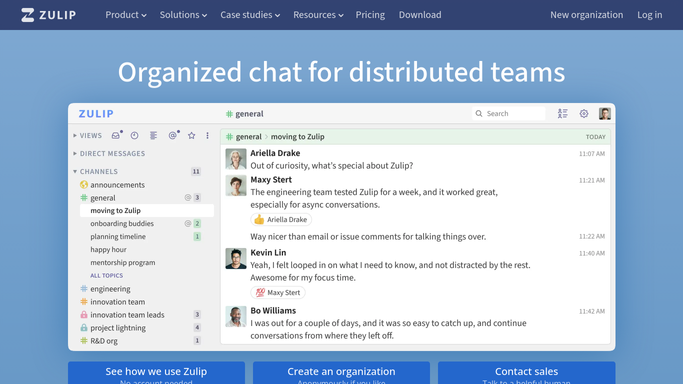
WebRun opens Zulip to read the streams you follow. - Open Zulip and go to the streams you nominated for the brief
- Find the topics with new messages since the last run
- Summarise each topic in two or three lines covering what was discussed, who took part, and whether anything was decided
- Note separately any message that mentions you or asks you a direct question
- Read only. Do not reply, react, or resolve a topic
Done when Every topic that moved overnight has a short summary.
-
2
Microsoft Teams - post the morning brief
microsoft.com

WebRun opens Microsoft Teams to post the morning brief. - Post the morning brief to your Microsoft Teams channel
- Group the summaries by stream and put the busiest topics first
- Mark topics where a decision was reached and topics still open
- Include the message count per topic so you can judge what to open in full
Done when The brief is in Teams, grouped by stream.
-
3
Telegram - ping you on a mention
telegram.org

WebRun opens Telegram to ping you on a mention. - Send a short Telegram note only when you were mentioned or asked something directly
- Name the stream, the topic, and the person who asked
- Keep it to the few items that genuinely need you, and stay silent otherwise
Done when You have been pinged about anything that needs your answer.
How is each run configured?
Secure by default
Connect once, stays signed in
WebRun signs in once and keeps each session in a persistent environment, so every run picks up right where it left off.
Every action is checked against this policy before it runs.
Questions, answered
Will it reply in Zulip or mark things as read?
No. WebRun reads the streams you nominate and writes nothing back. It never posts a message, adds a reaction, resolves a topic, or changes your read state, so your colleagues see no activity from it.
Which streams does it cover?
Only the ones you name, for example engineering, incidents, and product. Private streams and direct messages are left out unless you explicitly add them, which keeps sensitive threads out of the brief.
Will the summary end up somewhere public?
No. The brief goes to the private Microsoft Teams channel you choose and the mention ping goes to your own Telegram chat. Nothing is published outside your organisation.
Related templates
Put this on autopilot.
Turn it on in minutes - or have our team set it up for you.