Keep your Typefully queue and calendar in sync
Every night, WebRun opens Typefully, reads what's drafted and scheduled to post, mirrors each thread into an Airtable content calendar, and emails you a heads-up whenever an upcoming day has nothing queued.
- No credit card
- Under $0.01 per run
- Cancel anytime
How do I make sure my Typefully queue never runs empty?
WebRun checks your Typefully queue every night, reading what's drafted and scheduled to post. It mirrors each thread into an Airtable content calendar and emails you only when an upcoming day has nothing queued, so your posting cadence stays consistent without you checking the queue manually every day.
- Empty content days get caught up to a week in advance
- Your team can see the queue in Airtable without a Typefully login
- You're only emailed when a gap actually needs attention
Built for Twitter and X creators · personal brand builders · content marketers · solo founders
What does WebRun do on every run?
The exact actions WebRun takes, in order - in plain language, so you can adjust anything.
-
WebRun signs in and gets to work
Opens
typefully.comin a real browser with your saved login - no setup, no API keys. -
1
Typefully - read the draft and scheduling queue
typefully.com
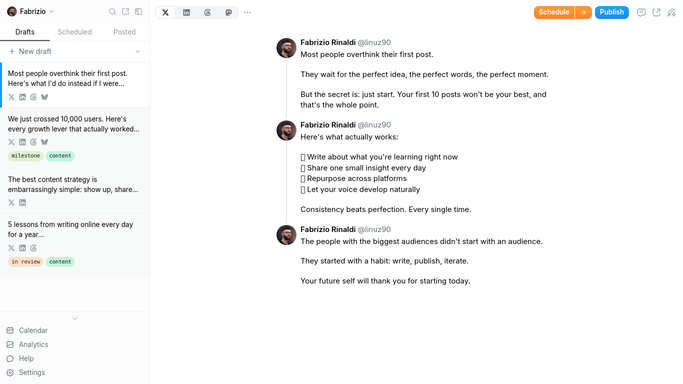
WebRun opens Typefully to read the draft and scheduling queue. - Open Typefully and check drafts and the scheduling queue
- Note the publish date and status for each scheduled thread
- Flag any of the next 7 days that has nothing scheduled
Done when Every drafted and scheduled thread has been read and any gap days flagged.
-
2
Airtable - mirror it into the calendar
airtable.com How to Automate Airtable

WebRun opens Airtable to mirror it into the calendar. - Update the content calendar so it matches the current Typefully queue
- Add rows for newly scheduled threads and remove cancelled ones
- Mark upcoming gap days clearly on the calendar
Done when The Airtable calendar matches what's actually queued in Typefully.
-
3
Gmail - email you about empty days
gmail.com How to Automate Gmail

WebRun opens Gmail to email you about empty days. - Draft a short email to you when an upcoming day has nothing queued
- List which days are empty and how many days out they are
- Skip sending anything on nights when the queue is fully covered
Done when You're emailed only when a gap in the queue needs your attention.
How is each run configured?
Secure by default
Connect once, stays signed in
WebRun signs in once and keeps each session in a persistent environment, so every run picks up right where it left off.
Every action is checked against this policy before it runs.
Questions, answered
Does it write or schedule new threads for me?
No. It only reads your existing Typefully queue. It never drafts, schedules, or publishes a thread on your account.
When do I actually get an email?
Only when one of the next 7 days has nothing scheduled. A fully covered queue means no email that night.
Why keep a copy in Airtable at all?
So your team can see and plan around the queue without needing a Typefully login, and so you have a record of what published when.
Related templates
Put this on autopilot.
Turn it on in minutes - or have our team set it up for you.