Catch a failed Sked Social auto-post before your audience notices
Every hour, WebRun opens Sked Social, checks the publishing queue for any auto-post that failed to go out as scheduled, texts you through Twilio the moment one fails, and saves a weekly performance report of successful posts to Google Drive.
- No credit card
- Under $0.01 per run
- Cancel anytime
How do I know when a Sked Social auto-post fails to publish?
WebRun checks Sked Social's publishing queue every hour for any auto-post that failed to go out, texts you through Twilio the moment one fails with the reason given, and saves a weekly performance report to Google Drive. It never retries a failed post itself, so fixing the connection stays your call.
- A failed auto-post gets caught within the hour, not days later
- You know the exact reason a post failed, not just that it did
- A weekly performance history builds automatically in Drive
Built for Social media managers · ecommerce brands · agencies · influencer teams
What does WebRun do on every run?
The exact actions WebRun takes, in order - in plain language, so you can adjust anything.
-
WebRun signs in and gets to work
Opens
skedsocial.comin a real browser with your saved login - no setup, no API keys. -
1
Sked Social - check the publishing queue for failed posts
skedsocial.com
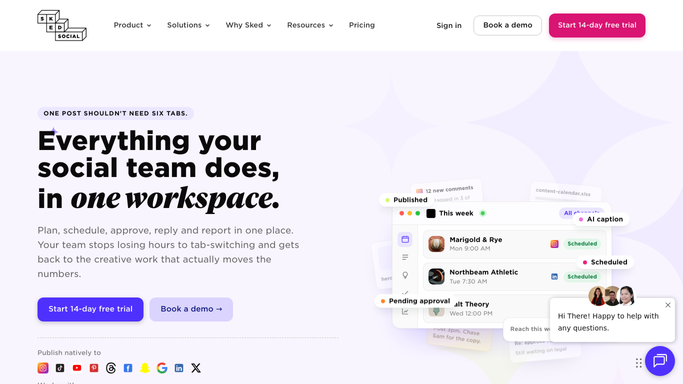
WebRun opens Sked Social to check the publishing queue for failed posts. - Open the publishing queue in Sked Social
- Check the status of every post scheduled to go out since the last check
- Flag any post marked failed or requiring reconnection
Done when Every scheduled post's publish status has been checked.
-
2
Twilio - text you about the failure
twilio.com How to Automate Twilio

WebRun opens Twilio to text you about the failure. - Send a text as soon as a post is found failed
- Include the account and the reason given, like an expired connection
- Skip texting for posts that published successfully
Done when You've been texted about every failed post since the last check.
-
3
Google Drive - save the weekly performance report
drive.google.com How to Automate Google Drive

WebRun opens Google Drive to save the weekly performance report. - Open the performance tracking folder in Google Drive
- Save this week's successfully published post count and engagement as a report
- Keep it alongside prior weeks for comparison
Done when This week's performance report is saved in Drive.
How is each run configured?
Secure by default
Connect once, stays signed in
WebRun signs in once and keeps each session in a persistent environment, so every run picks up right where it left off.
Every action is checked against this policy before it runs.
Questions, answered
Does WebRun retry a failed post automatically?
No. It only detects and alerts you to the failure. Reconnecting an account or reposting is still something you do yourself.
Why do auto-posts fail?
Usually an expired account connection or a platform rejecting the content. The Twilio text includes the reason Sked Social gives, so you know what to fix.
Is the weekly report just about failures?
No. It's a broader performance report of successfully published posts, saved to Drive alongside prior weeks so you can track engagement over time.
Related templates
Put this on autopilot.
Turn it on in minutes - or have our team set it up for you.