Automated CoinMarketCap Price Move Alerts
Every hour during market hours, WebRun opens CoinMarketCap, reads the coins on your watchlist, compares each price and 24 hour change against the movement threshold you set, posts only the coins that crossed it to Slack with the size and direction of the move, and escalates the largest swings to Microsoft Teams so the wider team sees them.
How do I get an alert when a coin on my watchlist moves?
WebRun watches your CoinMarketCap watchlist every hour and stays silent until something actually moves. When a coin crosses the percentage threshold you set, it posts the price, the change over 1 and 24 hours and the volume context to Slack, and escalates the largest swings to Microsoft Teams.
- Quiet hours post nothing, so every alert means a real move
- Each alert carries volume context, not just a percentage
- Large swings reach the wider team within the hour
Built for crypto investors · treasury teams · trading desks · research analysts
What does WebRun do on every run?
The exact actions WebRun takes, in order - in plain language, so you can adjust anything.
-
WebRun signs in and gets to work
Opens
coinmarketcap.comin a real browser with your saved login - no setup, no API keys. -
1
CoinMarketCap - check the watchlist for moves
coinmarketcap.com
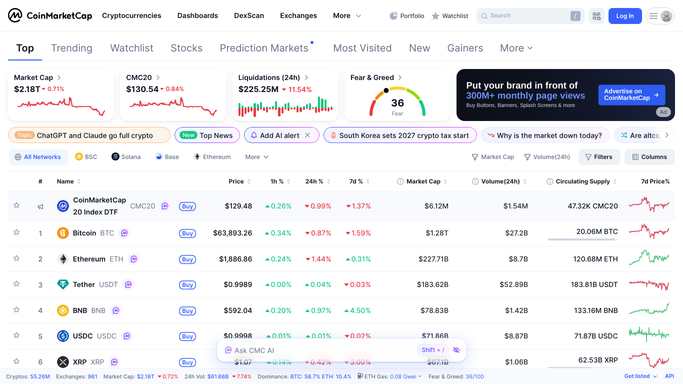
WebRun opens CoinMarketCap to check the watchlist for moves. - Open CoinMarketCap and load your saved watchlist
- Capture the current price, 1 hour change, 24 hour change and 24 hour volume for each coin
- Compare each change against the movement threshold you configured, for example 5 percent in 24 hours
- Flag coins whose volume is far above their recent normal, since price moves on thin volume mean less
- Note the market cap rank so a move in a large cap coin reads differently from a small one
Done when Every watchlist coin has been read and each threshold crossing is recorded with its size and direction.
-
2
Slack - post the movers
slack.com

WebRun opens Slack to post the movers. - Post only the coins that crossed your threshold to your markets channel
- Give each one a single line: name, current price, change over 1 hour and 24 hours, and volume against normal
- Mark direction clearly so up moves and down moves are not confused at a glance
- Post nothing at all when no coin crossed the threshold, so the channel stays quiet by default
Done when This hour's movers are in Slack, or nothing was posted because nothing moved.
-
3
Microsoft Teams - escalate the big swings
microsoft.com

WebRun opens Microsoft Teams to escalate the big swings. - Escalate to Microsoft Teams only when a coin moves past your larger second threshold, for example 15 percent
- Include the coin, the move size, the volume signal and the time it crossed
- Keep every message internal and informational. WebRun never places a trade, never buys or sells and never gives investment advice
Done when Any major swing has reached the wider team in Microsoft Teams.
How is each run configured?
Secure by default
Connect once, stays signed in
WebRun signs in once and keeps each session in a persistent environment, so every run picks up right where it left off.
Every action is checked against this policy before it runs.
Questions, answered
Will it trade or move funds for me?
No, and it cannot. WebRun only reads prices on CoinMarketCap and posts what it saw to your own channels. It never places an order, never transfers funds and never offers investment advice or a recommendation.
How do I stop it alerting on every small wobble?
Set the threshold. WebRun posts only when a coin crosses the percentage you chose, and escalates to Microsoft Teams only past a second, larger threshold. Below those numbers, nothing is posted at all.
Why does it mention volume alongside the price move?
Because a large price move on unusually thin volume is a weaker signal than the same move on heavy volume. WebRun shows volume against the coin's recent normal so you can read the move in context.
Related templates
Put this on autopilot.
Turn it on in minutes - or have our team set it up for you.