How to Automate WellnessLiving
Most client reminders can run inside WellnessLiving: Marketing Suite sends an Upcoming expiry message before a pass runs out and a win-back when a client stops visiting, and clients get an Automatic Payment Failed notice. When the front desk wants a list and a draft to read first, WebRun builds both from Purchase Options, attendance and autopays.
 Written by
Grace Okafor
Healthcare operations
Written by
Grace Okafor
Healthcare operations
 Reviewed by
Nikhil Bhatt
Automation strategist
Reviewed by
Nikhil Bhatt
Automation strategist
WellnessLiving counts every visit against a pass, a membership or a package
Yoga and pilates studios, martial arts schools, spas, salons and massage clinics run their bookings and payments on WellnessLiving. Clients book in the Achieve app, on the studio's website or through Reserve with Google, and staff check them in on the Elevate app.
What clients buy are Purchase Options, WellnessLiving's name for session passes, memberships and packages: the ten-class pass, the monthly unlimited on auto-renewal, the three-massage package. WellnessLiving records every visit against one of them, which is how reception can see who has classes left and which pass runs out next week. Starter, at $69 a month, includes one staff member. Business, at $199, adds unlimited staff and email, text and push campaigns, and BusinessPro and Enterprise sit above it.
A pass with four visits left and ten days to run needs a nudge from the desk
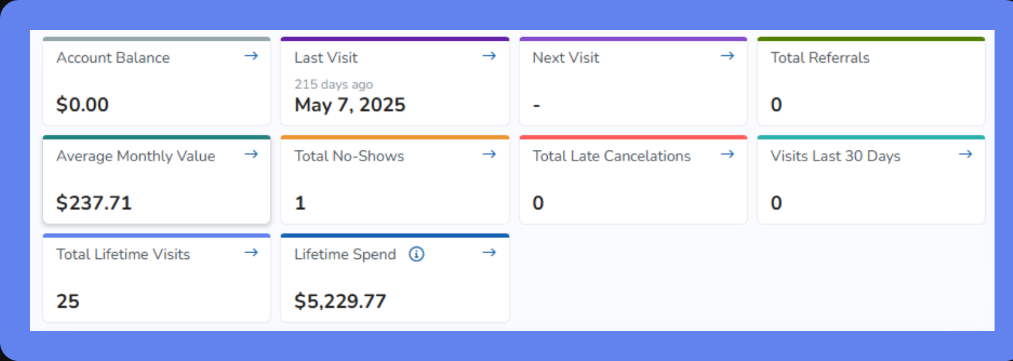
A client on a ten-class pass has four visits left and ten days to use them. The Expiring Purchase Options report lists passes like hers with their visits remaining and last visit, and whoever works reception writes to each client on it, between check-ins. A regular who came three times a week now comes once, and the Clients at Risk report shows who has not attended for a set time; the studio manager decides who hears from the studio and writes each note.
A monthly membership fails to renew because the card was replaced. WellnessLiving sends the client an Automatic Payment Failed notice, but a week later the balance is still open, and the desk has to spot it and write.
A member whose membership ended six weeks ago hears about coming back only if someone writes the email in the studio's Mailchimp account.
Marketing Suite's Upcoming expiry trigger messages a client before a pass runs out
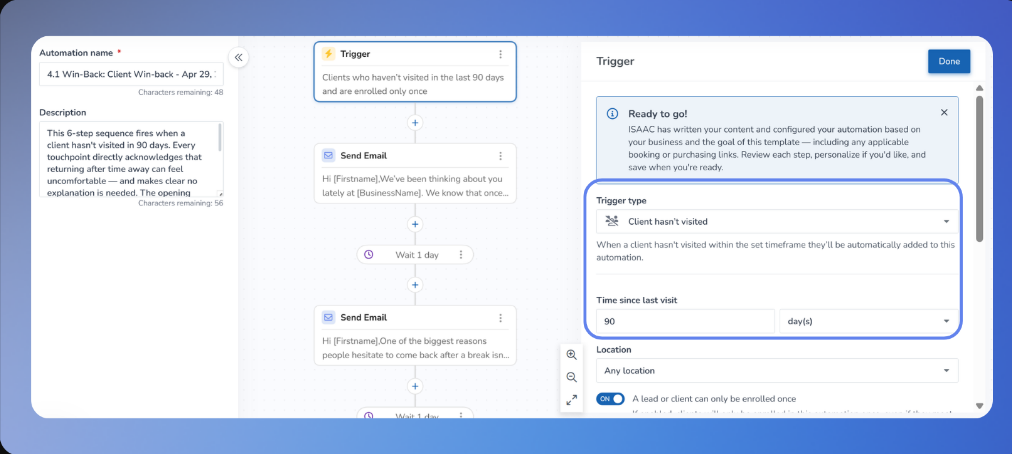
Marketing Suite 2.0, released on 7 April 2026, runs pre-built automations for lead nurture, retention and win-back, and Isaac, its AI writing assistant, drafts the email and SMS copy. Its triggers include Upcoming expiry, which fires before a pass without auto-renewal expires, and Client hasn't visited, behind WellnessLiving's own example of a re-engagement offer after 60 days. An automation can also create a task for staff. Studios whose subscription does not include Marketing Suite sign up for it separately, and SMS campaigns need a Message Center subscription, from $19 a month.
When an autopay fails, WellnessLiving sends the client its Automatic Payment Failed notification, and with the Reattempt failed automatic payments policy switched on, it tries the payment again. The Clients at Risk report lists clients who have not attended for a period you choose, and on every plan Isaac predicts which clients are likely to leave.
Those automations fire on a trigger and send the words Isaac or the studio wrote, so a client with four visits left gets what everyone on that trigger gets. The failed-payment notification is a message to the client, and the Clients at Risk report is a list of names. A studio that wants each message read before it leaves, or keeps its newsletter in Mailchimp, writes those by hand.
Passes closest to expiry head the front desk's Slack list
A ten-class pass with three visits left and nine days to run sits near the top of the morning Slack list, which runs in order of expiry date. The studio's Gmail has a draft to her naming the visits left and the date, with a line inviting her to book. Whoever is on the desk sends it, or raises it in person when she comes in.
The studio manager works from a second list in the same channel: members whose classes over the past 30 days fell below the number the studio set, longest absence first, each with a check-in drafted in Gmail that mentions their last class.
Failed autopays reach Slack sorted by days outstanding, with a text asking each member to update their card and the cases that need a manual card update set apart. A membership that cleared overnight on WellnessLiving's reattempt is already off it.
Each Monday the owner reviews the win-back batch: members whose membership ended 30 to 90 days ago, entered in the win-back tracking sheet as Pending and skipped if written to this quarter, each with a Mailchimp draft that mentions their last visit and old membership.
Upcoming expiry and the morning credit list can run side by side
A studio with Upcoming expiry switched on will see some of the same clients on the credit list, and whoever sends the drafts can delete the one for a client the automation has just reached.
WebRun is an AI agent that works a real Chrome browser. For these jobs it uses a WellnessLiving staff login whose role the owner sets, since roles there limit what a login can view or change, along with the studio's Gmail, Mailchimp and Slack.
It extends no pass and leaves every autopay schedule as it is. A staff member sends each credit reminder and check-in from Gmail, win-backs are unscheduled Mailchimp drafts, and a payment-update text goes to a member only after approval in Slack. On Starter, which has notifications but no marketing campaigns, these drafts stand in for follow-up a campaign would send.
Questions people ask
Will a client get two reminders if Upcoming expiry is switched on?
Possibly, for the same pass. Upcoming expiry sends on its own before a pass without auto-renewal expires, while the credit reminder goes nowhere until someone at the studio sends it from Gmail, so reception can delete drafts for passes the automation already covers.
Does a card that clears on the overnight reattempt drop off the list?
Yes. The failed-payment list is rebuilt every morning, so a membership that cleared on WellnessLiving's reattempt is gone before anyone sends a text. That reattempt happens only when Reattempt failed automatic payments is switched on in the business policies.
Starter includes one staff login. Does the agent need its own?
It is better with its own. Business and above include unlimited staff, which leaves room for a login whose role is set for these jobs alone. On Starter it would share the single staff login.
How long after a membership ends does the win-back go out?
Between 30 and 90 days after it ends. Those are defaults, and setup is where the owner moves either one. Anyone already written to this quarter is skipped, using the Google Sheet where each one is logged as Pending until the email goes out.
Sources
- Automation triggers | WellnessLiving Help Center Lists the Marketing Suite triggers, including Upcoming expiry before a session pass or Purchase Option without auto-renewal expires, Pass visits remaining and Client hasn't visited.
- Expiring Purchase Options Report | WellnessLiving Help Center Describes the report of passes, memberships and packages expiring in a date range, with visits remaining and last visit, meant for staff to follow up with clients before their options run out.
- Pricing - WellnessLiving Shows Starter at $69 with one staff member, Business at $199 with unlimited staff and email, text and push campaigns, staff roles and permissions and the Isaac Client-at-risk Predictor on every plan, and CAASI as an add-on.
- Complete guide to the Marketing Suite | WellnessLiving Help Center Marketing Suite is signed up for separately when a subscription does not include it; examples include a re-engagement offer after 60 days without a visit and staff task creation; SMS campaigns need a Message Center subscription from $19 a month.
- Release Highlights - April 2026 (Version 26.72) - WellnessLiving Marketing Suite 2.0, released 7 April 2026, with pre-built marketing automations and the Isaac AI Writing Assistant for email and SMS campaigns.
- Client notification types | WellnessLiving Help Center The Automatic Payment Failed notification tells a client that an automatic payment failed on a renewal, a conversion, a membership payment or a payment plan.
- FAQ: Automatic payments | WellnessLiving Help Center With the Reattempt failed automatic payments business policy switched on, a failed automatic payment is reattempted.
- Clients at Risk report | WellnessLiving Help Center Lists clients who have not attended for a configurable period, with their last and upcoming visits and Purchase Option status.
4 ready-made WellnessLiving workflows
Each one names the apps it touches and the exact steps it takes. Open one to read what it will do, then turn it on.


Want one of these running on your own WellnessLiving?
Show WebRun the process once and it will run it on schedule, in your own private browser environment.