How to Automate Weave
Weave sends reminders, confirmations, recall messages, waitlist offers and missed call texts from your practice management data. Answers held elsewhere, such as an optical lab's order page or a vision plan's website, are looked up by staff. An AI agent like WebRun can read those systems and prepare the reply in Weave for staff to send.
 Written by
Tom Kessler
Field operations analyst
Written by
Tom Kessler
Field operations analyst
 Reviewed by
Hannah Vogel
Finance operations
Reviewed by
Hannah Vogel
Finance operations
Every call and text to the practice lands in Weave
Weave is the phone system and patient messaging platform that dental, optometry and veterinary practices, among others, run their front desk on, and it syncs with the practice management system behind it, bringing household names and profile photos into its patient profiles. When a patient calls, Call Pop puts their name, their next appointment, when they are due and any overdue balance on screen before anyone picks up, along with any tasks or notes left for them.
Patients text the office number, or start a text from the practice's website through Text Connect, and staff answer from that number. Appointment requests, digital forms and invoices arrive in one unified inbox, and voicemails come in transcribed as text.
The answer to a patient's text often sits in another system
A lot of what comes into Weave is a question the front desk cannot answer from Weave: whether the glasses are ready, whether insurance covered the visit, when the next box of contact lenses can be ordered, whether the dog's bloodwork is back. For each one, a receptionist leaves the inbox, looks up the answer in the practice management system, on a lab's website or on an insurer's portal, and comes back to type a reply that is often one line.
The front desk also works the lists behind the messages: today's no-shows, who should hear from someone before the day ends, patients whose balance is past due, families due for a recall who let the automated reminder pass, and optical orders that have arrived and not been picked up.
Weave automates the messages its PMS sync can trigger
Once Weave is synced with the practice management system, it sends appointment reminders by text, phone call or email and updates the calendar when a patient confirms or declines. A patient can confirm with any affirmative reply rather than a single C. When someone cancels, Weave texts them to reschedule and tells waitlisted patients about the opening. For recall, staff sort patients by scheduled or unscheduled, narrow them by appointment type, status, practitioner and location, and send a text or email in bulk or one at a time. A missed call gets a customized text back automatically.
Smart Drafts reads an inbound message and suggests a reply, and the AI Receptionist answers calls and texts around the clock. For dental offices, insurance verification goes directly to dental insurance portals ahead of appointments and reports maximums, deductibles and remaining coverage.
When the answer sits on an optical lab's order page or a reference lab's results portal, a receptionist looks it up there before typing the reply, and an optometry practice checks vision plans on each plan's own website.
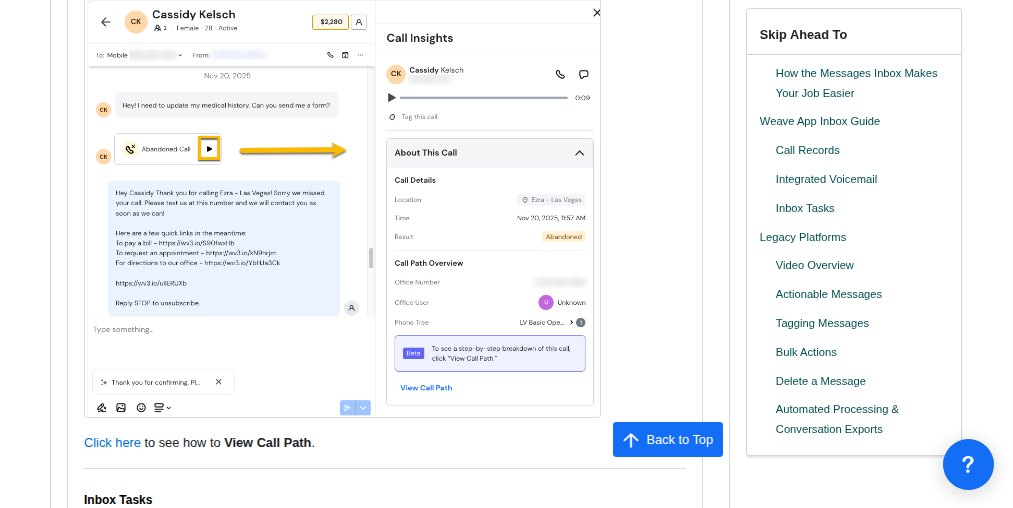
The looked-up answer waits in the Weave thread
In an optometry practice, the front desk sends each pickup text from the patient's Weave conversation, where it waits already written on the afternoon the lab or the EHR marks the glasses ready. Contact lens wearers whose last box was bought long enough ago to be running low have a reorder text waiting in the same place.
Before tomorrow's exams, a patient whose vision coverage has changed has a warning text waiting in Weave, for the front desk to send or hold. Each of today's no-shows has one rebooking text waiting too, written with their balance and recall date in view.
In a veterinary hospital, the reception team can tell a pet owner that the bloodwork is back, and that the doctor will call, from a text written after the result posts on the reference lab's site.
Because each text sits in the patient's own Weave conversation, the history stays in one thread.
The front desk sends each Weave text itself
A pickup text needs the optical lab's order page on one side and the patient's Weave conversation on the other. WebRun is an AI agent that works a real Chrome browser, signed in as you. One run covers both sides, with logins the practice sets up for the lab site and for Weave.
The front desk sends every one of those texts from the office number, after reading it in the patient's Weave conversation. Nothing changes in the practice management system or the chart unless the practice allows the agent to type there.
Crystal PM, Eyefinity and RevolutionEHR are among the systems paired with Weave in the workflows below.
Questions people ask
Will this conflict with Weave's reminders and AI Receptionist?
No. Reminders, confirmations, recall messages, missed call texts and the AI Receptionist keep running inside Weave. The texts described here are the ones that need an answer from another system first, such as an optical order or a lab result.
Weave's insurance verification is built for dental portals. What about vision plans?
Those are read on each vision plan's own website, with the logins your staff already have, and a patient whose coverage changed gets a warning text waiting in Weave. Weave describes its own verification as going directly to dental insurance portals.
Which veterinary jobs fit this?
The ones that start on another site: a reference lab's results page or a pharmacy's refill queue, then a text to the pet owner prepared in Weave for your team to send. Weave lists veterinary among the practices it serves.
Can it find missed calls that nobody returned?
Yes. Each afternoon it compares Weave's call history with the calls and texts made since, so the front desk knows before closing which missed calls nobody has returned.
Sources
- Patient Appointment Reminder Software | Weave Vendor page describing reminders by text, call or email with confirmations updating the calendar, segmented recall and reactivation messages, the waitlist and automatic rescheduling texts.
- Phones | Weave Describes Call Pop, which shows the caller's name, upcoming appointment, due date and overdue balances, Missed Call Text and voicemail transcription.
- Insurance Verification | Weave States that Weave's insurance verification goes directly to dental insurance portals and reports maximums, deductibles and remaining coverage, and lists the industries Weave serves, veterinary among them.
- AI | Weave Describes Smart Drafts, which suggests a reply to inbound messages, and the AI Receptionist, which answers calls and texts around the clock.
- New Weave Experience | Weave Describes the unified inbox for appointment requests, invoices and digital forms.
- EMR Integration That Simplifies Practice Communication | Weave States that Weave maintains officially authorized integrations with most major practice management systems, syncing patient and appointment data used by reminders and caller pop-ups.
- Weave Text Connect Describes Text Connect, which lets visitors start a text conversation with the business from its website.
9 ready-made Weave workflows
Each one names the apps it touches and the exact steps it takes. Open one to read what it will do, then turn it on.




Want one of these running on your own Weave?
Show WebRun the process once and it will run it on schedule, in your own private browser environment.