How to Automate Wave
On Wave's Pro plan, bank transactions import and categorize themselves, receipts are captured and invoice reminders are scheduled; the free Starter plan relies on statements the owner uploads. Matching receipts to transactions, planning which bills to pay and writing to a customer's second contact stay manual, and a browser agent such as WebRun can do the gathering.
 Written by
Dimitri Vasilev
Logistics analyst
Written by
Dimitri Vasilev
Logistics analyst
 Reviewed by
Marcus Deleon
Support operations
Reviewed by
Marcus Deleon
Support operations
Wave is bookkeeping for owners who keep their own books
Wave is accounting and invoicing software for freelancers, contractors, consultants and other owners who do their own bookkeeping. The Starter plan is free and covers unlimited estimates, invoices, bills and bookkeeping records. Pro, the paid plan, adds automatic bank imports, late payment reminders, unlimited receipt capture and extra users with their own permissions.
Customers' invoices sit next to the bills the business owes, and an estimate can carry a deposit request for work that needs money up front. Customers can pay an invoice online by card through Wave, for a processing fee on each payment. Every line that moved through the bank arrives as a transaction that needs a category. Payroll is an add-on.
The profit and loss report is built from those categories, so a fuel purchase filed under meals shows up there as meals, and so does the figure the tax return starts from.
Uncategorized transactions pile up until the weekend
On Starter the week starts with downloading a statement from online banking and uploading it to Wave, because automatic bank imports are a Pro feature. On either plan the transactions then need categories one by one: fuel, software, a client lunch, a transfer to savings that is not an expense at all.
Emailed receipts sit in the inbox and paper ones in the van, while software subscriptions keep theirs on each vendor's billing page. Meanwhile bills entered in Wave come due without anyone checking the balance, and a customer's invoice due on Thursday gets noticed on Friday. When the owner converts an estimate to an invoice before its deposit arrives, the deposit request disappears from the invoice, and the deposit has to be recorded later as a partial payment.
Left for a month, it becomes one long sitting the weekend before a tax deadline, with the owner trying to remember what a four-week-old card payment was for.
Wave Pro imports bank lines daily and reminds only the primary contact
Pro imports transactions from connected bank accounts, generally every 24 hours, though some banks take up to seven days, and it auto-merges and categorizes them. It also captures unlimited receipts.
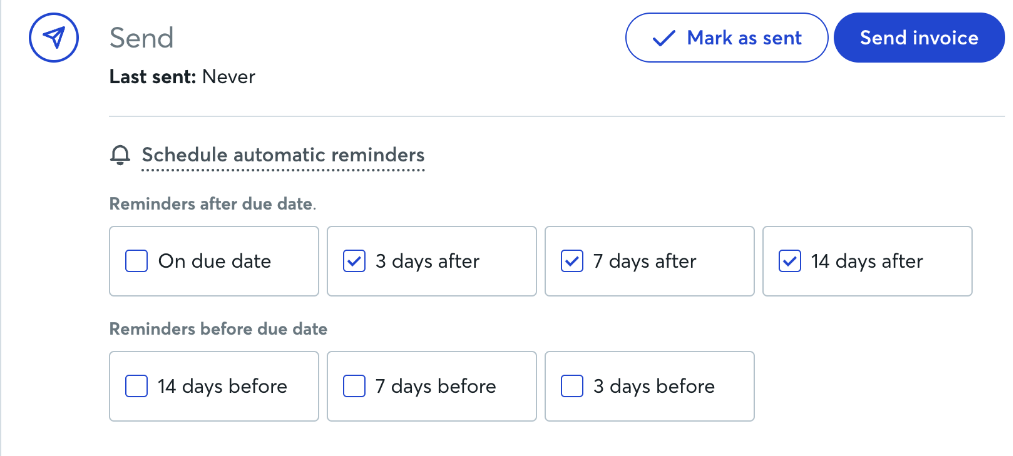
Businesses on Pro, or taking online payments through Wave, can schedule invoice reminders 14, 7 or 3 days before the due date, on it, or 3, 7 or 14 days after, and each one goes to the customer's primary email. Once a customer authorizes automatic payments on a recurring invoice, Wave charges them each time the invoice is generated and emails a receipt; automatic bank payments need the customer to connect through Plaid, and Wave cannot take them from Chase accounts. The mobile app sends a push notification when an invoice is viewed, goes overdue or gets paid.
A receipt still in the inbox or on a vendor's billing page never reaches Wave until the owner captures it. The scheduled reminders reach only the primary contact, so an office manager who pays the bills never sees them. Wave lists the bills that are due and leaves the owner to weigh them against the balance.
Each Friday's uncategorized transactions can come with their receipts
By Friday afternoon, each of the week's uncategorized transactions could come to the owner with the matching receipt from the inbox or the vendor's billing page and a suggested category to accept or change. A transfer that might be a loan repayment, or a lunch that might be personal, needs a decision only the owner can make, and it could wait on the board the owner plans from instead of in memory.
Invoices due in the next three days could reach the owner's calendar with each customer's phone number. The office manager at a customer who never sees Wave's reminders could get a note of their own, which the owner sends.
Each Monday the owner could check the bills due against the bank balance before paying any, with any question for a vendor drafted in email. A deposit could be watched from the day the customer accepts the estimate until it lands in the bank, so the owner converts the estimate knowing whether it has been paid. A Starter owner could have the week's statement waiting as a file downloaded from online banking, ready to upload.
Suggested categories reach Wave only when the owner enters them
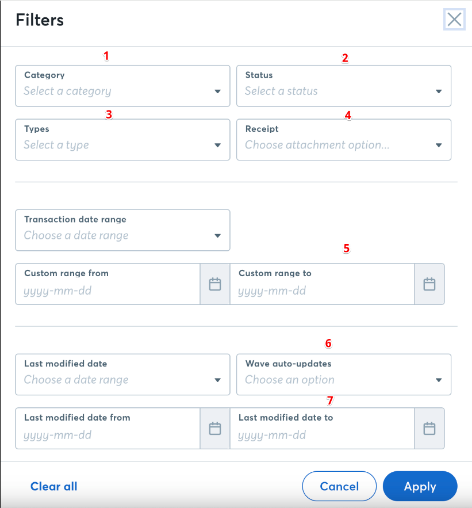
Wave marks which transactions are uncategorized, and on Pro most arrive from the bank within a day; what the owner lacks each week is the receipt and the reason behind each line. WebRun is an AI agent that works a real Chrome browser, signed in as you. Across Wave, the inbox, the bank and the vendors' billing pages, it gathers what each shows into the Friday sheet, the calendar entries and the Monday bill plan.
The agent saves no category in Wave and merges or deletes nothing there: the owner accepts each suggestion from the Friday sheet and enters it. Bill payments and reminders are the owner's to make, and the agent leaves any note to a customer or vendor in the owner's drafts folder. The Friday tidy-up and the Monday bill plan are both among the workflows below.
Questions people ask
Does this work on Wave's free Starter plan?
Yes. Starter has no automatic bank import, so the agent downloads the week's statement from online banking as an .ofx, .qbo, .qfx, .aso or .csv file, in the same currency as the Wave account, for you to upload under Accounting, Transactions. On Pro it reads the imported transactions directly.
How is this different from Wave Advisors' bookkeeping?
Wave Advisors assigns an in-house bookkeeper who categorizes and reconciles your transactions and holds a monthly review call, and bookkeeping clients get Pro without the Receipts feature. The agent is for owners who keep their own books: it gathers the receipts and suggests categories, and you save them.
How far back will Wave import from my bank?
Up to 18 months, depending on the bank, once the account is connected on Pro.
Sources
- Wave pricing: Starter and Pro Wave's plan comparison: the free Starter plan covers unlimited estimates, invoices, bills and bookkeeping records, while Pro adds automatic bank imports, auto-merge and categorization, late payment reminders, receipt capture and extra users.
- Schedule invoice payment reminders Wave's help article: reminders can be scheduled 14, 7 or 3 days before the due date, on it, or 3, 7 or 14 days after, go only to the customer's primary email, and need Pro or online payments.
- Import transactions automatically by connecting a bank account Confirms automatic bank imports are part of the Pro plan, that transactions generally update every 24 hours, taking up to seven days at some banks, and that up to 18 months of transactions can import depending on the bank.
- Upload bank and credit card statements Describes downloading a statement from online banking and uploading it to Wave as an .ofx, .qbo, .qfx, .aso or .csv file, in the same currency as the account.
- Enable automatic payments on an existing recurring invoice Once a customer authorizes it, Wave charges them each time the recurring invoice is generated and emails a receipt.
- Turn push notifications on or off in the Wave mobile app The mobile app's push notifications say when an invoice is paid, overdue or viewed.
- Wave Advisors' services Wave Advisors' bookkeeping assigns an in-house bookkeeper for categorization, reconciliation and monthly review calls, and includes Pro without the Receipts feature; accounting and payroll coaching are separate services.
3 ready-made Wave workflows
Each one names the apps it touches and the exact steps it takes. Open one to read what it will do, then turn it on.


Want one of these running on your own Wave?
Show WebRun the process once and it will run it on schedule, in your own private browser environment.