How to Automate Travefy
Put the dated work into Travefy's own automations and task lists, and let Compass list payment dates and unanswered invoices. Supplier holds, final payment deadlines and commission statements live in each supplier's portal, where an AI agent like WebRun can check them every day and draft the client notes for the advisor.
 Written by
Marcus Deleon
Support operations
Written by
Marcus Deleon
Support operations
 Reviewed by
Elliot Nakamura
Platform writer
Reviewed by
Elliot Nakamura
Platform writer
Each client's trip in Travefy lives in one Trip view
Travefy is itinerary and client software for travel advisors, agencies and tour operators. Each client's trip sits in one Trip view that holds its itineraries, proposals, forms and Decisions, where the client picks one of up to three proposal options.
Advisors build itineraries by dragging in content, pulling details from more than 200 integrated suppliers, or running Smart Import on a supplier's confirmation PDF. The client reads the result in the Trip Plans app, with live flight updates. Behind each trip sit its bookings, each with its supplier and commission, and its invoices, whose payment schedule can split a balance into a deposit and a final payment.
Forms collect card details, passport uploads and e-signatures. Compass, the home screen, brings the day's dates and tasks together with a business panel of total sales against commission expected and received.
Every deposit, hold and rooming list carries a supplier's deadline
The deposit on a courtesy hold for a balcony cabin has to go in by Thursday, or the cruise line releases the cabin. A tour operator's final payment falls due before departure while the client's balance on the Travefy invoice is still open. At a resort, the wedding group's rooming list is due, and the organiser has not sent the names for the groom's side.
A commission for a spring sailing never arrived, and finding out why means the cruise line's agent portal and a call to its support desk. Every month the agency owner downloads each supplier's commission statement from its portal and pastes it into Smart Reconcile, one supplier at a time.
A destination's State Department advisory level goes up the week before a family leaves, and the family is the one who tells the advisor.
Travefy's automations send on a date, whatever the invoice says
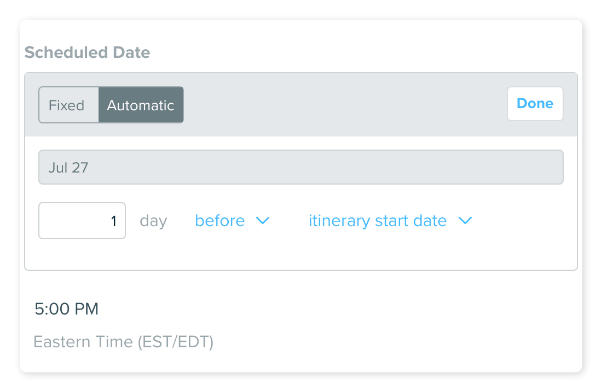
Compass surfaces trip dates, payment due dates and passport expirations by itself, and its Waiting on Others list shows forms and invoices a client has not answered. Automations send an email or a trip chat message at a fixed time or a set number of days before or after the trip, and tasks can take due dates counted from its start or end.
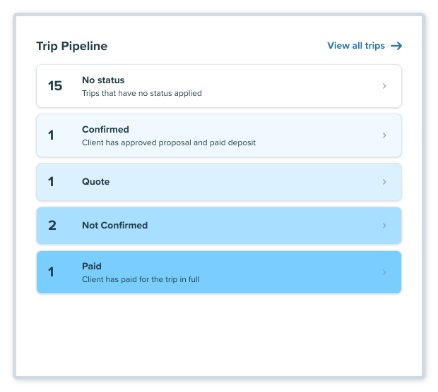
Bookings total commission as received, outstanding or overdue. Smart Reconcile, switched on by request to Travefy support, matches a supplier's payment document against the bookings it pays.
A hold released by the cruise line, a moved option date or a resort's rooming list cutoff stays in the supplier's portal or an email until the advisor types it in. An automation sends the message it was given on the date it was given, whatever the invoice shows by then. Smart Reconcile works on a payment document someone has uploaded or pasted, and an overdue commission stays overdue until the advisor asks the supplier why.
The State Department's advisory levels sit on travel.state.gov, on a map a person filters by country, and STEP sends its email alerts to the travelers who enroll.
Each active trip points to a supplier portal worth checking
The agency's advisors choose which deposits to take from the #holds channel in Slack, where each courtesy hold and option date expiring this week sits with its supplier and reference.
For a trip whose supplier final payment is coming up, the advisor sends a reminder from Gmail drafts that names the balance on the Travefy invoice that morning and its due date, so a client who paid last week is left out. The group coordinator asks the wedding organiser for exactly the travellers missing from the rooming list, a week before the resort's cutoff.
The agency owner opens Smart Reconcile with every supplier's statement already downloaded, then works down the commission sheet, where the bookings Travefy marks overdue are set against each supplier's statement as unpaid or short-paid. When the State Department raises the level for a destination on next month's departures, the advisor calls the family that morning.
Client emails leave from the advisor's own address
An advisor checking holds signs in to each cruise line's agent portal in turn, looks up the booking by its reference and reads the option date. WebRun is an AI agent that works a real Chrome browser, signed in as you. With your Travefy login and the supplier agent logins you add, the agent reads each active trip's bookings and invoices, checks the portals and travel.state.gov, and leaves what it finds in #holds, the commission sheet or your Gmail drafts.
Charging a card from a Travefy form, paying a supplier, and booking or releasing anything all stay with the advisor. Each note to a client lands in the advisor's Gmail drafts and is sent, from the advisor's own address, only when the advisor chooses.
There is one card per job: holds, final payments, rooming lists, commission and advisories.
Questions people ask
Will it charge a client's card or pay a supplier?
No. Payments stay in the advisor's hands, in Travefy and on the supplier's side. Invoices, bookings and the status of a card authorization are there for the agent to read, never to act on.
Why would a client who already paid get Travefy's final payment reminder?
Because an automation sends on the date it was given and does not look at the invoice first. A note drafted from that morning's balance is what leaves a client who paid last week alone.
Can it read my cruise line and tour operator portals?
Yes, the ones you can open in a browser with your own agent login. It reads what the portal shows, such as a hold's expiry or a commission statement, and it does not book, change or cancel anything there.
Does Smart Reconcile collect the supplier statements itself?
No. Smart Reconcile matches a supplier's payment document against your bookings once someone uploads it, pastes it or types it in. Fetching those statements from the supplier portals, and listing the commissions still missing, is the agent's part.
Sources
- Compass Travefy's help article on Compass: key dates such as payment due dates and passport expirations surface automatically, and unanswered forms and invoices appear under Waiting on Others.
- Automating an Email message Shows an automated email is set to a fixed date or a number of days before or after the trip's start or end date.
- Bookings Amounts Defines Total Sales, Received, Outstanding and Overdue, where Overdue means the commission date has passed without payment.
- Smart Reconcile Explains that Smart Reconcile matches an uploaded or pasted supplier payment document against bookings, and that access is requested through Travefy support.
- Travefy | The Software That Connects Your Travel Business Travefy's own description: itinerary, CRM and proposal software for travel agents, agencies and tour operators, with over 200 supplier integrations and a client app with live flight updates and offline mode.
- Travel Agency CRM | Travefy Forms that collect payment details, passport documents and e-signatures; invoices with payment schedules; commissions filled in from an invoice in one click.
- Automating a Stripe Planning Fee A Travefy automation sends a fee on a fixed date or a number of days before or after the trip, with no check on whether anything is already paid.
- Travel advisories and STEP | USAGov The State Department's four advisory levels, viewed on its map by destination, and STEP email alerts for travelers who enroll.
6 ready-made Travefy workflows
Each one names the apps it touches and the exact steps it takes. Open one to read what it will do, then turn it on.


Want one of these running on your own Travefy?
Show WebRun the process once and it will run it on schedule, in your own private browser environment.