How to Automate Tekmetric
Tekmetric Marketing, an add-on at $345 a month per shop, sends a Tekmetric shop's appointment reminders, post-visit follow-ups and review requests automatically, and the Tech Board on the Scale plan shows each technician's hours. An AI agent working in Tekmetric's web app, WebRun, can post a 6:30 workload check and queue reminder, follow-up and review texts in Slack to be approved.
 Written by
Tom Kessler
Field operations analyst
Written by
Tom Kessler
Field operations analyst
 Reviewed by
Nikhil Bhatt
Automation strategist
Reviewed by
Nikhil Bhatt
Automation strategist
Tekmetric runs the shop from estimate to text-to-pay
Tekmetric is cloud-based shop management software for independent auto repair shops, built by Sunil Patel after more than a decade running his own shop; the first version launched in 2017. Advisors build estimates with Smart Jobs, send a digital vehicle inspection with photos for the customer to approve, and turn the estimate into the repair order without retyping it.
Parts come from integrated suppliers such as PartsTech and Nexpart, ordered from the job with prices and arrival times side by side, and restocking suggestions follow the minimum levels the shop sets. Tire shops add the Tire Suite, $39 a month per shop, for tire quotes matched to the VIN and automatic DOT registration.
At pickup the advisor texts a payment link, and the customer pays from their phone with a card, Apple Pay or Google Pay, or spreads the bill with buy now, pay later. On the Scale plan, the owner watches car count, labor hours, average repair order and close ratio on a real-time dashboard.
Advisors, technicians and the owner each sign in with their own login, and role-based permissions decide what each one can see.
The service advisor phones tomorrow's drop-offs between customers
At 7:30 the shop foreman scans the open repair orders and finds one technician with eleven hours of brake and suspension work and another with a single oil change, and moves jobs around before the bays fill.
Through the afternoon the service advisor calls tomorrow's drop-offs between customers at the counter. Three of the eight answer, and the rest get a voicemail. A Tuesday customer forgets anyway, and the lift booked for her brake job stands empty until ten.
After a brake job goes home, nobody calls to ask whether the customer is happy with it until the customer calls first, as a comeback. The Google review request gets asked at the counter while the customer pays, when the advisor remembers.
Tekmetric Marketing sends reminders and review requests as a per-shop add-on
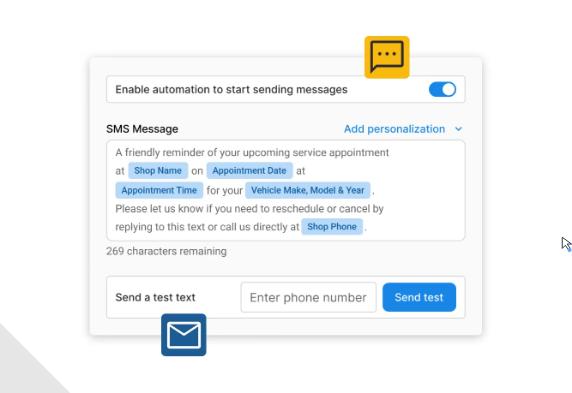
Tekmetric Marketing, an add-on at $345 a month per shop, sends an appointment confirmation the moment a booking is made, pre-visit reminders on whatever timing the shop sets, a how's-it-running follow-up after the visit, reminders for declined jobs and upcoming maintenance, and Google review requests, as texts or emails. Reviews can be answered from inside Tekmetric, with an optional AI-generated response.
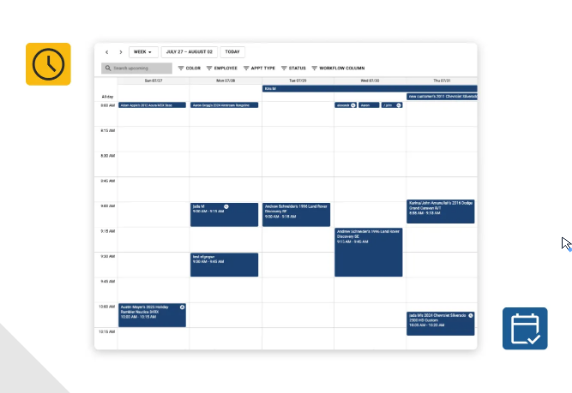
On the Scale plan, the Tech Board gives each technician a column showing assigned, complete and incomplete hours, and an advisor assigns a job by clicking the wrench on its card or drags cards to change the order. Grow adds time and job clocks, and Scale adds two-way texting. Shops that skip the Marketing add-on can connect ShopGenie or AutoBucks from Tekmetric's integrations for reminders and reviews.
Marketing's messages go out on the schedule the shop configures, with no one reading each one first. Where a shop has neither the add-on nor a partner app, the reminder and the follow-up are phone calls from the advisor. The Tech Board, on the shops that have it, shows the hours on a screen the foreman checks between jobs.
The 6:30 post in Slack puts the most overloaded technician first
A post in the shop manager's Slack channel at 6:30 lists each technician's assigned jobs, their stage and estimated hours against the hours that technician has that day, most overloaded first, with a flag on anyone who has nothing. The manager moves two jobs off the eleven-hour column before the first car goes up on a lift.
At four in the afternoon, a proposed text for each of tomorrow's drop-offs sits in the drop-off reminders channel, with the customer's name, the vehicle, the time, the shop's address and a line about calling to reschedule; anyone already reminded for that appointment is left off. The service advisor approves them in one pass instead of dialling.
When the advisor marks an RO delivered, two drafts follow it into Slack within minutes: a text asking whether the customer is happy with the repair, in the delivery follow-up channel, and a Google review request with the shop's review link, in the review-requests channel, unless that customer has been asked before. Whoever approves messages that day reads both before they go.
Unlimited users on every Tekmetric plan include one for WebRun
Every Tekmetric plan includes unlimited users, so a separate employee login costs the shop nothing. WebRun is an AI agent that works a real Chrome browser. That login gives it a role limited to what these cards read: repair orders, delivery status and technician assignments.
The service advisor, or whoever the shop names, approves each text in its Slack channel before it leaves the shop's Twilio number, and repair orders, estimates and payments stay as the advisor left them. A shop already paying for Tekmetric Marketing would keep the workload post and leave the three message cards off, since the add-on sends those messages on its own.
Questions people ask
Do the texts need a Twilio account?
Yes, for the drop-off reminders and the satisfaction follow-ups, which leave from the shop's own Twilio number once someone approves them in Slack. The review request is prepared in Slack with the customer's name, phone number and the link to your Google reviews.
How soon after delivery does the follow-up appear?
Within minutes. The card checks Tekmetric every few minutes for repair orders newly marked delivered, and it skips any customer who already received a follow-up text.
Does the workload post need the Tech Board?
No. It reads the technician and the estimated labor hours on each job in the active repair orders, not the Tech Board itself, and compares them with the hours each technician has that day.
Sources
- Automated Customer Reminders | Tekmetric Tekmetric Marketing's automatic appointment confirmations, pre-visit reminders, post-visit follow-ups, declined-job and maintenance reminders and Google review requests.
- Tekmetric Pricing Start, Grow, Scale and Enterprise plans, with the Technician Board, real-time dashboard and two-way texting on Scale, time and job clocks on Grow, unlimited users on every plan, and Tekmetric Marketing at $345 and Tire Suite at $39 a month per shop as add-ons.
- Tekmetric's Tech Board Helps Streamline Auto Technician Workflows Each technician's column shows assigned, complete and incomplete hours; advisors assign jobs with the wrench icon and drag cards to reorder them.
- Google Reviews | Tekmetric Tekmetric Marketing prompts customers for a review right after service and lets the shop reply from the platform, with an optional AI-generated response.
- Shop Management | Tekmetric Cloud-based access, Smart Jobs, digital vehicle inspections with photos, estimates that flow into repair orders and role-based permissions.
- About Tekmetric The first version launched in 2017; founder Sunil Patel ran an auto shop for over a decade before building it.
- Parts and Inventory | Tekmetric Ordering through integrated suppliers such as PartsTech and Nexpart with prices and arrival times, and restocking suggestions from minimum stocking levels.
- Tire Suite | Tekmetric Quotes tires from the repair order with fitment matched from the VIN and registers DOT numbers with tire manufacturers automatically.
- Tekmetric Integrations Lists ShopGenie (online scheduling, two-way texting, automated service reminders and reviews) and AutoBucks (text rewards with post-visit reviews and service reminders).
4 ready-made Tekmetric workflows
Each one names the apps it touches and the exact steps it takes. Open one to read what it will do, then turn it on.



Want one of these running on your own Tekmetric?
Show WebRun the process once and it will run it on schedule, in your own private browser environment.