How to Automate ServiceMonster
For the routine messages, use ServiceMonster's appointment reminders, FillMySchedule cards and, on Premier, the retention drip. A technician's notes never reach a campaign merge field, so a check-in naming the treated stain, along with review, recall and win-back emails a person reads first, can be drafted in Gmail by an AI agent like WebRun.
 Written by
Ben Kirkwood
Solutions engineer
Written by
Ben Kirkwood
Solutions engineer
 Reviewed by
Marcus Deleon
Support operations
Reviewed by
Marcus Deleon
Support operations
ServiceMonster keeps each household's cleaning history on one account
Carpet cleaning is sold to the same households again and again. A family has the living room and stairs done in March, rings after the new puppy has settled in, and books the upholstery the year after. ServiceMonster is software for carpet cleaning, window cleaning and pressure washing companies, and the account is where that history stays together.
Each account holds the order and activity history, the contact details, the household's sites and its notes, with tags such as do-not-contact. Techs quote on site from packages and price lists in the mobile app, so a hallway and three bedrooms cost the same whoever writes the estimate, and before-and-after photos go on the job. On the schedule, jobs are color coded by location, and a waitlist holds last-minute bookings.
Two-way texting runs from the business number, with each conversation tied to the customer, the job and the invoice. Invoices and payments export to QuickBooks Online or Desktop.
A treated pet stain comes back before anyone calls to ask about it
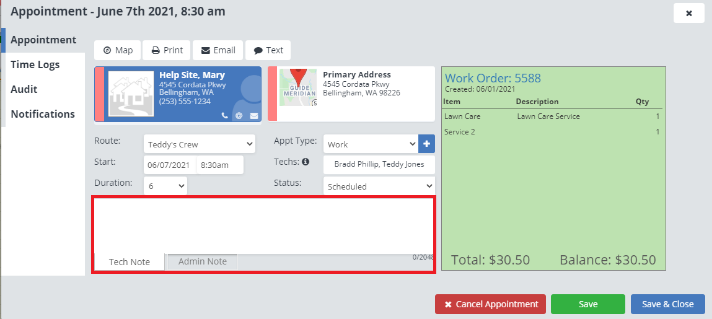
A tech treats a pet urine stain in the hallway and writes it on the job, with a warning that it may wick back. Ten days later the customer rings because it has, and the office learns about the stain from the customer instead of from its own check-in.
Yesterday's six jobs went well, and each of those customers is worth asking for a Google review, except the one asked in the spring. In March, last year's deep-clean customers come due again, and the office wants to reach them before a competitor's coupon does. Further back sit the customers with no booking in more than a year, some of them good accounts for a decade, and a few who asked never to be contacted. Finding each group means searching ServiceMonster's accounts and orders, then typing the emails one customer at a time between Monday's phone calls.
ServiceMonster has no merge field for a technician's notes
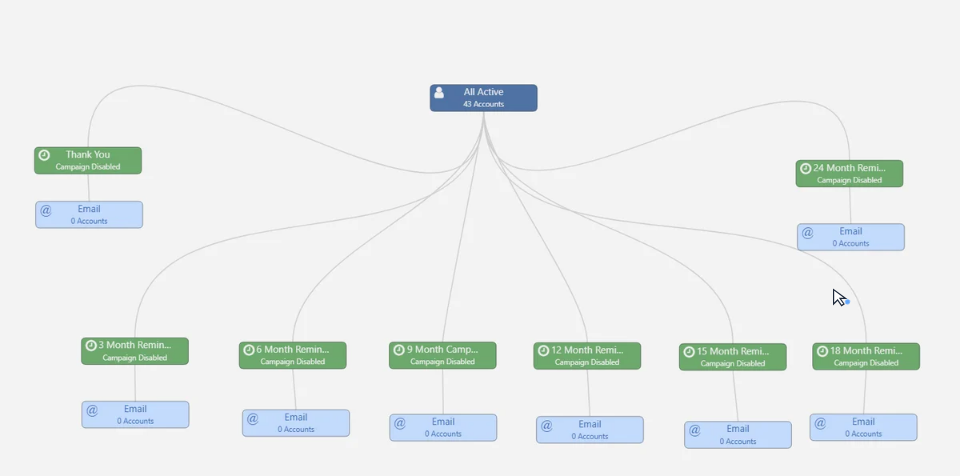
FillMySchedule, included on every plan, mails thank-you and reminder cards after each job. Marketing campaigns come with Grow and Premier, and drip campaigns with Premier only: the Client Retention Drip Campaign emails past customers twelve months after their last invoice, for an annual clean, and skips accounts marked do-not-contact or commercial. Other drip steps can queue marketing calls, print letters or export a list.
For reviews, the Request for Review email template goes out by hand after a job, or the next day through a drip campaign. The NiceJob integration, a separate subscription, enrolls each customer in its own review campaign once the order is invoiced.
Campaign emails are filled from merge fields: the account's name, the order total and package name, the job dates, the site address. ServiceMonster has no merge field for the notes a technician writes on a job, so no campaign can mention the stain in the hallway, and the warranty check-in is a call or an email the office writes after reading the notes. On Basic and Grow no drip runs, and the recall goes out by hand or on a FillMySchedule card. On Premier, the retention drip can send the twelve-month recall by itself.
A spot-treatment check-in names the area the tech treated
Jobs from the past one to two weeks with a spot treatment or a stain warranty in the notes each get a check-in in Gmail that names the treatment and the area, repeats the care instructions and asks whether anything has come back. The office manager clears that folder each morning, and the customer with the hallway stain gets a note before having to call.
Yesterday's customers have review requests in the same drafts folder, each naming the service and the technician and linking to your Google or Yelp page. Customers already asked within 90 days are left out.
The owner approves two batches on Mondays. One holds recalls for customers whose last deep clean was ten to thirteen months ago; the other holds win-backs for anyone away a year or more, sorted in the Slack summary by how long they have been gone, with the biggest past spenders marked. Accounts tagged do-not-contact, and anyone with a job already booked, appear in neither.
Job notes are where WebRun starts in ServiceMonster
The notes on a finished job are the one part of a ServiceMonster order that no campaign can quote, and every warranty check-in begins there. WebRun is an AI agent that works a real Chrome browser, signed in as you. Its ServiceMonster login is an ordinary user you create, so it needs none of the API access that only Grow and Premier include, and a Basic account gets the same jobs.
A do-not-contact tag keeps an account out of every batch, and WebRun leaves accounts, orders and notes as it found them. No email leaves the Gmail drafts unread; the owner or the office manager goes over each one first. The deep-clean recall stands in for the retention drip on Basic and Grow, which have none.
Questions people ask
Can a recall mention what the tech wrote last time?
Not as built. Recalls name the last service and how long ago it was; the technician's notes feed the warranty check-ins, which start from the spot treatment recorded on the job.
Do the review drafts clash with our NiceJob campaign?
They can, if someone sends both. NiceJob enrolls a customer once the order is invoiced, so if it runs on your account, leave the review drafts unsent or switch that job off and keep the warranty check-ins.
Which jobs count as a spot treatment?
From the job notes and the service type. Writing the treatment the same way every time, or adding a consistent label such as stain warranty, makes the match exact.
Can the win-back email include a discount?
Yes, as a placeholder you fill in before sending. The draft refers to the customer's last service and how long it has been, and leaves the offer itself to you.
Sources
- Merge Fields | ServiceMonster Help ServiceMonster's master list of merge fields: account, company, job dates, order totals and package names, site address and social links, with account custom fields; no field for technician notes.
- Client Retention Drip Campaign | ServiceMonster Help Shows how a drip campaign emails past customers automatically based on the date their last invoice was completed.
- Free Automatic Appointment Reminders | ServiceMonster Help Explains appointment reminders sent by email or text a set number of days or hours before or after an appointment.
- Field Service Business Software Pricing | ServiceMonster Plan comparison showing Marketing, Reporting and API Access on the Grow and Premier plans, and Drip Campaigns on Premier only.
- How To Build A Drip Campaign The steps a ServiceMonster drip campaign can run: email a marketing template, create marketing calls, print letters or labels, or export a list, on a daily, weekly, monthly or yearly schedule.
- Generating Reviews via the 5-Star Method The Request for Review email template under Settings > Templates > Email Templates, sent by hand after a job or by a drip campaign the next day, linking to Google, Facebook, Yelp or another review site.
- NiceJob The NiceJob integration enrolls customers in a NiceJob review campaign once their order is invoiced; it needs a NiceJob trial or plan.
- FillMySchedule ServiceMonster's direct mail service: thank-you, reminder and seasonal cards mailed after a job is done.
- Scheduling Jobs color coded by work site location, appointment types and a waitlist for last-minute bookings.
- Messaging and Texting Two-way texting from the business number, with conversations tied to the customer, job and invoice.
- QuickBooks Integration ServiceMonster exports invoices and payments to QuickBooks Online and QuickBooks Desktop.
- Account Management What an account holds: order and activity history, contacts, multiple sites, notes and tags such as do-not-contact.
4 ready-made ServiceMonster workflows
Each one names the apps it touches and the exact steps it takes. Open one to read what it will do, then turn it on.

Want one of these running on your own ServiceMonster?
Show WebRun the process once and it will run it on schedule, in your own private browser environment.