How to Automate Sage Intacct
Sage Intacct routes bills through approval policies, turns emailed bills into drafts with AP Automation, tracks the close in Close Workspace and flags budget variances with Variance Analysis. Gathering what sits outside it, such as bank statements, payroll registers and each department head's reason for a variance, stays manual; a browser agent such as WebRun can do it.
 Written by
Nikhil Bhatt
Automation strategist
Written by
Nikhil Bhatt
Automation strategist
 Reviewed by
Rosa Lindqvist
Operations editor
Reviewed by
Rosa Lindqvist
Operations editor
Sage Intacct is built for a finance team rather than a bookkeeper
Sage Intacct is Sage's cloud financial management system for finance teams: controllers, accounts payable, planning and the CFO they report to.
It is built for organizations with more than one set of numbers to keep. Each legal entity gets its own tasks in the month-end close, and a bill can be routed for approval by the department on each of its lines, so the head of that department sees it. An approver can be restricted to certain entities or departments, and then sees only the bills that belong to them.
The close itself runs from Close Workspace, the checklist of tasks each entity has to finish, and it ends in the board pack the CFO reads.
Close week runs on chasing other people's tasks
In close week the finance team mostly waits on other people. The subsidiary controller has not ticked off the bank reconciliation, and a department head still has three bills to approve.
Bills sit in submitted state until an approver acts, and an approver who never turned on bill emails in My preferences hears about them only when someone asks. If an approver is later restricted to certain entities or departments, bills with lines outside those restrictions stop reaching their queue and can stay stuck until the AP team notices. A payment run slips because one approval never arrived.
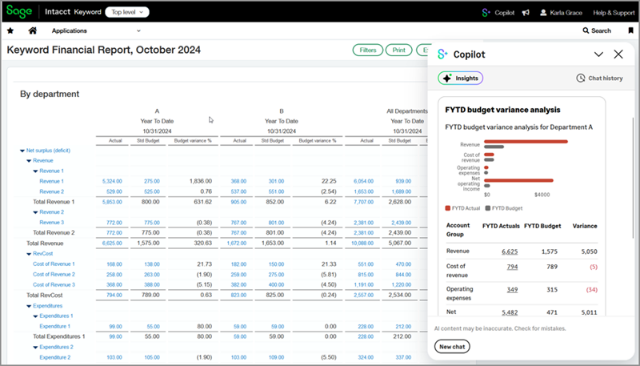
The budget review needs words as well as numbers. The budget to actual report shows marketing over for the month, so the finance team emails marketing to ask why, waits for the answer and puts it next to the line before the CFO reads the pack. In a company with several entities, the same questions go out once per entity.
Sage Intacct routes bills and tracks the close from its own records
Bill approval policies route a bill to the vendor's assigned approver, by amount, by the department on each line or to a named user. AP Automation creates draft bills from bill documents that are emailed or uploaded, and GL Outlier Detection flags journal entries in the approval cycle that do not match past patterns.
Close Workspace holds the period-close checklist, with a task assignment per entity, start and due dates, dependencies and a view of which tasks are on track, at risk or overdue, and Copilot notifies assignees as deadlines approach. Variance Analysis flags budget-versus-actual anomalies and writes an explanation of each with generative AI.
Smart events, which need Customization Services or Platform Services, email someone or post to a web address when a condition is met, and Sage now points customers to platform triggers in their place.
These act on records inside Intacct. Close Workspace can show that a subsidiary's cash reconciliation is overdue, but it cannot fetch the bank statement the task needs. Variance Analysis flags the variance and drafts an explanation, but a reason that only the department head knows, such as a campaign brought forward a month, still has to be asked for. Anything that reaches outward has to be built as a trigger or an integration.
Variance notes and close evidence can be collected before the pack is due
When a cash reconciliation task opens in Close Workspace, the subsidiary controller could have that entity's bank statement in the close folder, downloaded from the bank portal with the finance team's existing login. The payroll register from the payroll provider could arrive the same way for the tasks that need it.
On Monday rather than the night before the pack, the finance lead could send each department head an email covering only that department's lines over budget, with the Variance Analysis explanation attached for them to confirm or correct.
The AP lead could see the bills in submitted state grouped by approver, with how long each has waited, and the controller would hear when a payment run is at risk because one approval has not come through. An approver with bill emails switched off could get one note listing everything waiting for them, written for the AP lead to send.
An entity-limited Intacct user does the close-week reading
Close week sends someone from the finance team to the budget to actual report, the approval queue and Close Workspace every morning, then out to the bank and payroll portals for what the open tasks need. WebRun is an AI agent that works a real Chrome browser, signed in as you. Its Intacct user needs access only to the entities it covers; with that access it makes the same morning round, including the documents the open tasks wait on, and writes the reminders.
It posts no journal entry, approves no bill, changes no budget and releases no payment; the approval queue and the Pay bills page stay with the people who hold those permissions. The finance lead sends every reminder to a department head or subsidiary controller, and the agent only writes them. The three cards further down each start on an Intacct screen.

Questions people ask
Is this the same as Sage Accounting?
No. Sage Intacct is Sage's financial management system for finance teams with several entities and departments to report on. Sage Accounting is its small-business bookkeeping product and has a separate guide.
Which Intacct subscriptions does this need?
None beyond a user account. Smart events need Customization Services or Platform Services and someone to build them; the agent needs only the browser and the access of the user it signs in as.
How do approvers get an email when a bill is waiting for them?
Each approver turns it on in My preferences, under Email notifications and Requests for approval, by selecting Bill, and can set a minimum amount so only larger bills trigger an email. Submitters' notifications are automatic once an admin enables email notifications for Accounts Payable.
Sources
- Close Workspace overview (Sage Intacct Help) Sage's help page describing Close Workspace: period-close checklists, task assignments per entity, dependencies with notifications, and a view of tasks on track, at risk or overdue.
- Get to know Sage AI and Copilot (Sage Intacct Help) Lists AP Automation (draft bills from emailed or uploaded documents), GL Outlier Detection, and Close Automation, including Variance Analysis, which flags budget-versus-actual anomalies with generative AI explanations.
- About bill approvals in Accounts Payable Explains approval policies by vendor, amount, department or user, and that bills can get stuck in submitted mode when an approver is later restricted to certain entities or departments.
- Receive notification when bills are pending your approval Approvers turn on bill emails in My preferences, under Requests for approval, with an optional minimum amount; submitters' notifications are automatic once enabled.
- GL Outlier Detection Describes the machine learning service that compares journal transactions in the approval cycle with historical patterns and flags the ones that do not match.
- Automate processes with Smart events States that Smart events send an email or post to a web address when a condition is met, and require a Customization Services or Platform Services subscription.
3 ready-made Sage Intacct workflows
Each one names the apps it touches and the exact steps it takes. Open one to read what it will do, then turn it on.






Want one of these running on your own Sage Intacct?
Show WebRun the process once and it will run it on schedule, in your own private browser environment.